Shield Painting
Paint your own design onto any shield, pixel by pixel, with a spray can and a painting table.
介绍
Paint your own design onto any shield, pixel by pixel, with a spray can and a painting table.
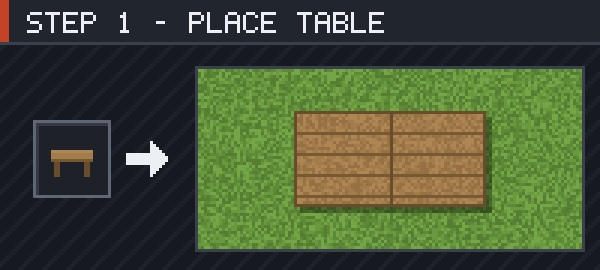
Craft a Painting Table and put it down. It takes up 2×1 blocks and extends in the direction you are facing, so leave a block of room in front of you.
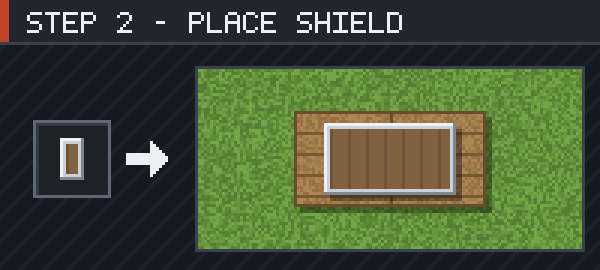
Right-click the table holding a shield. It leaves your hand and lies flat on the table at its real size — either half of the table works.
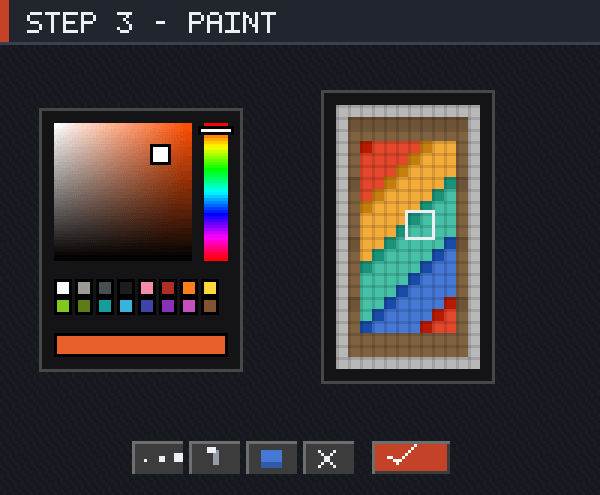
Right-click with a Spray Can and the editor opens on the shield’s 12×22 face. Left-click paints, right-click erases, the scroll wheel changes brush size, and Ctrl+Z undoes. Press Done or Esc to save.
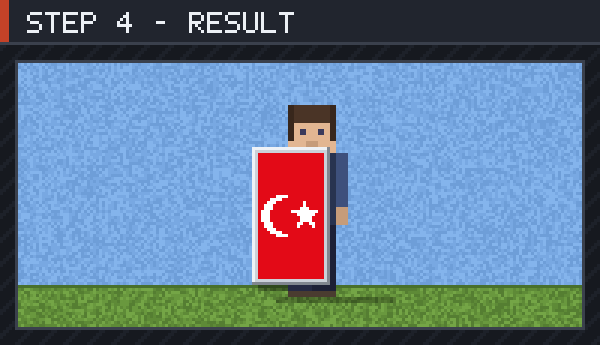
Take the shield back and the picture stays on it — in your hand, in the inventory, in item frames and lying on the ground. It is still an ordinary shield, so it blocks and enchants exactly as before.
常见问题
Shield Painting 支持哪些 Minecraft 版本?
Shield Painting 支持 Minecraft Java 版 1.20.1,可用的加载器:Forge。下载时注意选择和你游戏版本一致的文件。
Shield Painting 怎么安装?
先用 PCL2 或 HMCL 启动器安装对应版本的 Forge,再把下载的 .jar 文件放进游戏目录的 mods 文件夹,重新启动游戏即可。开启了版本隔离的,mods 文件夹在 versions/版本名 下面。

评论
登录后评论和评分