
Agma’s Accessories
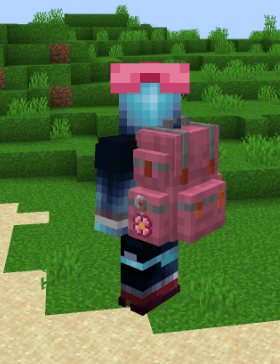
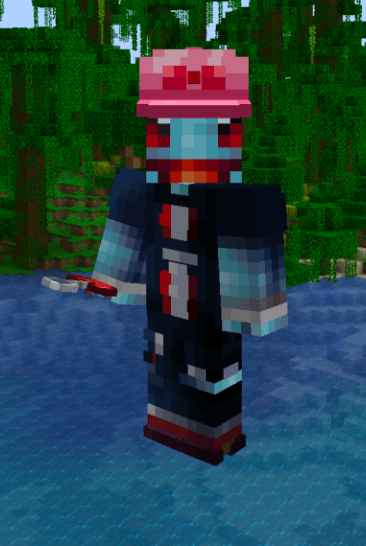
Cute keychains and a pink bow cap, and lets Sophisticated Backpacks show the displayed item on the front, left or right pouch.
截图
介绍
Agma’s Keychains
Small cosmetic accessories made for a friend: four cute keychains to hang on your Sophisticated Backpacks, and a pink bow cap.
Keychains
Four keychains, each with its own charm:
Pink: flower
Blue: star
Purple: moon
Red: heart
Recipe (shapeless): 1 iron nugget + 1 dye (pink, blue, purple or red).
How to hang one on your backpack
1. Put the keychain in your backpack.
2. Open the backpack, go to Settings > Item Display and click the keychain’s slot.
3. Use the position button to choose where it hangs: front, left pouch or right pouch (left click: next, right click: previous).
4. The button next to it moves the keychain closer or further from the backpack.
It shows on the backpack everywhere: in the inventory, worn on your back, and placed as a block.
This mod also unlocks the left / right position for any item shown with Item Display on a backpack, not only keychains.
Agma’s Cap
A pink cap with a red bow tie. Same stats as the leather helmet (1 armor, 55 durability, repaired with leather, enchantable). Works in the helmet slot and in Cosmetic Armor slots.
Recipe: pink dye, string, pink dye on top, then the leather helmet shape below.
Requirements
Minecraft 1.21.1, NeoForge
Sophisticated Backpacks (and Sophisticated Core, installed with it)
Needed on both client and server.
Notes
The side display works by patching how Sophisticated Backpacks draws the displayed item. If a future Sophisticated Backpacks update changes that code, the side position may stop working, but the game will not crash, and the keychains and cap keep working.
常见问题
Agma’s Accessories 支持哪些 Minecraft 版本?
Agma’s Accessories 支持 Minecraft Java 版 1.21.1,可用的加载器:NeoForge。下载时注意选择和你游戏版本一致的文件。
Agma’s Accessories 怎么安装?
先用 PCL2 或 HMCL 启动器安装对应版本的 NeoForge,再把下载的 .jar 文件放进游戏目录的 mods 文件夹,重新启动游戏即可。开启了版本隔离的,mods 文件夹在 versions/版本名 下面。
评论
登录后评论和评分