Ala Screen
Press F2 and your screenshot becomes a link you can paste anywhere - you see the shot before it is sent.
截图
介绍
Ala Screen
Sharing a Minecraft screenshot usually means leaving the game, finding the file
and attaching it somewhere. Ala Screen makes it one click.
Press F2 exactly as you always have. The screenshot is saved to your
screenshots/ folder exactly as it always was, and the message in chat gains one
extra word:
Saved screenshot as 2026-08-29_18.24.32.png [share]
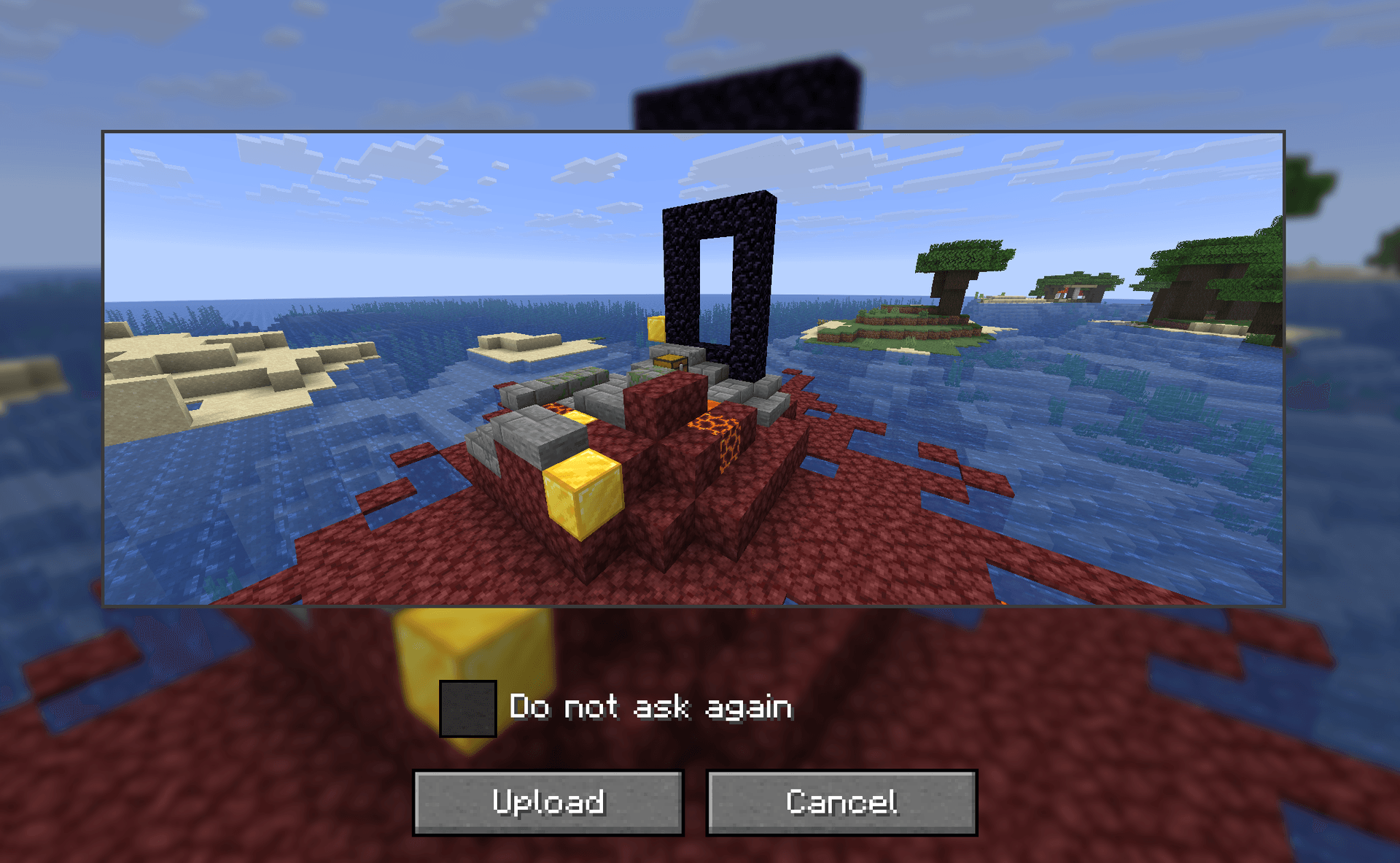
Click it, look at the shot one last time, and you get a link:
Screenshot uploaded: alacraft.day/en/screenshots/aB3xY9kM [open] [copy] [delete]
The link is already on your clipboard. Pasted into Discord, it unfolds as the
picture itself.
You see it before it leaves
There is no way to scan pixels for things you did not mean to share. A screenshot
can carry your coordinates from the F3 overlay, a conversation in chat, a private
server address, somebody’s name over their head — and no rule could reliably find
any of it.
So the mod shows you the frame and asks. It is the one feature here that cannot be
automated, and it is on by default. You can turn it off if you take fifty shots an
evening; that is your decision to make, not ours.
Built for the monitor you actually own
An ultrawide or a 4K panel produces a very large image every single time. Rather
than refusing those, the mod scales the upload down to fit — and the file saved
on your disk keeps its full resolution. Only the copy that travels is smaller.
When something goes wrong, it says what
Offline, rate limited, too large, and "a moderator removed it" are four different
messages, because they call for four different responses — and most of them are
not your fault.
Your uploads stay yours
Every upload comes with a delete token kept on your machine, so the link you shared
this morning is still yours to remove tonight — after a restart, after a week.
Deleting asks first. Screenshots are kept for 90 days from the last time anybody
opened them.
Seven languages
Every line the mod prints follows your client’s language: English, Russian,
Ukrainian, German, French, Spanish, Japanese. So does the link — it points at the
page in your language, not a translated-later version of it.
Also
- F7 shares a fresh capture directly, without going through F2. Rebindable.
/alascreen listshows what you have uploaded;/alascreen delete <id>removes one.- Point
apiBaseUrlat your own instance if you run one. - Optional account token from your profile: uploads join your history and get a
higher rate limit. Everything works without it.
Requirements
Minecraft 26.2, Fabric, Fabric API. Client side only — the server never needs it,
and never knows.
常见问题
Ala Screen 支持哪些 Minecraft 版本?
Ala Screen 支持 Minecraft Java 版 26.2–26.3,共 2 个版本,可用的加载器:Fabric / NeoForge。下载时注意选择和你游戏版本一致的文件。
Ala Screen 怎么安装?
先用 PCL2 或 HMCL 启动器安装对应版本的 Fabric / NeoForge,再把下载的 .jar 文件放进游戏目录的 mods 文件夹,重新启动游戏即可。开启了版本隔离的,mods 文件夹在 versions/版本名 下面。
Ma3auka 的其他作品
查看全部 →
Ala Industrial
一个以EU能源系统、机器、发电机和矿石处理为特色的Minecraft科技模组。

Ala Loot
Random loot from the entire item registry - drop chance equals your XP level. Boss kills give legendary stacks. Multi-language, fully configurable, server-side only.

Ala Aggro
Every mob — chickens, sheep, cows, fish, axolotls, even bats — attacks the player on sight. Boss-safe, fully configurable, datapack-friendly, server-only with vanilla-client compatibility.
Ala Horde
Hostile mobs grow stronger as you kill them — per-species kill counter scales HP, damage, speed and XP for every new spawn.
评论
登录后评论和评分