
Smooth Progression
A configurable RPG progression system featuring mob level scaling, elite enemies, boss progression, and skill-based leveling.
截图

介绍
Smooth Progression
Minecraft 1.20.1 · Fabric & Forge · Client & Server
What if Minecraft had a proper RPG progression system?
Not just collecting vanilla experience and enchanting your gear, but actually growing stronger as you explore, fight, level up, and develop your character.
That’s where Smooth Progression comes in.
Smooth Progression adds dedicated character levels, custom XP, skill-point progression, scalable hostile enemies, elites, boss progression, multiplayer nameplates, and integration with Smooth Classes.
Kill things. Get stronger. Walk farther away from spawn. Discover that the Zombies have also been going to the gym.
Simple enough.
Everybody Starts Somewhere
Your adventure begins at Level 1.
Your character level is separate from vanilla enchantment XP. Earn progression XP through combat and configured activities such as mining ores, harvesting crops, and fishing.
In multiplayer, other players can see your level above your name.
So when your friend says, “Trust me, I can fight the boss,” you can look at their Lv. 1 nameplate and make an informed decision.
Screenshot — Level 1, Seen by Another Player
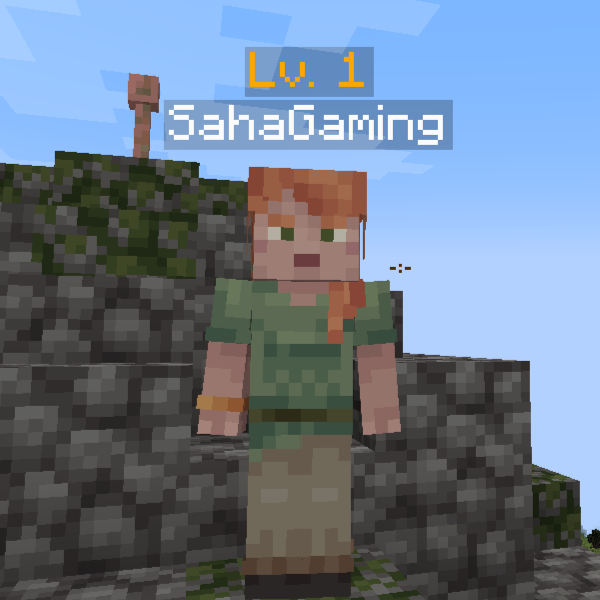
Everybody starts at level 1. Some people just start with considerably more confidence.
Level Up Your Adventure
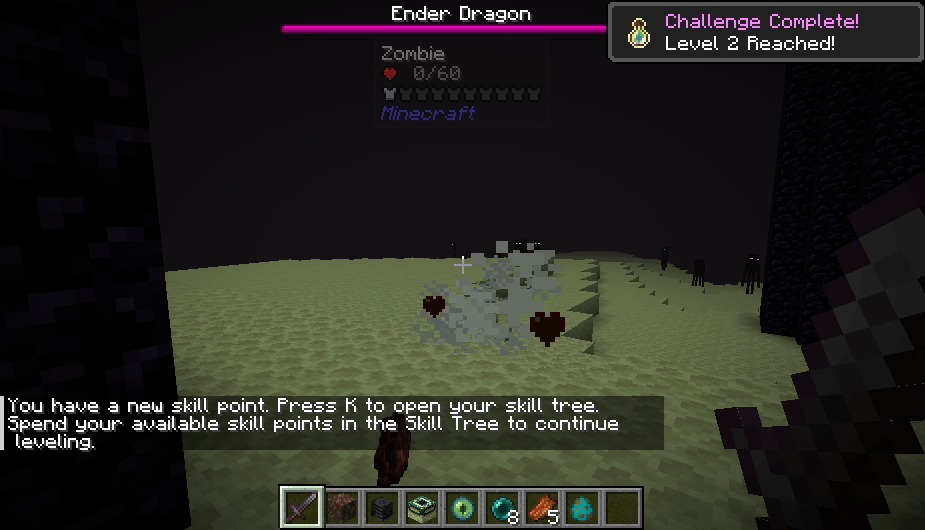
Earn enough XP and your character levels up, with a Minecraft-style advancement toast celebrating your newly reached level.
No unnecessary chat wall.
Just:
ding
Number bigger.
Brain happy.
Each earned level grants 2 skill points that feed directly into Smooth Classes.
Screenshot — Level-Up Celebration

Your adventure continues. Your skill-point spending problem also continues.
Choose Your Grind: Sword, Pickaxe, Hoe, or Fishing Rod
You do not have to fight hostile mobs to earn character XP.
Mine ores. Harvest crops. Go fishing. Become the best version of yourself while the Berserker next door is being chased by twelve Zombies.
Everyone gets the same character XP system and the same 2 skill points per earned level, regardless of which supported activity earned the XP. The usual Smooth Classes progression stages still apply.
You can pursue greatness through agriculture. It just involves considerably more potatoes. LMAO.
Where Character XP Comes From
| Source | How It Works |
|---|---|
| Mob kills | Player-credited kills grant XP based on the mob’s health before this mod’s scaling, with a level bonus for eligible leveled mobs. Passive mobs can also grant base kill XP. |
| Boss kills | Configured bosses use a larger reward based on their configured level, your level relative to theirs, and whether it is your first kill of that boss type. |
| Mining | Breaking configured ore blocks grants XP. Default rewards are listed below. Placing an ore yourself and breaking it again does not award mining XP. |
| Farming | Breaking fully grown supported crops grants XP. Melons and pumpkins also qualify. Planting seeds alone does not grant XP. |
| Fishing | Rewarded fishing reel-ins grant XP, normally when you reel in a catch. The current trigger also includes reel-ins of hooked entities. |
Kills credited to an owned vanilla tameable, such as your wolf, can award XP to its owner too. Player kills do not grant progression XP.
Your dog can contribute to your education. Your friend cannot. Please stop testing this with a sword.
Mining: The Underground Career Path
| Ore Block | Default Character XP per Block |
|---|---|
| Coal ore | 2 |
| Copper ore | 3 |
| Iron ore | 4 |
| Redstone ore | 5 |
| Lapis ore | 5 |
| Gold ore | 6 |
| Nether gold ore | 4 |
| Diamond ore | 15 |
| Emerald ore | 20 |
| Ancient debris | 30 |
Listed Overworld ores include their deepslate variants at the same reward. Mining rewards apply to the configured block, rather than the number of items it drops. Modpack creators can add other block registry IDs to mining.blocks.
Ancient debris pays more XP than a level-1 Zombie. Unfortunately, the workplace is the Nether.
Human Resources has not responded to my complaint about the lava.
Farming: Become Powerful Through Carrots
| Harvest | Default Character XP per Block |
|---|---|
| Fully grown wheat, carrots, potatoes, or beetroot | 1 |
| Fully grown Nether wart or cocoa | 2 |
| Melon or pumpkin | 2 |
| Other supported mature crops without an individual override | 1 |
These rewards use block-breaking harvests. A right-click harvesting feature from another mod needs to trigger a compatible event or integration to award the same XP. Modded crops must support the maturity checks; adding an arbitrary plant ID does not automatically make it a supported crop.
Want Lord of the Fallen without fighting hostile mobs for XP?
You can work toward it with crops. At some point, “Lord of the Farmland” may feel more appropriate.
Fishing: Your Training Arc Has a Chair
The default fishing reward is 12 character XP per rewarded reel-in.
That is more than one wheat harvest, and slightly more than a normal level-1 Zombie kill.
One player is dodging arrows. Another is sitting beside a pond.
Both are progressing. One has made significantly better lifestyle decisions.
Which Activity Gives More XP?
These are default rewards per action, not a guarantee of XP per minute. Travel, crop growth, fishing wait times, available ores, gear, and farm setup all affect your actual pace.
| Example | Default Character XP |
|---|---|
| One mature wheat harvest | 1 |
| One coal ore block | 2 |
| One ordinary level-1 Zombie kill | 10 |
| One rewarded fishing reel-in | 12 |
| One diamond ore block | 15 |
| One emerald ore block | 20 |
| One ancient debris block | 30 |
| First Wither kill, player within 5 levels of its default level 65 | About 6,772 |
| First Ender Dragon kill, player within 5 levels of its default level 100 | About 15,194 |
Bosses provide the biggest individual payouts in these examples. Higher-level eligible mobs receive a kill-XP bonus. Repeat boss kills and mobs from spawners pay less than their respective normal rewards.
Ordinary mob XP starts at half the mob’s pre-scaling max health. The eligible mob-level bonus is +1% per level above 1, capped at 3×. This mod’s extra mob health does not inflate that base reward.
Spawner mobs pay 20% of their calculated normal kill XP by default, rounded with a minimum reward of 1 XP. For bosses, the first kill of each boss type has a 1.25× modifier; repeat kills use 0.35× instead. Boss rewards also change with the difference between your level and theirs.
So yes, everyone can grow without fighting hostile mobs for XP. A peaceful route often means a longer grind, especially at higher levels, but a good farm or mining route can change the pace.
With default settings, going from level 100 to 101 costs 22,100 XP. That is 22,100 individual wheat harvests if wheat is your only XP source.
Same training arc. Different soundtrack. Yours is mostly crop-breaking noises.
LMAO.
Exploration, Quests, and Custom Rewards
Walking farther from spawn changes enemy difficulty; simply walking does not automatically grant character XP. Quest and exploration XP source labels are available through the mod’s API for integrations, alongside custom rewards, but this version does not include automatic quest rewards or discovery-XP triggers.
Administrators can also grant XP using /sp xp add <amount> or set it using /sp xp set <amount>.
If you want a quest board to pay character XP, it needs an integration. The quest board does not currently possess a debit card.
Your Level. Your Class. Your Extremely Questionable Build.
Unlock a class in Smooth Classes and your multiplayer nameplate displays both your level and selected class.
For example: Lv. 20 • Avanger, with your player name underneath.
Below level 100, the display stays compact: level, class, name.
Your class follows your actual unlocked class category. Picking up a bow does not suddenly make you an Archer.
Nice try, though.
Screenshot — Level and Selected Class
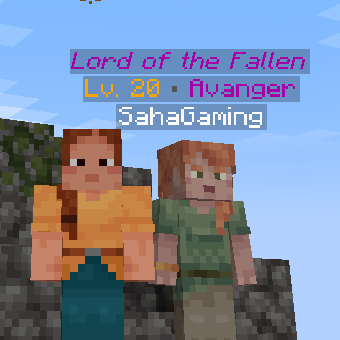
Your friends can now identify your class before you explain why the entire village is following you.
Screenshot note: This is an earlier development screenshot. The extra title shown here now requires level 100+. At level 20 in the current version, you see Lv. 20 • Avanger and the player name underneath.
Level 100: Now You Have a Title to Live Up To
Reach Level 100 or higher with a selected class and an additional class-specific title appears above your level and class.
An Avanger earns Lord of the Fallen. A Rider earns Skybound Sovereign.
Same player. More dramatic introduction.
| Class | Level 100+ Title |
|---|---|
| Avanger | Lord of the Fallen |
| Foreigner | Riftblade Wanderer |
| Caster | Archmage of the Elements |
| Berserker | Wrath Incarnate |
| Archer | Sovereign of the Arsenal |
| Assassin | Phantom of the Night |
| Saber | Radiant Oathkeeper |
| Ruler | Divine Arbiter |
| Rider | Skybound Sovereign |
| Lancer | Heaven Piercer |
These titles are cosmetic recognition of your progression. They do not grant extra combat bonuses.
Your nameplate has completed its anime training arc. Whether your gameplay has caught up is between you and the next boss.
Screenshot — Level 100+ Title Preview
Yes, same screenshot. Yes, it says level 20. I was too lazy to take another one. Please imagine the number says 100. Thank you for supporting this highly advanced screenshot technology.
This older screenshot previews the title layout. In the current version, Lord of the Fallen appears only at level 100+ with Avanger selected. Your level-20 character gets the compact level and class display. The screenshot got promoted early. You still have to grind.
Lord of the Fallen. Still capable of dying to fall damage.
Level and class changes are synchronized to other players. New arrivals receive the existing players’ progression data, and resetting a class removes its class label and title. Titles are shown only while the player is level 100+ and has a selected class.
The Farther You Go, the Less Friendly Things Become
Exploration affects enemy difficulty.
Ordinary hostile mobs receive levels based on their spawn area’s distance and dimension. Their levels are saved with the mob, so moving an existing enemy toward spawn does not give it a factory reset.
With Jade installed, looking at a leveled hostile mob displays Level: number in its tooltip.
Now you can inspect the problem before becoming part of it.
Screenshot — Near World Spawn
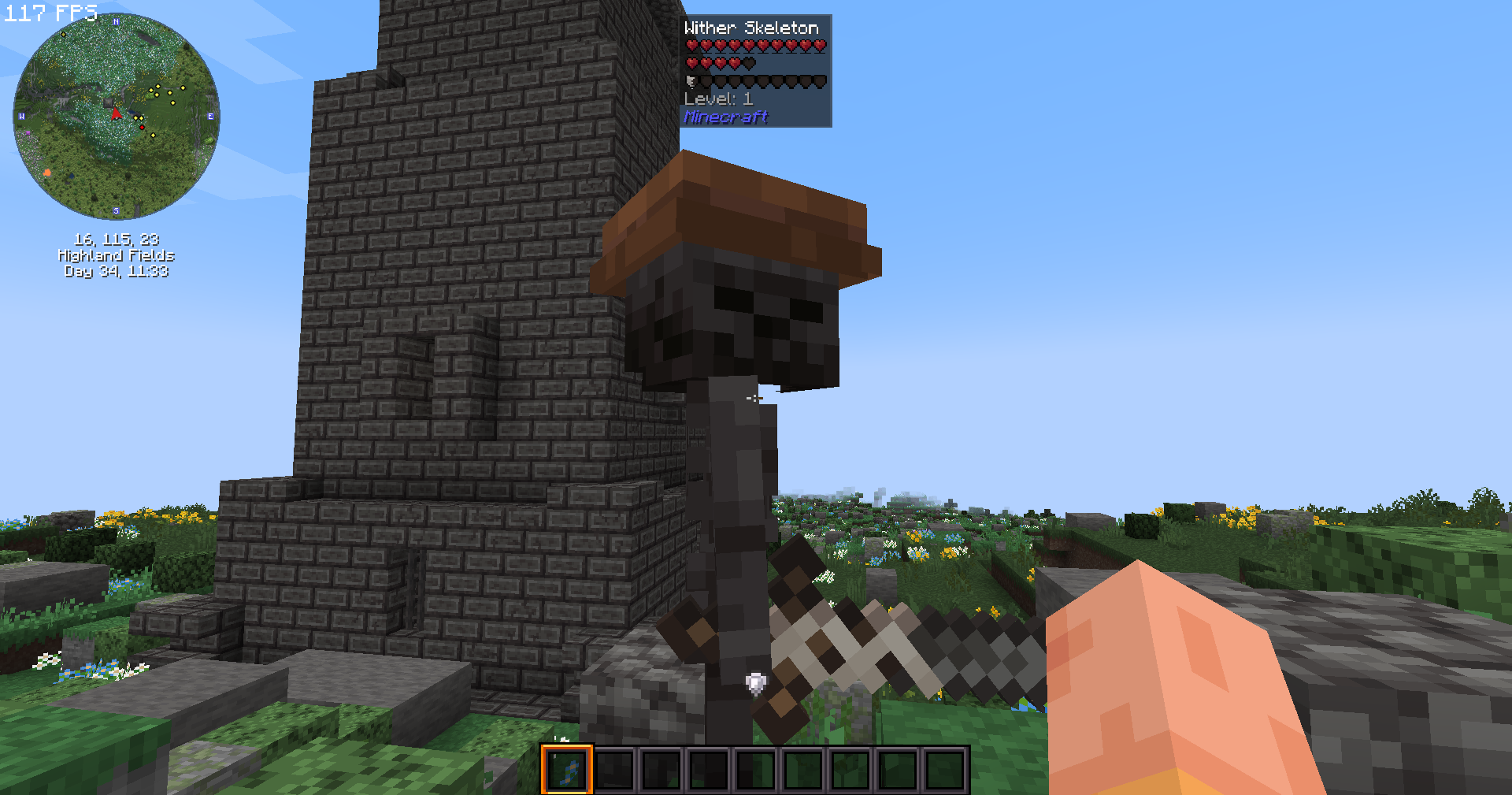
Around 100 blocks from world spawn with default Overworld settings: a level-1 enemy. A reasonable place to begin your adventure.
Screenshot — Far From World Spawn

Around 12,000 blocks from world spawn with default Overworld settings: a level-50 enemy. Your three baked potatoes are beginning to look like poor preparation.
Default Overworld Examples
| Horizontal Distance From World Spawn | Ordinary Hostile Mob Level |
|---|---|
| 0–100 blocks | 1 |
| 2,000 blocks | 15 |
| 6,000 blocks | 30 |
| 12,000 blocks | 50 |
| 25,000 blocks | 75 |
| 50,000 blocks | 100 |
Levels increase between these milestones. These are default configuration examples; dimension settings, entity overrides, and modpack configuration can change them. Bosses use their own progression settings.
Enemy scaling includes increased health and damage, while elite encounters add occasional extra danger.
The world is large. Your confidence is not a substitute for equipment.
Elite Enemies & Bosses Worth Preparing For
Some hostile mobs can become Elite variants with increased health and additional combat advantages.
Elites create occasional high-threat encounters rather than turning every Zombie into a Dark Souls boss.
Probably.
Bosses have their own configurable progression levels, health scaling, combat scaling, and XP rewards. Fighting a boss while heavily underleveled can reduce your damage against it and increase the damage it deals to you.
With Jade, supported bosses also display their configured level. The defaults include Wither: Level 65 and Ender Dragon: Level 100. Modded living bosses can be assigned levels through the boss configuration.
Screenshot — Know What You’re Challenging
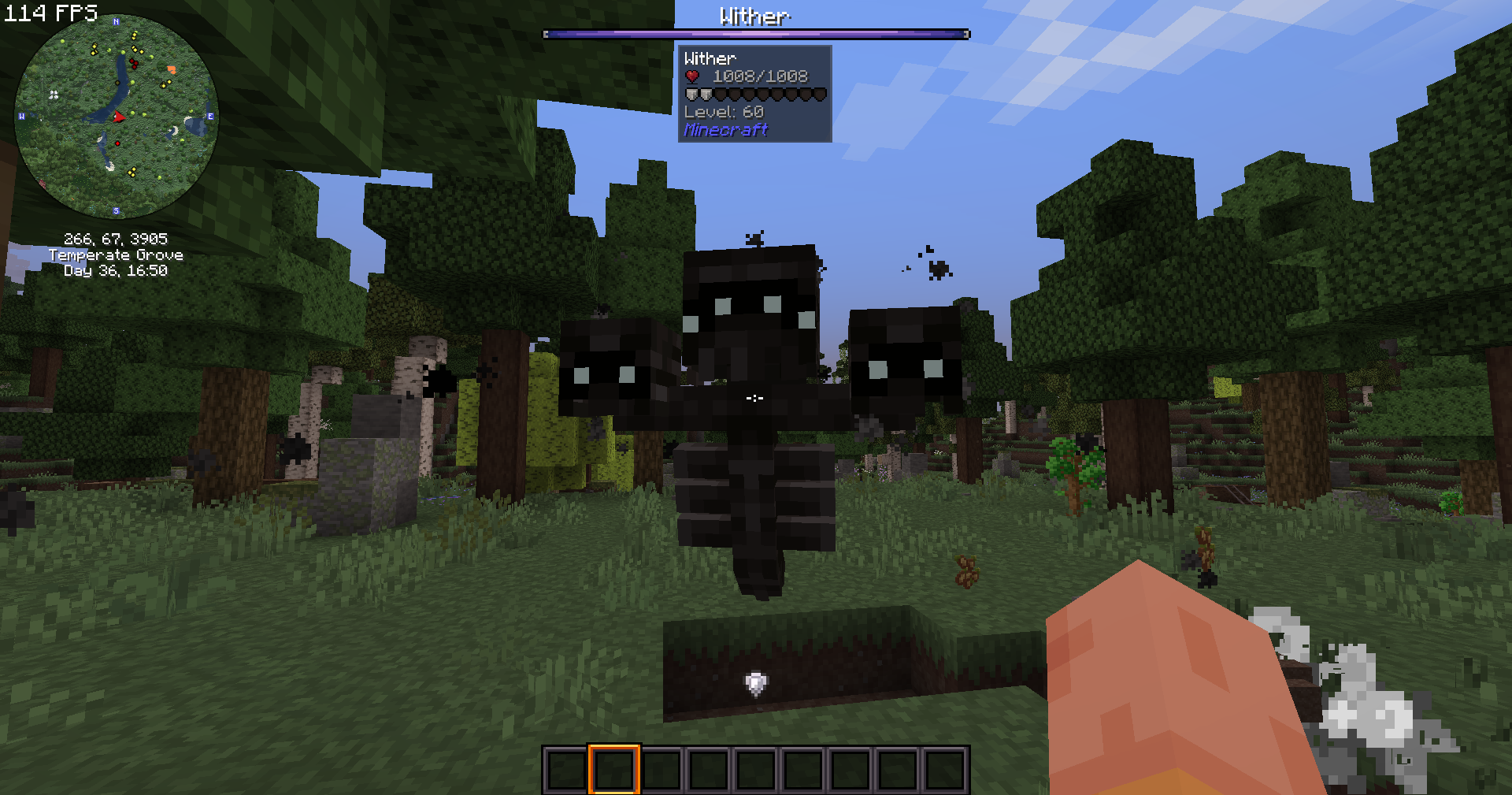
You can challenge it early. The tooltip just makes the decision harder to blame on missing information.
Built for Smooth Classes
Smooth Progression handles levels, XP, world progression, and level-earned skill points.
Smooth Classes handles classes, abilities, skill trees, class mechanics, and Ascendancy, using Puffish Skills as its skill-tree framework.
Skill points follow your active progression stage:
Base Skill Tree → Selected Class → Ascendancy
Once a stage is completed, future level-up points continue into the next valid stage.
So character levels are not just a number sitting above your head pretending to be important.
They actually fund your build.
For signature abilities, mounts, summons, class details, and gameplay previews, visit the Smooth Classes project page.
Made for Modpacks: All Configuration Files
Smooth Progression creates three JSON configuration files in config/smooth_progression/ on first startup:
| Configuration File | Controls |
|---|---|
experience.json |
Character XP requirements, boss/spawner XP modifiers, mining, farming, and fishing rewards |
mob_scaling.json |
Mob levels, distance and dimension settings, health/damage scaling, elites, and entity filters/overrides |
boss_scaling.json |
Boss registration, fixed boss levels, health scaling, underlevel combat penalties, and per-boss XP modifiers |
The tables below describe the current settings and defaults. Dotted paths show where a setting lives inside the JSON; replace <dimension_id>, <entity_id>, or <block_id> with a registry ID such as minecraft:overworld or minecraft:diamond_ore.
Edit the files on the server for multiplayer, or in your Minecraft instance for singleplayer, then restart the server or game to load them. Existing saved mob levels and health modifiers can persist, so newly spawned mobs are the clearest way to check changed scaling settings.
experience.json — Decide How Long the Training Arc Lasts
Character Level Requirements
| Setting | Default | Purpose |
|---|---|---|
curve.base |
100 |
Base XP cost for one level-up |
curve.linear |
20 |
XP cost added per current character level |
curve.quadratic |
2 |
XP cost added per current character level squared |
The formula is base + linear × current level + quadratic × current level². Defaults: 122 XP from level 1 to 2, and 22,100 XP from level 100 to 101.
This controls the cost of the next level, rather than total lifetime XP. Your mob-level cap is a separate setting.
Combat XP
| Setting | Default | Purpose |
|---|---|---|
combat.spawner_multiplier |
0.20 |
Normal mob XP multiplier for spawner mobs |
combat.boss_reward_fraction |
0.55 |
Base boss reward as a fraction of the XP cost at its configured level |
combat.boss_level_match_range |
5 |
Player/boss level difference counted as a matched fight |
combat.boss_level_match_multiplier |
1.0 |
Reward modifier within that range |
combat.boss_above_level_multiplier |
1.20 |
Reward modifier when the boss is above the matching range |
combat.boss_below_level_multiplier |
0.65 |
Reward modifier when the boss is below the matching range but not far below |
combat.boss_far_below_threshold |
15 |
Levels by which the player must exceed the boss for the far-below modifier |
combat.boss_far_below_level_multiplier |
0.25 |
Reward modifier when the boss is far below the player |
combat.boss_first_kill_multiplier |
1.25 |
First-kill modifier, tracked per player and boss entity type |
combat.boss_repeat_multiplier |
0.35 |
Modifier for subsequent kills of that boss type |
Boss XP is XP cost at boss level × reward fraction × level relevance × per-boss XP multiplier × first/repeat modifier, rounded to whole XP.
Farming the same boss forever is allowed. The payroll department eventually notices.
Activity XP
| Setting | Default | Purpose |
|---|---|---|
mining.enabled |
true |
Enable mining XP |
mining.blocks.<block_id> |
Ore rewards listed above | XP per configured block; 0 removes its mining reward |
farming.enabled |
true |
Enable farming XP |
farming.default_mature_crop_xp |
1 |
Fallback reward for other supported mature crops |
farming.blocks.<block_id> |
Crop rewards listed above | Individual supported crop rewards; 0 removes that crop’s reward |
fishing.enabled |
true |
Enable fishing XP |
fishing.xp_per_catch |
12 |
XP per rewarded fishing reel-in |
Want wheat to pay more? Change its reward. Your server can become an agricultural superpower through one JSON edit and a concerning amount of free time.
mob_scaling.json — Decide How Far From Home Becomes a Problem
Global and Distance Settings
| Setting | Default | Purpose |
|---|---|---|
enabled |
true |
Master switch for mob scaling; also gates combat XP, dedicated boss progression, and Jade level data |
level_curve.max_level |
200 |
Maximum ordinary mob level; does not set a player-level cap |
level_curve.tiers |
(0, 1), (2000, 15), (6000, 30), (12000, 50), (25000, 75) |
Distance/level milestones used to interpolate mob levels |
level_curve.tiers[].distance |
Distances above, in blocks | Distance for each milestone |
level_curve.tiers[].level |
Levels above | Mob level at each milestone |
level_curve.endgame_blocks_per_level |
1000.0 |
Extra distance per mob level beyond the final milestone |
Mining, farming, and fishing have their own switches in experience.json and remain separate from the combat master switch.
Dimensions
Each entry in dimensions uses a dimension registry ID. You can add entries for modded dimensions.
| Setting | Default | Purpose |
|---|---|---|
dimensions.<dimension_id>.enabled |
true |
Enable ordinary mob scaling in that configured dimension |
dimensions.<dimension_id>.minimum_level |
Overworld 1; Nether 26; End 51 |
Minimum mob level in the dimension |
dimensions.<dimension_id>.distance_multiplier |
1.0 |
Multiplier on distance before the level curve is evaluated |
dimensions.<dimension_id>.blocks_per_level |
100.0 |
Legacy compatibility field; current distance leveling uses level_curve instead |
Distance is measured horizontally from world spawn in the Overworld, and from X/Z 0,0 in other dimensions. It is not measured from each player’s bed.
Changing your respawn point does not convince the Zombie that it should downgrade its gym membership.
Health, Damage, and Elites
| Setting | Default | Purpose |
|---|---|---|
scaling.health_per_level |
0.04 |
+4% base health per mob level above 1 |
scaling.max_health_multiplier |
5.0 |
Cap on the ordinary level-based health multiplier, before entity/elite modifiers |
scaling.damage_per_level |
0.01 |
+1% damage per mob level above 1 |
scaling.max_damage_multiplier |
3.0 |
Cap on the level-based damage multiplier |
elite.enabled |
true |
Allow elite rolls for newly assigned mobs |
elite.spawn_chance |
0.05 |
5% chance to become elite |
elite.health_multiplier |
1.5 |
Additional elite health multiplier |
Entity Filters and Overrides
| Setting | Default | Purpose |
|---|---|---|
entities.mode |
all_hostile |
Scale eligible hostile entities, or use whitelist mode |
entities.blacklist |
["minecraft:warden"] |
Entity IDs excluded from ordinary scaling |
entities.whitelist |
[] |
Entity IDs included when whitelist mode is selected |
entities.overrides |
{} |
Optional settings per entity ID |
entities.overrides.<entity_id>.minimum_level |
1 |
Minimum level for that entity type |
entities.overrides.<entity_id>.health_multiplier |
1.0 |
Additional health multiplier for that entity type |
entities.overrides.<entity_id>.elite_enabled |
true |
Whether that entity type can roll elite |
Ordinary scaling applies to supported hostile entities; an ID in the whitelist does not make a passive animal eligible. Dedicated bosses use the boss file below.
boss_scaling.json — Give the Boss a Proper Job Description
Boss Registration and Individual Settings
| Setting | Default | Purpose |
|---|---|---|
enabled |
true |
Enable dedicated boss progression, while the mob master switch is also enabled |
entities |
Wither and Ender Dragon IDs | Exclude these IDs from ordinary mob scaling |
levels |
Wither level 65; Ender Dragon level 100 |
Map of actual boss progression entries |
levels.<entity_id>.min_level |
1 for a new entry; defaults above for vanilla bosses |
Fixed boss level and reference level for combat penalties/rewards |
levels.<entity_id>.hp_multiplier |
1.0 |
Additional health multiplier for that boss |
levels.<entity_id>.xp_multiplier |
1.0 |
Additional XP reward multiplier for that boss |
To give a modded living boss a level, add its registry ID and settings to levels. Listing it only in entities excludes ordinary scaling but does not assign a boss level or enable the dedicated boss reward.
Boss Health and Underlevel Combat
| Setting | Default | Purpose |
|---|---|---|
health_per_level |
0.04 |
+4% boss health per configured level above 1 |
max_health_multiplier |
5.0 |
Cap on the level-based boss health multiplier, before its individual HP modifier |
damage_reduction_per_missing_level |
0.05 |
Reduce an underleveled player’s damage by 5 percentage points per missing level |
boss_damage_bonus_per_missing_level |
0.08 |
Increase damage from the boss by 8 percentage points per missing player level |
minimum_player_damage_multiplier |
0.05 |
Lowest underlevel player-damage multiplier: 5% |
maximum_boss_damage_multiplier |
6.0 |
Highest underlevel boss-damage multiplier: 6× |
xp_per_level |
0.01 |
Legacy health-based XP calculation setting; the current boss-kill reward uses experience.json instead |
max_xp_multiplier |
3.0 |
Cap for that legacy XP calculation; does not cap the current dedicated boss-kill reward |
You can challenge a boss early. These settings determine how strongly it disagrees with your decision.
What Is Currently Fixed Rather Than Configurable?
The 2 skill points per earned level, level-100 honorary-title threshold and title names, and ordinary mob kill-XP formula are currently defined in code. Elite speed/knockback bonuses, equipment behavior, and extra loot behavior also have no settings in these three files.
Smooth Classes skill trees, abilities, and their own unlock requirements belong to Smooth Classes/Puffish Skills. Completing all progression stages ends XP progression; level_curve.max_level controls mobs, not that completion state.
Want relatively relaxed RPG progression?
You can do that.
Want leaving spawn to eventually feel like entering unpaid overtime?
Also possible.
Whether your adventure lasts a weekend or several months and permanently alters your sleep schedule is now partially your decision.
Requirements & Multiplayer
Minecraft 1.20.1 — Fabric & Forge — Client & Server
Choose Your Mod Loader
Smooth Progression has separate Fabric and Forge builds. Download the JAR that matches your Minecraft instance and install one Smooth Progression build.
Use matching loader versions of Smooth Classes and every required dependency as well.
Your class can be complicated. Installing it should not require a second skill tree.
Required
| Requirement | Fabric Build | Forge Build |
|---|---|---|
| Minecraft | 1.20.1 | 1.20.1 |
| Mod loader | Fabric Loader for Minecraft 1.20.1 | Minecraft Forge 47.4.0 or newer for Minecraft 1.20.1 |
| API | Fabric API | Forgified Fabric API 0.92.6 or newer, for Minecraft 1.20.1 |
| Pufferfish’s Skills | Fabric version | Forge version, 0.19.1 or newer |
| Smooth Classes | Fabric version and its required dependencies | Forge version, 1.0.5 or newer, and its required dependencies |
Fabric API is required only by the Fabric build. The Forge build requires Forgified Fabric API, which provides the shared API hooks on Forge. Sinytra Connector is not required.
Smooth Classes has its own dependencies, including Pufferfish’s Attributes, Spell Engine, Spell Power Attributes, and Accessories, plus the supporting libraries required by their selected versions. Follow the Smooth Classes project page for its complete requirements, and choose releases compatible with Minecraft 1.20.1 and your loader.
Optional
- Jade — adds hostile-mob and boss level tooltips. Choose its matching Fabric or Forge build.
Multiplayer
Install Smooth Progression and its required dependencies on both the server and clients, using the same loader and matching mod versions. For Jade’s level tooltips, install the matching Jade build on both as well.
Player level/class nameplates work without Jade or a separate title mod.
Commands
Check your progression with:
/sp level
/sp xp
Administrator and debug commands are also available for progression and Smooth Classes testing.
Useful when developing a modpack.
Or when you do not feel like killing another 700 Zombies just to test one node.
Made for Smooth Odyssey
Smooth Progression was originally created for Smooth Odyssey, my RPG-inspired Minecraft modpack built around exploration, progression, classes, and combat.
The Smooth family currently looks something like:
Smooth Progression — levels, XP, and world progression
Smooth Classes — classes, skill trees, abilities, and Ascendancy
Smooth Odyssey — the place where I throw everything together and hope my RAM forgives me
Will future mods also have Smooth in their names?
At this point I think legally they have to.
Fabric or Forge, the naming problem remains. :3
Feedback & Bug Reports
Found a bug, have a balance suggestion, or discovered an enemy with enough health to qualify as real estate?
Report it through the project’s issue tracker, including your Minecraft version, mod loader and loader version (Fabric or Forge), Smooth Progression/Smooth Classes versions, relevant dependencies, latest log or crash report, and steps to reproduce the problem.
Screenshots and videos are appreciated for visual or combat-related issues.
Have fun.
And remember:
If the next enemy looks too strong, exploring back toward spawn is also a valid strategy.
常见问题
Smooth Progression 支持哪些 Minecraft 版本?
Smooth Progression 支持 Minecraft Java 版 1.20.1,可用的加载器:Fabric / Forge。下载时注意选择和你游戏版本一致的文件。
Smooth Progression 怎么安装?
先用 PCL2 或 HMCL 启动器安装对应版本的 Fabric / Forge,再把下载的 .jar 文件放进游戏目录的 mods 文件夹,重新启动游戏即可。开启了版本隔离的,mods 文件夹在 versions/版本名 下面。
Marj4n 的其他作品
查看全部 →
Smooth SimplySwords SpellPower Compat
修复 Minecraft 1.20.1 Fabric 上 Simply Swords 1.70.2 与 Spell Power 1.6.x 的兼容问题。

Smooth Classes
Smooth Classes is an RPG class and Ascendancy system for Minecraft 1.20.1, built around distinct playstyles, powerful abilities, progression, and class identity.

Smooth Odyssey
A performance-friendly Fabric 1.20.1 RPG experience featuring custom classes, vampire and werewolf transformations, overhauls, and smooth multiplayer action.
Smooth Spellblade Compat
Compatibility layer for Spellblades and Such 2.4.0 on Minecraft 1.20.1, bringing it to the modern Spell Engine and Spell Power stack.
评论
登录后评论和评分