Highways x Aeronautics Military Structures Compat
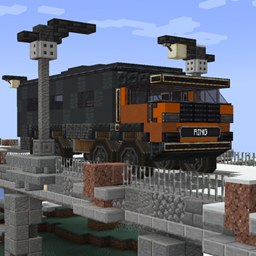
Create vehicles now spawn right on Endless Highways: trucks, SUVs and cars parked along the infinite roads.
介绍
🛣️ Endless Highways × Aeronautics Military Structures: Compat
A small compatibility addon that connects two mods: Endless Highways and Aeronautics Military Structures.
Vehicles now generate directly on the procedurally generated highways. Drive along an endless road and find abandoned trucks and cars standing on the asphalt, waiting for you to claim them.
✨ Features
- 🚚 Vehicles on highways. Structures spawn right on the road surface of Endless Highways
- 🚗 Ground vehicles only. Truck, Off-Road SUV, SUV and Cogrider. No planes or helicopters on the roads
- ♾️ Works with infinite generation. Vehicles appear as new road sections generate ahead of you
- 🧩 Plug and play. No setup or config required, just drop it in
- 🎲 Adds variety to the journey. Every long trip can end with a find
🚙 Vehicles that can spawn
- Truck – a hauling vehicle
- SUV – good capacity and reasonable speed
- Cogrider – a small car with exposed mechanisms
✈️ Offroad-Suv, The Plane and Helicopter are not included in this compat.
📋 Required mods
- Endless Highways
- Aeronautics Military Structures (and all of its dependencies: Create, Aeronautics, Propulsion, Copycats, Diesel Generators, Hots Aerostuff, Sable, Steam ’n’ Rails)
⚙️ Customization
Spawn rules are set through datapacks. If you want to change how often vehicles appear or which vehicles generate, edit the structure sets with a datapack or Structurify. Also this mod have config.
💬 Feedback
Found a bug or compatibility issue? Leave a comment, I read them all. You’re welcome to include this addon in your modpack!
常见问题
Highways x Aeronautics Military Structures Compat 支持哪些 Minecraft 版本?
Highways x Aeronautics Military Structures Compat 支持 Minecraft Java 版 1.21.1,可用的加载器:NeoForge。下载时注意选择和你游戏版本一致的文件。
Highways x Aeronautics Military Structures Compat 怎么安装?
先用 PCL2 或 HMCL 启动器安装对应版本的 NeoForge,再把下载的 .jar 文件放进游戏目录的 mods 文件夹,重新启动游戏即可。开启了版本隔离的,mods 文件夹在 versions/版本名 下面。
ya_ne_absolent 的其他作品
查看全部 →
Aeronautics Military Structures
添加 4 种由机械动力驱动的载具结构:飞机、卡车、越野车和直升机,并兼容 Aeronautics。

Endless Highways
无限程序化生成的道路,包含转弯、死胡同、隧道和带支撑的桥梁。

Level [ UNDEFINED ]: The Places
一个受后室启发的硬核恐怖整合包。探索未定义的阈限空间,在稀缺资源中生存,并使用无线电在反应性环境中保持理智。
Aeronautics Ship Structures
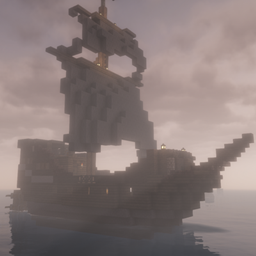
Adds 2 Create-powered ship structures — a big and small variants — built for Aeronautics compatibility.
评论
登录后评论和评分