NyanLex Translator
Read chat, items and quests in your language, and translate your replies before sending, with client-side translation using Google, AI or local models.
介绍
NyanLex Translator
The limits of your language should never be the limits of your world.
NyanLex helps you read unfamiliar languages in Minecraft and reply in your own. Translate chat, item tooltips, quest descriptions and interface text without leaving the game. It runs on your client; the server does not need to install it.
Online translation is off on a new installation. Enabling it sends the text you choose to your selected translation provider. Chat translation can include private messages. Saved translations remain available offline.
Read the game in your language
- Follow conversations: incoming chat shows its original text immediately by default, then adds the translation in the same position. Modern and legacy builds also offer ordered translation delivery or showing each translation as soon as it is ready. Choose bilingual or translation-only display separately.
- Understand items and quests: translate item names, descriptions, books and modpack quest text while keeping the original available for comparison. Modern builds support both older and current FTB Quests APIs.
- Read interfaces and HUD text: translate supported menus, tooltips, scoreboards, boss bars, titles, action bars, name tags, advancement notices and supported Jade/WAILA-style object-name overlays. The screen-translation shortcut captures visible text, including hovered tooltips.
- Keep useful translations: reuse saved results and share them through JSON import/export. Supported modern builds also offer translation packs and batch translation before you explore.
Translation quality and speed depend on the provider. Custom mod interfaces may render text in ways NyanLex cannot capture. NyanLex does not read text baked into images, and the screen-translation shortcut captures only what is currently visible.
Reply in your own language
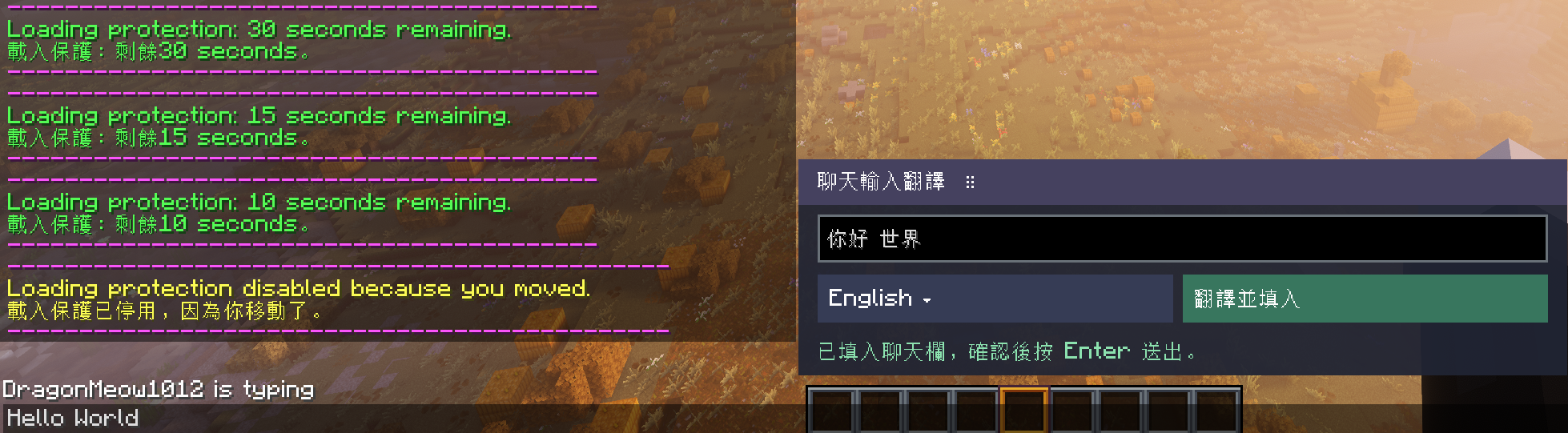
Enable Chat input translation in the General settings, then open chat. Write a draft in the movable composer, select a target language and click Translate & fill. The result appears in the normal chat bar for you to review or edit before pressing Enter to send.
The composer starts at the bottom right unless you have saved a different position. Search target languages by name or code; this choice is separate from the language used to read game content. Closing chat keeps the draft for the current game session. The feature is disabled by default and never sends a chat message for you.
See it in game
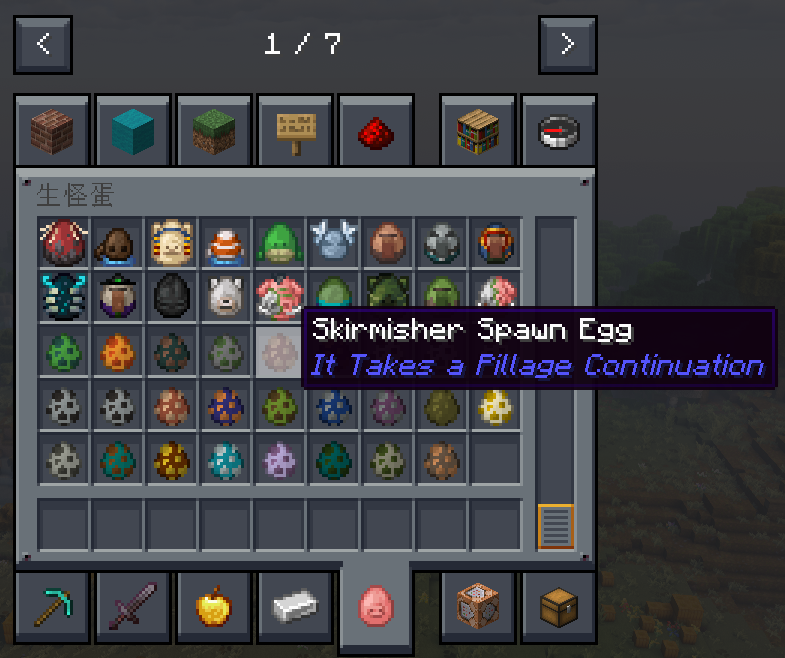
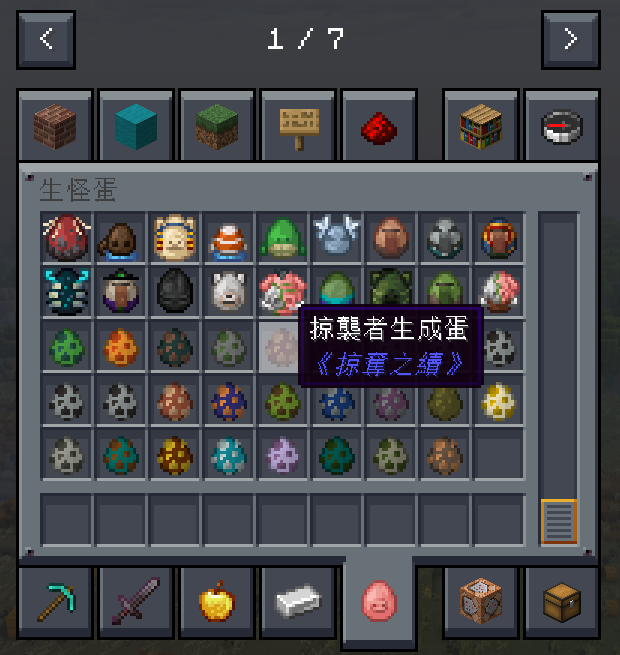
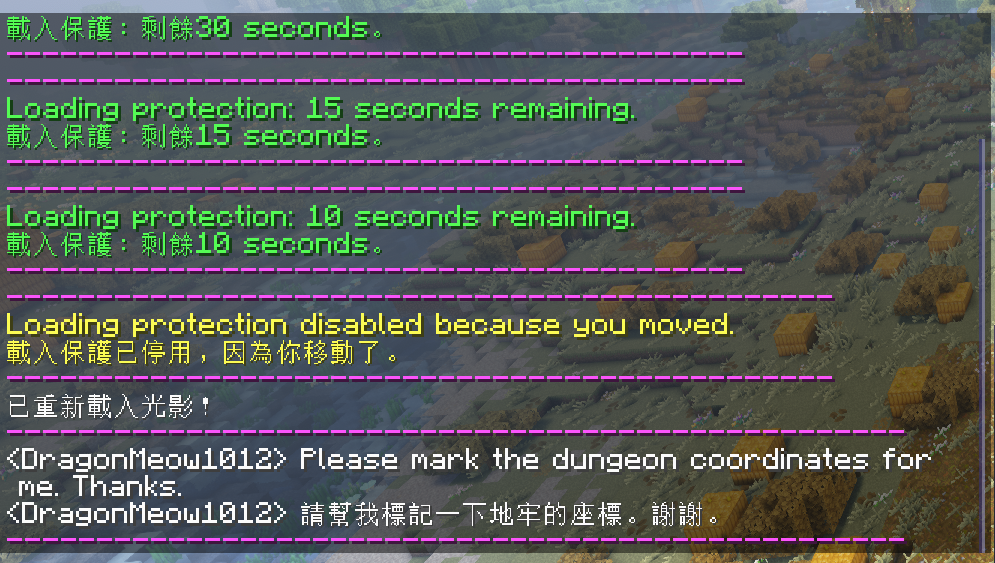
The examples below show translation into Traditional Chinese; you can select a different target language in settings. Screenshots were captured while playing the Better MC modpack, with the in-game translation text left unaltered.
| Original item tooltip | Traditional Chinese translation |
|---|---|
 |
 |
First-time setup
Install the build matching your Minecraft version and loader on the client only. Fabric builds also require a matching Fabric API. Complete the in-game Quick setup to choose your language and provider; no selection is applied until you confirm it. You can leave online translation off and use existing local translations.
On Fabric 1.17+ and NeoForge:
| Key | Action |
|---|---|
G |
Switch between original and translated display |
R |
Translate or retranslate the item under the pointer |
P |
Translate or retranslate visible screen, tooltip or HUD text |
With Google, incoming chat translates automatically after opt-in; other content is translated on demand with R or P. With AI, enabled content translates automatically and those keys request a fresh translation. Saved results display without another request. Shortcuts do not activate while you are typing.
Open Translation Settings from the settings menu, or enter /nyanlex in chat if another UI mod hides that entry.
Legacy builds (Fabric 1.14.4–1.16.5 and Forge 1.12.2–1.13.2) use a simpler interface and do not include translation packs or full-content warmup. G opens settings and P retranslates the current screen; Forge also uses H to enable or disable translation.
Choose a translation service
| Service | What you need |
|---|---|
| Google machine translation | No API key. Uses unofficial web endpoints and tries a compatible alternate once after a 429 or block page; availability may still change. |
| Gemini, OpenAI or DeepSeek | Your own API key; presets are available in settings. |
| Claude | Your own Anthropic API key; includes model selection and defaults to Claude Haiku 5.5 / medium. |
| Google / Antigravity sign-in | Hidden by default; reveal it in Advanced settings after reading the account and service risks. On modern Fabric/NeoForge builds, install Antigravity CLI from the official Google download page and sign in. NyanLex uses that Google account’s Antigravity allowance and the model variants reported by the CLI. |
| OpenRouter or another OpenAI-compatible service | Its service URL, model and any required API key. |
| Ollama or LM Studio | Your own running OpenAI-compatible local server and model. |
| ChatGPT / Codex | Available on every listed target. Requires a separately installed Codex CLI and ChatGPT sign-in; includes model, reasoning-effort and session-token controls, uses your account’s Codex allowance, and defaults to gpt-6-luna / medium. |
AI providers may charge for usage. OpenAI API, ChatGPT/Codex and Claude offer an optional Fast mode, off by default, with a warning before potentially higher charges or allowance use. The optional Codex and Antigravity integrations start separately installed local tools; NyanLex does not install either CLI. Antigravity installation instructions are available at antigravity.google/download. You can choose whether Google machine translation is used as a fallback after an AI failure. If enabled, that text may also be sent to Google.
Prepare and share translations
On modern builds, full-content warmup can translate item names/descriptions and screen text in batches; quest text belongs to the screen category. It requires AI, starts only when you choose Start or Continue, skips existing translations, and can be paused or stopped. Some content becomes available only after entering a world.
Translation packs provide prepared translations for supported mods. Packs are detected from the last Quick setup page or the Packs settings, not automatically at game startup. The mod lists matching packs and their sizes before you confirm a download. Clearing downloaded packs keeps translations you generated yourself.
Import and export let you share saved translations as JSON. Large exports split into numbered files; share the whole set. Importing adds missing valid entries without replacing existing translations or sending new translation requests. Modern Fabric/NeoForge builds share one format; legacy builds share another, and the two formats cannot be mixed.
Privacy and data handling
- You control online translation. A new installation starts with it off. Quick setup, settings or an explicit translation confirmation can enable it. Upgrading preserves your existing choice.
- Selected text goes to your selected provider. Depending on enabled features, this includes chat, item descriptions and other game text. Chat may include private messages. TAB-list player names are masked locally, but other text may still contain personal information; masking is not a guarantee of anonymity.
- Outgoing drafts are sent only when you request their translation. After closing chat, drafts remain only in memory until you quit the game; they are not stored in the translation cache or translation exports. You still review and send the final chat message yourself.
- API keys are stored in your local configuration and used for the configured service. Translation providers apply their own data-handling policies.
- Translation packs are download-only. Discovery reads a public GitHub index; selected pack files are downloaded after confirmation. Your local translations and installed-mod list are not uploaded to the hub.
- Exports contain translation entries, not API keys or settings. Translated text itself may contain personal information, so review exports before sharing them.
Documentation and licensing
Full documentation: English · 日本語 · 繁體中文 · 简体中文
Code is licensed under MIT. Optional translation packs have separate licensing and attribution; see the translation hub documentation.
NyanLex is an unofficial project, not affiliated with or endorsed by Mojang, Microsoft or other mod authors. Server rules vary; check the rules of the server you play on.
常见问题
NyanLex Translator 支持哪些 Minecraft 版本?
NyanLex Translator 支持 Minecraft Java 版 1.14.4–1.19,共 9 个版本,可用的加载器:Fabric。下载时注意选择和你游戏版本一致的文件。
NyanLex Translator 怎么安装?
先用 PCL2 或 HMCL 启动器安装对应版本的 Fabric,再把下载的 .jar 文件放进游戏目录的 mods 文件夹,重新启动游戏即可。开启了版本隔离的,mods 文件夹在 versions/版本名 下面。
评论
登录后评论和评分