
RPG Zones
Utility Mod to declare RPG-like Zones with customisable Titles, Respawns, Actionbars and more!
截图
介绍

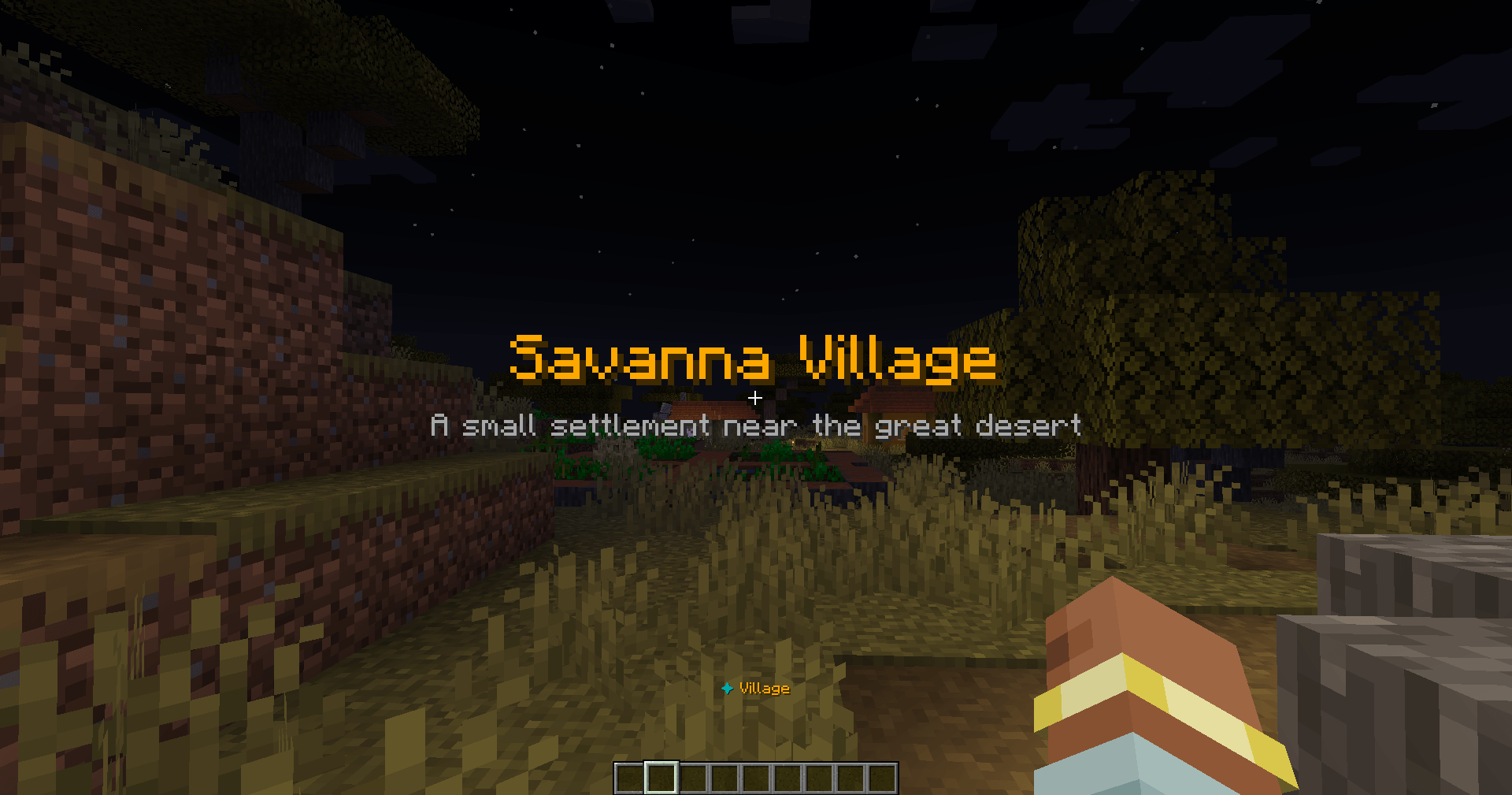
RPG Zones is a simple utility mod that lets you add RPG-like titles to certain zones:
- Let’s you declare and manage custom Zones in your Single-/Multiplayerworld
- Makes use of Minecraft’s inbuilt Title System to display Custom Titles
- Configure Zones in-game and set Tags like Custom Actionbars or Respawn Points
- More QoL Features!
This mod is to be used in creative to create immersive RPG-like exploration maps or to add immersion to Minecraft RPG-like Servers.
Commands
General:
/zones list – Shows a list of the created zones, 20 per page
/zones add <BlockPos1> <BlockPos2> “<ZoneIDName” – Creates new zone for the given block coordinates, make sure to set “ZoneIDName” to something clear and original, so you don’t loose track of your zones
/zones remove <ID> – Removes the zone with the given ID (not the “ZoneIDName”, each zone will get a numeral ID on creaotion)
Tags & Titles:
/zones tag <ID> clearVisitors – Clears the list that keeps tracks of the players that entered the zone, which is used to e.g. Display Zone Titles only ONCE upon entering and “discovering” the zone
/zones tag <ID> title “title” <color> <bShowTitle> <FadeIn> <Stay> <FadeOut> – Set’s the Zone Title’s title along with a color (command will suggest any official minecraft color). Sets the timings for the title, just like the vanilla title command.
/zones tag <ID> subtitle “subtitle” <color> <bShowSubtitle> – Set’s the Zone Title’s subtitle with a color (command will suggest any official minecraft color)
/zones tag <ID> actionbar “actionbar” <prefix_color> <color> <bShowActionbar> <bActionbarPersistent> – Set’s the zones Actionbar (text component displayed over the hotbar) along with a prefix color and a full color, as the actionbar will look like this: “✦ “actionbar”” – prefix_color will change the color of the ✦-Icon, color the actionbar title’s color (command will suggest any official minecraft color). The value of <bActionbarPersistent> will determine, if the Actionbar will be displayed at all times within the zone or only for 3 seconds on entry.
/zones tag <ID> respawn <BlockPos> <bUseRespawnPoint> – When a player dies within the zone, he will not respawn at his usual respawn point, like the World Spawn or his bed. Instead he gets transported to a pre-defined Block Position/coordinates
Suggestions for future features and feedback are greatly appreciated!
常见问题
RPG Zones 支持哪些 Minecraft 版本?
RPG Zones 支持 Minecraft Java 版 1.20.1,可用的加载器:Forge。下载时注意选择和你游戏版本一致的文件。
RPG Zones 怎么安装?
先用 PCL2 或 HMCL 启动器安装对应版本的 Forge,再把下载的 .jar 文件放进游戏目录的 mods 文件夹,重新启动游戏即可。开启了版本隔离的,mods 文件夹在 versions/版本名 下面。

评论
登录后评论和评分