
PackagedAuto Terminals
Two AE2 terminals that list and edit your PackagedAuto recipes from anywhere on the ME network. No more walking to every Packager
截图
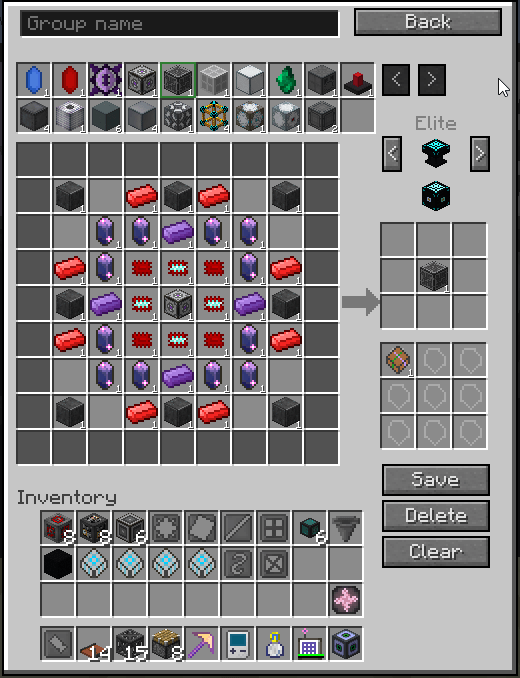
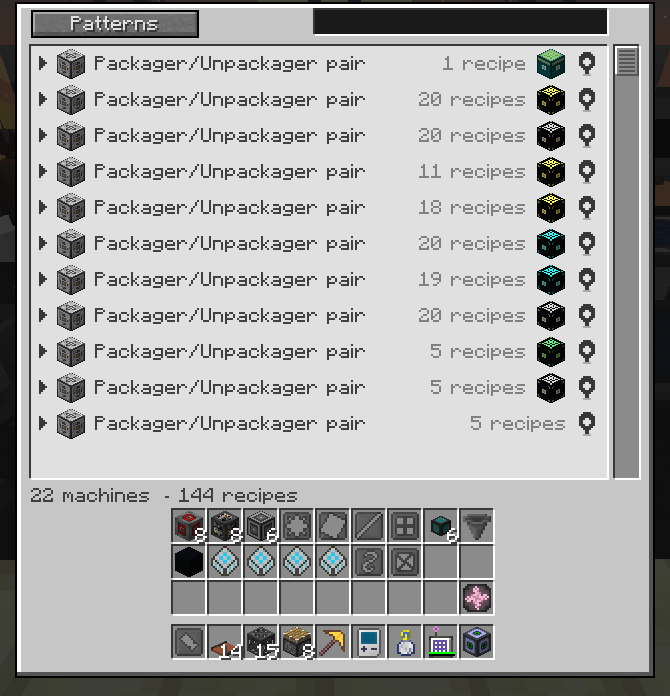
介绍
PackagedAuto Terminals adds two Applied Energistics 2 terminals. They edit the recipes of your
Packagers, Unpackagers and Packaging Providers from anywhere on the ME network. You no longer
walk to the machine to change a recipe.
The terminal joins the machines that work together into a group. One save writes the recipe into
every machine of the group at the same time. The editor follows the layout of the Package Recipe
Encoder, so you learn one screen only.
It works with JEI in both directions
The + button of a JEI recipe fills the whole grid. A single ingredient dragged out of JEI fills
one slot. A fluid enters as an AE2FC Fluid Packet, and you edit its amount in millibuckets.
It goes wireless
The Wireless PackagedAuto Terminal opens the same screen from anywhere in range. It answers the
AE2 range, energy and security rules, and it works from either hand. With AE2WUT installed, it
joins the Wireless Universal Terminal.
Getting started
- Craft the PackagedAuto Terminal from one ME Terminal and one Package Recipe Holder.
- Place the terminal on a face of an ME cable, like any other AE2 part.
- Right click the terminal. The screen lists the machine groups of the network.
- Left click a group row. The editor opens on a new recipe.
- Fill the grid, then press Save. The recipe reaches the Packager and the Unpackager together.
To edit a recipe that already exists, right click its row instead.
For a description page in game, press the JEI usage key on either item.
Gestures worth knowing
| Gesture | Effect |
|---|---|
| Left click a group row | Open the editor on a new recipe |
| Shift and left click a group row | Send the recipe holders of the group back to the network |
| Right click a recipe row | Edit that recipe |
| Shift and right click a recipe row | Remove that recipe from the group |
| Left click a filled slot | Open the amount panel |
| Turn the wheel over a slot | Change the amount. Shift and Ctrl take bigger steps |
| Right click a filled slot | Empty the slot |
Requirements
| Mod | Role |
|---|---|
| AE2 Unofficial Extended Life | required |
| PackagedAuto 1.0.24.73 or newer | required |
| JEI or HadEnoughItems | optional: recipe transfer, drag and drop, description pages |
| PackagedExCrafting, PackagedAvaritia | optional: their recipe types appear on their own |
| AE2 Fluid Crafting with PackagedFluidCrafting | optional: fluids need both |
| PackagingProvider | optional |
| AE2WUT | optional: the terminal joins the Wireless Universal Terminal |
The mod detects every integration by modid at load time. Without the addon, the feature
disappears and the game does not cras
Links and license
| Subject | Where |
|---|---|
| Source and issues | https://github.Terminals |
| Wiki | https://github.com/programgames/PackagedAutoTerminals/wiki |
The license is MIT. This project copile from PackagedAuto. It
compiles against them only.
You may put this mod in a modpack. Yois welcome, and not required.
常见问题
PackagedAuto Terminals 支持哪些 Minecraft 版本?
PackagedAuto Terminals 支持 Minecraft Java 版 1.12.2,可用的加载器:Forge。下载时注意选择和你游戏版本一致的文件。
PackagedAuto Terminals 怎么安装?
先用 PCL2 或 HMCL 启动器安装对应版本的 Forge,再把下载的 .jar 文件放进游戏目录的 mods 文件夹,重新启动游戏即可。开启了版本隔离的,mods 文件夹在 versions/版本名 下面。

评论
登录后评论和评分