
Day Counter Plus
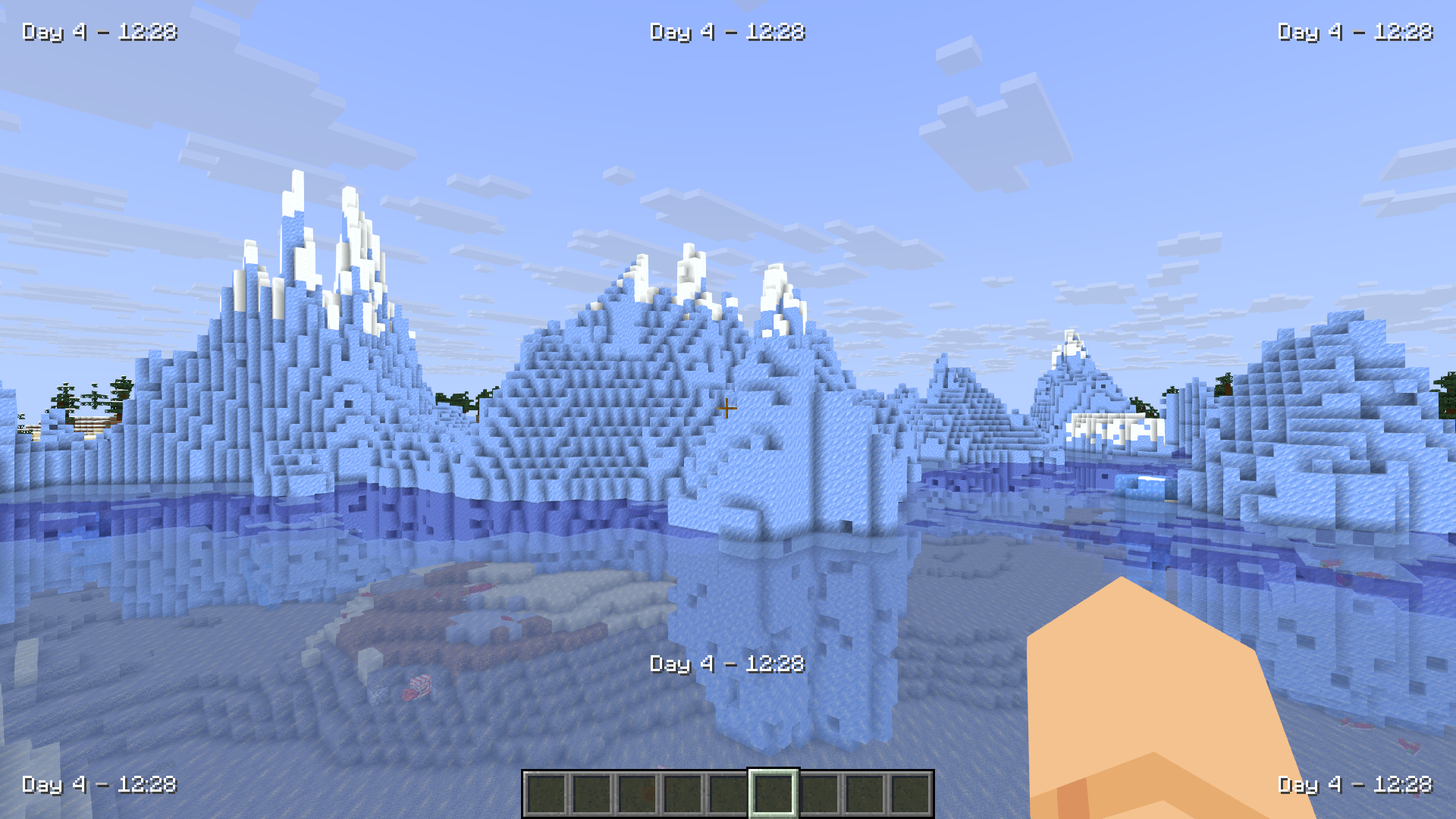
Day Counter Plus is a Minecraft mod that displays the current in-game day and time on your screen. It has many customizable options and works on single player and multiplayer.
截图




介绍
Day Counter Plus – 
Day Counter Plus displays your Minecraft days and time played in a fancy way on your screen. It is fully customizable and works on singleplayer and multiplayer servers. It runs fast with almost no impact on game performance.
The cool thing about Day Counter Plus, is that it works on already existing worlds! This makes it available to use for Everyone at any time. This feature makes it able to work perfect on multiplayer servers aswell.
You can edit the way everything is displayed to the way you like it, including colors, format, sounds and visibility settings.
With the setting: “Dynamic Colors” you can change the color of the display automatically depending on your enviroment! You can see the demonstration here.
Features
- Shows current in-game day and time.
- Customizable display style (Action bar and Custom).
- Play sounds when a new day starts and when you’re able to sleep.
- Compatible with singleplayer and multiplayer.
- Works with worlds you played before installing the mod
Why Use DCP?
- Never lose track of your days played.
- Easely know when you can sleep or not.
- You dont have to search the F3 menu anymore.
- Fully customizable to fit your personal style.
- Lightweight and performance-friendly for any server or world.
_Clarity and Better HUD were used when making screenshots for the gallery_
To do list
- Hide when time not changing
- Start at Day 1 or Day 0 customizable setting
Settings
General Tab
| Setting | Default |
| :— | :— |
| Enabled | Yes |
| Enable on Singleplayer | Yes |
| Enable on Multiplayer | Yes |
| Only Show on New Day | No |
| Show Day | Yes |
| Show Time | Yes |
Formatting Tab
| Setting | Default |
| :— | :— |
| Time Format | 24h |
| Show Text Capitalized | No |
| Show Decimals | Commas |
| Show Separator | Yes |
| Separator Character | - |
| Show Line Terminators | No |
| Line Terminator Characters | « » |
| Terminator Spacing | 1 |
Colors Tab
| Setting | Default |
| :— | :— |
| Day Color | #fff |
| Time Color | #fff |
| Separator Color | #aaa |
| Line Terminator Color | #fff |
| Dynamic Colors | No |
| Dynamic Colors Transition Time | 15 |
| Darken Separator | Yes |
Background Tab
| Setting | Default |
| :— | :— |
| Show Text Shadow | Yes |
| Show Background | No |
| Background Color | #50000000 |
| Background Padding | 3 |
| Rounded Background | No |
Placement Tab
| Setting | Default |
| :— | :— |
| Placement Mode | Action Bar |
| Horizontal Alignment | Left |
| Vertical Alignment | Top |
| Horizontal Padding | 10 |
| Vertical Padding | 10 |
| Text Size | 1.0 |
| Time on Separate Line | No |
| Separate Line Height | 2 |
Sounds Tab
| Setting | Default |
| :— | :— |
| Enable New Day Sound | Yes |
| New Day Sound ID | minecraft:block.beacon.power_select |
| Enable Night Sound | Yes |
| Night Sound ID | minecraft:block.note_block.chime |
| Enable Thunder Sound | Yes |
| Thunder Sound ID | minecraft:entity.lightning_bolt.thunder |
| Play Toggle Visibility Sound | Yes |
Extras Tab
| Setting | Default |
| :— | :— |
| Start at Day 1 | No |
| Hide when Time isn’t Changing | Yes |
常见问题
Day Counter Plus 支持哪些 Minecraft 版本?
Day Counter Plus 支持 Minecraft Java 版 1.21.8–26.3,共 9 个版本,可用的加载器:Fabric。下载时注意选择和你游戏版本一致的文件。
Day Counter Plus 怎么安装?
先用 PCL2 或 HMCL 启动器安装对应版本的 Fabric,再把下载的 .jar 文件放进游戏目录的 mods 文件夹,重新启动游戏即可。开启了版本隔离的,mods 文件夹在 versions/版本名 下面。运行环境:仅客户端。
Astyll 的其他作品
查看全部 →
Clarity
FullBright2 现已更名为 Clarity,它移除了所有阴影和迷雾,让你在任何地方都能看清,可用于挖矿或夜间赶路。

Better Hud
A clean redesign of the default hud in-game

Better Friends List
Nickname and favorite your friends to get a clearer overview of your friends list with the Better Friends List mod!

FluxFont
A simple redesign of the original minecraft font.
评论
登录后评论和评分