
DisplayHost: [PT <> EN] Chat Translate
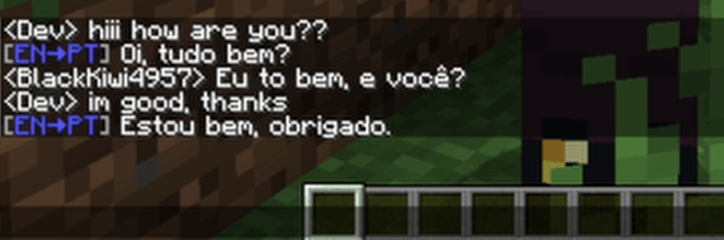
Translates messages written in Brazillian-Portuguese to English (and vice-versa) utilizing Google Translate's API.
截图
介绍
Chat Translator

Mod made by Yasmin Carolina ( Discord: diamond1666 )
Feito por, e para Brasileiros.
This project communicates between the server and the client in order to translate messages locally received in both Portuguese and English by players, as well as server messages and the likewise.
The mod currently only offers translation between Brazilian Portuguese and English.
You can find the server in which this was produced for at: discord.gg/UvqsZMuTtM
A Google Cloud API Key for Google Translate is required for this mod to function. The Cloud Natural Language API must also be enabled on the same project for automatic moderation to work.
General Commands
/ct help
/ct about
In-game Commands ( admin/op 2+ )
/ct testmode on/off       — Turns on and off Testing Mode
/ct status                — Moderation status + Cache size + Filter count
/ct clearcache            — Clears the Server's Translation Cache
/ct chars                 — Characters sent to the API
/ct checkkey              — Displays the API Key masked for confirmation
/ct setkey <KEY>          — Sets the Google API Key
/ct testapi               — Tests both APIs and displays a detailed diagnostic
Swear Filter ( admin/op 2+ )
Highly recommended, as per Google’s Terms of Service for the Translation API. Words in this list act as triggers for the automatic moderation system.
/ct filter add <word>     — Adds a word to the filter and clears it from the Cache
/ct filter remove <word>  — Removes a word from the filter
/ct filter list           — Lists all filtered words
/ct filter clear          — Clears all filtered words
Filtered words are stored at: config/chattranslator_filter.json
Automatic Moderation ( admin/op 2+ )
Powered by Google Cloud Natural Language API. Analyzes the full context of the message before translating. If a filtered word is detected, the NL API decides whether to approve or censor the message based on context — casual use passes, directed offenses are censored.
/ct moderation on/off                        — Enables or disables automatic moderation
/ct moderation list                          — Lists all 16 categories and their thresholds
/ct moderation default <value>               — Sets the default threshold for all categories (0.0 to 1.0)
/ct moderation mincategories <N>             — How many categories must exceed the threshold to trigger a block
/ct moderation category <value> <Name>       — Sets the threshold for a specific category
/ct moderation only <value> <cat1>, <cat2>   — Activates only the specified categories, disables the rest
/ct moderation reset                         — Restores default moderation settings
Available categories:
Toxic Insult Profanity Derogatory Sexual Death, Harm & Tragedy Violent Firearms & Weapons Public Safety Health Religion & Belief Illicit Drugs War & Conflict Politics Finance Legal
Moderation settings are stored at: config/chattranslator_moderation.json
Console Commands (Pterodactyl)
All in-game commands are also available directly from the server console without the / prefix.
ct setkey <KEY>            — Saves the API Key split across three separate folders
ct checkkey                — Displays the API Key masked for confirmation
ct testapi                 — Tests both APIs and displays a detailed diagnostic
ct status                  — General status overview
ct clearcache              — Clears the translation cache
ct filter add/remove/list/clear    — Manages the swear filter from the console
ct moderation ...          — All moderation commands available from the console
Security
The API Key is split between three different folders, which the client and operators never have access to, unless through direct access to the Server Files.
Key files are stored at: config/ct/k1.dat | logs/ct/k2.dat | world/ct/k3.dat
常见问题
DisplayHost: [PT <> EN] Chat Translate 支持哪些 Minecraft 版本?
DisplayHost: [PT <> EN] Chat Translate 支持 Minecraft Java 版 1.21.1,可用的加载器:NeoForge。下载时注意选择和你游戏版本一致的文件。
DisplayHost: [PT <> EN] Chat Translate 怎么安装?
先用 PCL2 或 HMCL 启动器安装对应版本的 NeoForge,再把下载的 .jar 文件放进游戏目录的 mods 文件夹,重新启动游戏即可。开启了版本隔离的,mods 文件夹在 versions/版本名 下面。
BlackKiwi 的其他作品
查看全部 →
Lavender Valley 2
2nd Season of Project Lavender Valley, a brazilian multiplayer Minecraft server

Black Kiwi’s Modded Server Pack
Black Kiwi's Community server Modpack

BlackKiwi Community 2
2nd Edition of Black's Community modpack and server, focused on tech, magic and a flavour of RPG.
评论
登录后评论和评分