Litematica RawMaterials
A Litematica addon that expands the material list into the raw materials you need to gather, following crafting recipes.
截图
介绍
Litematica RawMaterials
A Litematica addon that expands the material list into raw materials.
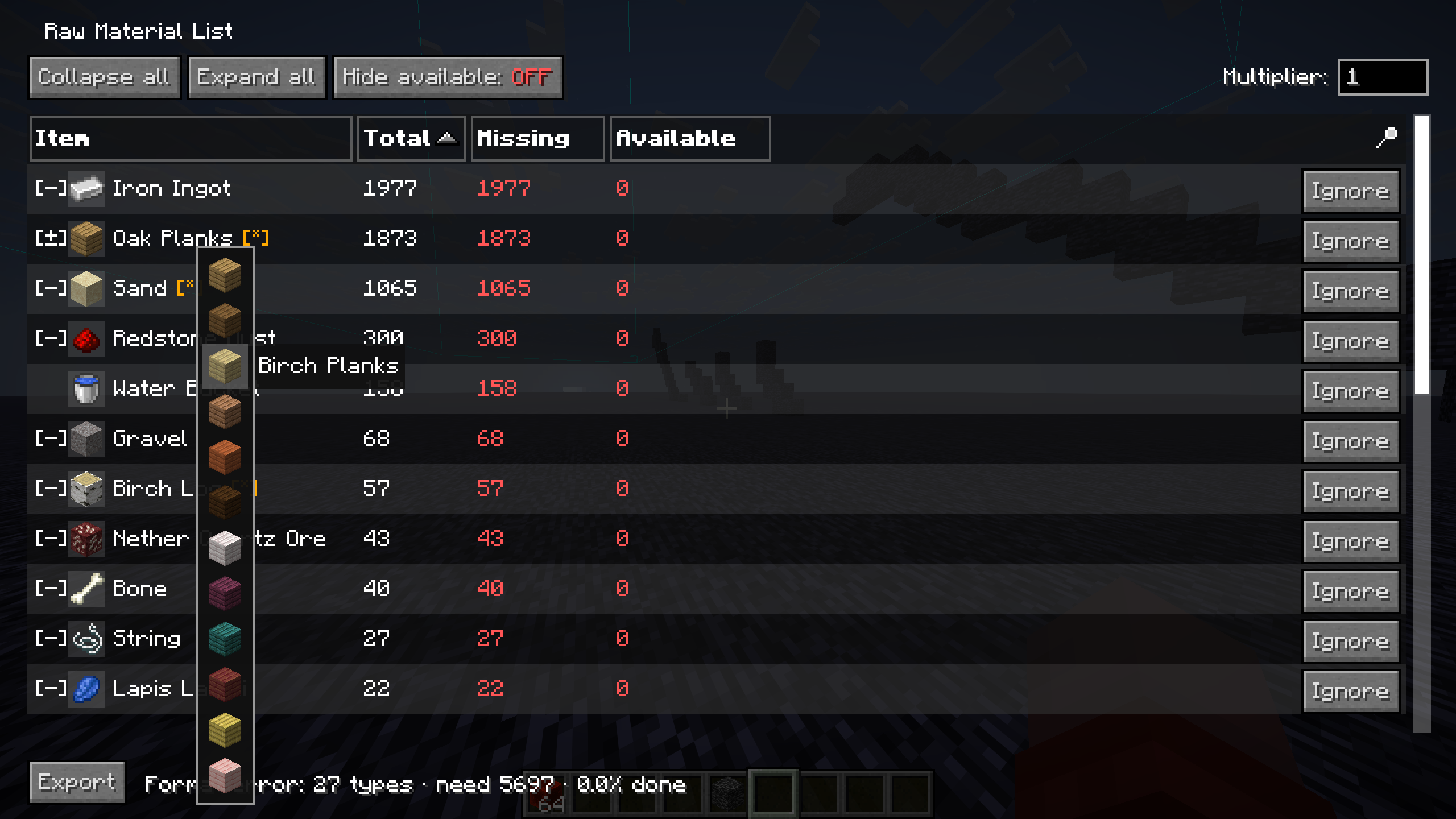
Litematica’s material list shows what a schematic is made of, but anything you’d normally craft (a block of redstone, a hopper, a chest) is listed as-is. RawMaterials follows the crafting recipes and shows the total raw materials you need to gather, minus what’s already in your inventory.
Requirements
Fabric, with malilib and Litematica for your Minecraft version:
| Minecraft | malilib | Litematica |
| — | — | — |
| 26.2 | 0.29.0+ | 0.28.0+ |
| 26.1 – 26.1.2 | 0.28.9+ | 0.27.9+ |
| 1.21.11 | 0.27.16+ | 0.26.11+ |
Older versions are not supported because the Litematica subsystem this mod builds on (the recipe-decomposed material list) does not exist there.
Usage
Press M + K to open the raw-material list. It uses the most recently opened Litematica material list; if none is open yet, it is generated automatically from the currently selected schematic placement (same as Litematica’s M + L). The hotkey also works while a container screen is open (inventory, crafting table, chest), and Esc brings you back to it.
Press M + J to open the settings screen, where you can rebind both keys.
Views
The list can be viewed in two ways. Expanded items, ignored items, tag choices, and the multiplier are shared between them, and the numbers are computed the same way in each, so switching views does not change the totals.
Raw Material List
The main flat list, styled after Litematica’s material list (Item / Total / Missing / Available columns, sortable).
- Left-click a row to expand it into its ingredients.
- Right-click a row to fold it back into the crafted item.
- Shift + Right-click a row to ignore it (removes it and everything it would be crafted into).
- Middle-click a tag row to pick which item to use.
- Hold Tab while hovering a row to see its crafting recipe.
The list also has a multiplier for building the schematic N times, a “Hide available” toggle, plain-text export, and an “Ignored: N” button that opens a menu where ignored items can be un-ignored one by one.
Crafting Flow
Opened with the Flow view button. Item types are merged into a single left-to-right graph: raw materials on the left flow through intermediate crafts into the schematic’s materials on the right. A shared ingredient like sticks appears only once, with an edge to every item that uses it.

- Same interactions as the list: left-click expand, right-click fold (a raw material folds into its consumer), Shift+right-click ignore, middle-click tag choice, Tab recipe.
- Counts are inventory-netted. Fully covered items get a green checkmark, partial stock shows
have/total. - Hovering a node highlights its paths: the materials it needs and everything it flows into.
- Drag to pan, scroll to zoom. Expand all / Collapse all / Hide available buttons are available here too.
Features
Recipe expansion
Crafted items are broken down into their ingredients, recursively, down to raw materials.
Inventory netting
Items already in your inventory are subtracted, so the list shows what’s actually left to gather. Fully covered branches stop expanding and turn green. This also applies to intermediate items: if you already have pistons in stock, their own materials are no longer requested, in every view.
Tag ingredients
When a recipe accepts a tag (any planks, any log), you choose which item to count toward it.
Ignoring items
Items you don’t want counted, such as things you farm anyway, can be removed with Shift+right-click. Ignoring an item also removes the demand it would have created. Ignored items can be restored later from the ignored menu.
Notes
Recipes come from your client’s recipe book, the same source Litematica uses. On a vanilla multiplayer server, recipes you haven’t unlocked won’t expand, so some totals may not be fully broken down until you’ve unlocked them.
Building
./gradlew buildThis builds every supported Minecraft version (Stonecutter); jars are written to versions/<version>/build/libs/ (e.g. versions/26.2.x/build/libs/rawmats-fabric-26.2-0.4.0.jar). Put the jar in your mods folder along with malilib and Litematica for the same Minecraft version.
常见问题
Litematica RawMaterials 支持哪些 Minecraft 版本?
Litematica RawMaterials 支持 Minecraft Java 版 1.21.11–26.3,共 6 个版本,可用的加载器:Fabric。下载时注意选择和你游戏版本一致的文件。
Litematica RawMaterials 怎么安装?
先用 PCL2 或 HMCL 启动器安装对应版本的 Fabric,再把下载的 .jar 文件放进游戏目录的 mods 文件夹,重新启动游戏即可。开启了版本隔离的,mods 文件夹在 versions/版本名 下面。运行环境:仅客户端。

评论
登录后评论和评分