
Selection GUI Crafting
Mod for modpack authors allowing the addition of recipes that are performed with holding the right items and pressing RMB using CraftTweaker.
截图
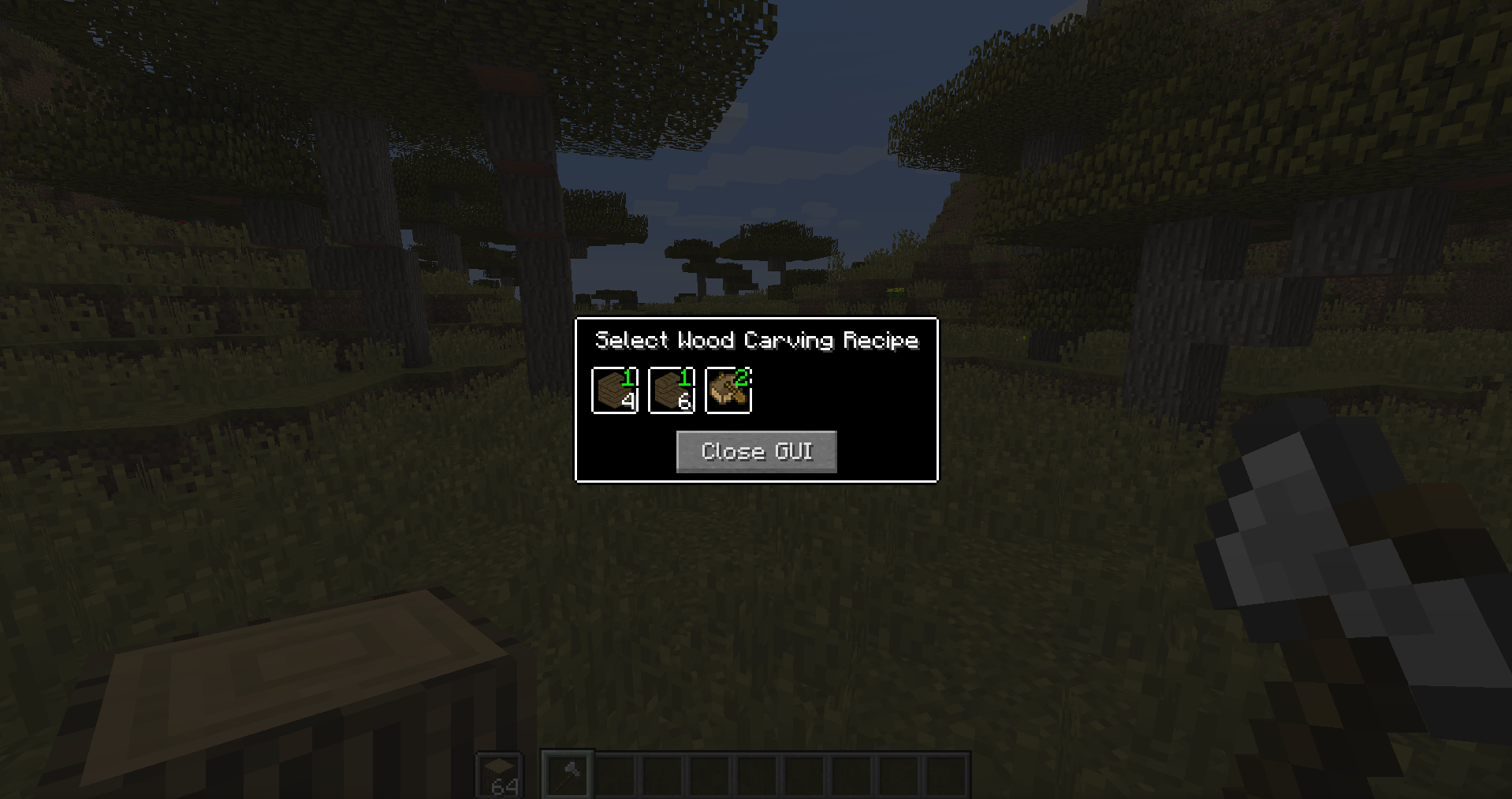
介绍
Selection GUI Crafting is a mod that gives modpack authors the ability to add crafting recipes into a selection GUI that is triggered by right-clicking while holding the right items using CraftTweaker.
There are no recipes by default, as the mod is intended to be used with CraftTweaker by modpack authors who are developing a highly customized modpack.
There’s many possible use cases. For example, one could use this mod to add wood carving. You could register any axe as a tool, and any log as an input item. And then have various recipes like bowl, boat, etc. as outputs. This is much more elegant and smooth than putting logs or axes into the crafting table in a different pattern.
Another example would be clayforming recipes. Instead of arranging clay balls in a different shape in a crafting table, you could have a spatula as a tool, clay balls as an input item, and just select the clay item (such as a clay vessel, clay bucket, flower pot, brick, etc.) that you want to make.
A last example could be forging. Blacksmith’s hammer as a tool, metal ingot as an input item, and from there you can select your desired forged object, such as a plate, a bucket, a pickaxe toolhead, etc.
You can add as many recipes as you want to a category and create as many categories as you want. The possibilities are endless and are only limited by your imagination and the items available in a pack.
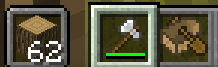
Tools must be in the main hand, and input items must be in the offhand for the recipe GUI to open.
CraftTweaker methods:
// Imports the ZenClass.
import mods.selectionGuiCrafting.SelectionGuiCrafting;
// Creates a category.
SelectionGuiCrafting.createCategory(string categoryName, string displayName);
// Adds tools to specified category. Note that for the timeMultipliers, a higher number means a faster recipe. A value of 2.0 will make the recipe complete twice as fast.
SelectionGuiCrafting.addToolsToCategory(string categoryName, IItemStack[] tools, float[] timeMultipliers, float[] damageMultipliers);
// Adds destructible tools to specified category. Destructible tools are destroyed after a single use instead of being damaged. For example: Using flint shards as single-use cutting tools instead of knives.
SelectionGuiCrafting.addDestructibleToolsToCategory(string categoryName, IItemStack[] tools, float[] timeMultipliers);
// Adds input items to specified category.
SelectionGuiCrafting.addInputToCategory(string categoryName, IItemStack[] inputs);
// Adds recipe to specified category.
SelectionGuiCrafting.addRecipe(string categoryName, int inputQuantity, IItemStack[] outputs, int craftingTimeInTicks, int durabilityUsage);
// Convenient method to save some space in your script for when you want to make a single recipe category. Note that this just makes a normal category, and further recipes can be added later.
SelectionGuiCrafting.createSingleCraftCategory(string categoryName, string displayName, IItemStack[] tools, Float[] timeMultipliers, Float[] damageMultipliers, IItemStack[] inputs, int inputQuantity, IItemStack[] outputs, int craftingTimeInTicks, int durabilityUsage);
// Same as above, but for destructible tools.
SelectionGuiCrafting.createSingleCraftCategoryDestructibleTools(string categoryName, string displayName, IItemStack[] tools, Float[] timeMultipliers, IItemStack[] inputs, int inputQuantity, IItemStack[] outputs, int craftingTimeInTicks, int durabilityUsage);
// Same as above, but for both tool types.
SelectionGuiCrafting.createSingleCraftCategoryBothTools(string categoryName, string displayName, IItemStack[] tools, Float[] timeMultipliers, Float[] damageMultipliers, IItemStack[] destructibleTools, Float[] destructibleTimeMultipliers, IItemStack[] inputs, int inputQuantity, IItemStack[] outputs, int craftingTimeInTicks, int durabilityUsage);
Here is an example script using the above methods:
import mods.selectionGuiCrafting.SelectionGuiCrafting;
// Creates a category named “Wood Carving”.
SelectionGuiCrafting.createCategory(“woodCarving”, “Wood Carving”);
// Adds the diamond and iron axe as tools. The diamond axe performs recipes twice as fast, and additionally, the iron axe takes two times the damage.
SelectionGuiCrafting.addToolsToCategory(“woodCarving”, [<minecraft:diamond_axe>, <minecraft:iron_axe>] as IItemStack[], [2.0, 1.0] as float[], [1.0, 2.0] as float[]);
// Adds flint as a destructible tool.
SelectionGuiCrafting.addDestructibleToolsToCategory(“woodCarving”, [<minecraft:flint>] as IItemStack[]);
// Adds all logs as valid inputs.
SelectionGuiCrafting.addInputToCategory(“woodCarving”, [<minecraft:log:*>] as IItemStack[]);
// Adds various recipes: 1 log into 4 planks, takes four seconds, 1 log into 6 stairs, takes 5 seconds, and 2 logs into a boat, takes 6 seconds and uses 3 durability instead of 1
SelectionGuiCrafting.addRecipe(“woodCarving”, 1, [<minecraft:planks>*4] as IItemStack[], 80, 1);
SelectionGuiCrafting.addRecipe(“woodCarving”, 1, [<minecraft:oak_stairs>*6] as IItemStack[], 100, 1);
SelectionGuiCrafting.addRecipe(“woodCarving”, 2, [<minecraft:boat>] as IItemStack[], 120, 3);
Images:
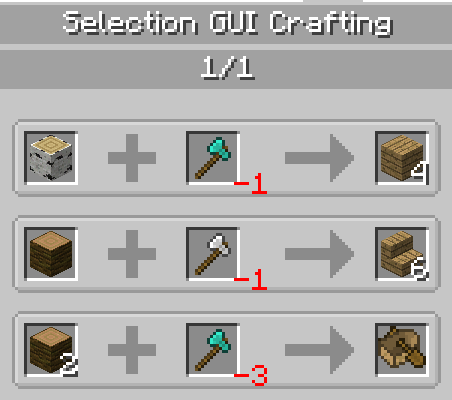
Here are the recipes as added in the example script:
JEI integration:
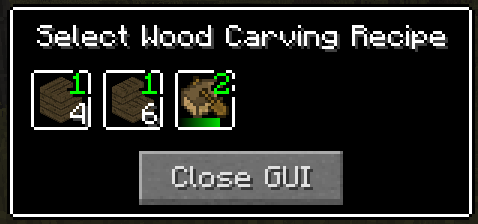
A recipe is started once you click on one – the green numbers indicate the quantity of input item required:
And here it is complete:
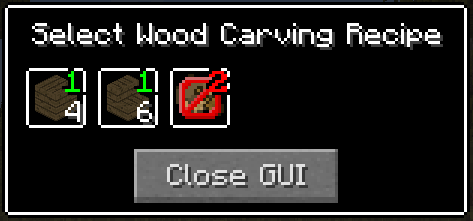
This is what happens if you don’t have enough of an input material for certain recipes – you are unable to click on it and perform the craft:
Potential future plans for the mod include:
– Chance recipes of two kinds – one where there’s a chance that nothing happens, and another where the input gets consumed, but you don’t get the output
– Failure alternatives for chance recipes; for the latter kind of the aforementioned chance recipes, there would be an option to get an alternative output, such as potsherds from pottery
– Only being able to perform a recipe while looking at or standing on a specific block, this could be useful for something like forging recipes allowing only to be performed while close to an anvil
– Customizable background texture per category, such as a wood background for wood carving, or a metallic background for forging
– Customizable sounds that are played when performing a recipe, per category and individual overrides per recipe
– Secondary input ingredients that are unique per recipe, the items would be taken from the inventory and wouldn’t be required to open the category GUI, but would be required to perform the actual recipe
常见问题
Selection GUI Crafting 支持哪些 Minecraft 版本?
Selection GUI Crafting 支持 Minecraft Java 版 1.12.2,可用的加载器:Forge。下载时注意选择和你游戏版本一致的文件。
Selection GUI Crafting 怎么安装?
先用 PCL2 或 HMCL 启动器安装对应版本的 Forge,再把下载的 .jar 文件放进游戏目录的 mods 文件夹,重新启动游戏即可。开启了版本隔离的,mods 文件夹在 versions/版本名 下面。
Gliese_832_c 的其他作品
查看全部 →
MineralMixTweaker
一个小型的沉浸工程/CraftTweaker 附属模组,可进一步配置沉浸工程的矿脉。

Nova Lux Vehiculum
Immersive Vehicles add-on featuring a variety of vehicles such as ships and hot air balloons.

Yes Flint Knapping
Fork of No Tree Punching mod for 1.12.2 stripping out most content and adding some CraftTweaker functionality.

Factory1-Resources
Fork of Factory0-Resources focused on adding new features and fixing bugs.
评论
登录后评论和评分