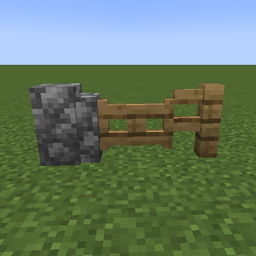
Jump Over Fences & Walls
Jump over fences, walls and fence gates with a normal jump, up to two blocks high. No carpets, no config.
介绍
Tired of fences and walls stopping you in the middle of a run? Just jump.
Jump Over Fences & Walls lets you jump over fences, walls and fence gates with a normal jump, no carpets and no Jump Boost needed. Your normal jumps stay exactly the same: the jump only gets stronger when you are about to hit an obstacle, and only by as much as it needs.
FEATURES
– Jump over fences, walls and closed fence gates
– Clears obstacles up to two fences or walls high
– Works walking, sprinting, sideways and diagonally
– Works from dirt paths, farmland, soul sand and mud
– Normal jumps are not changed
– Respects Jump Boost and low ceilings
– Fences, walls and gates from other mods work if they are built on the vanilla ones or use the standard tags
– Nothing to configure: install it and play
– Available in English and Spanish
HOW IT WORKS
When you jump, the mod calculates your jump with Minecraft’s own physics. If that jump would hit a fence, wall or gate you could not clear, it adds just enough height to get you over. If you are not heading into one, nothing changes.
Crouch while jumping to make a normal jump.
TOGGLE KEY
Press J to turn the mod on or off. You can change the key in Controls. The mod is on every time you start the game.
SERVERS
This is a client-side mod meant for singleplayer. DO NOT use it on servers: anti-cheat plugins may detect the higher jump and kick or ban you. When you join an online server, a reminder tells you to turn it off with the toggle key. Use it on a server at your own risk and check its rules first.
Made by ZeroKit. All Rights Reserved.
常见问题
Jump Over Fences & Walls 支持哪些 Minecraft 版本?
Jump Over Fences & Walls 支持 Minecraft Java 版 1.20.1–26.3,共 12 个版本,可用的加载器:Fabric / Forge / NeoForge。下载时注意选择和你游戏版本一致的文件。
Jump Over Fences & Walls 怎么安装?
先用 PCL2 或 HMCL 启动器安装对应版本的 Fabric / Forge / NeoForge,再把下载的 .jar 文件放进游戏目录的 mods 文件夹,重新启动游戏即可。开启了版本隔离的,mods 文件夹在 versions/版本名 下面。
ZeroFoxStudios 的其他作品
查看全部 →
VeinMiner Ore & Timber & Harvest
集 VeinMiner、TreeCapitator 和 Harvester 于一体的轻量级原版风格模组:挖掘整个矿脉、砍伐自然树木而不影响你的建筑,右键收获并重新种植作物
Create: Andesite VeinMiner
A VeinMiner made specifically for Create. It just lets you mine andesite faster. I don't know what else you'd use it for.
Chest Hub
A lectern that links every chest around it and opens them all as one big searchable, sortable chest.

ReadyKit
Get your test loadout with one key and make any mobs fight each other. A quick kit and mob-brawl tool for testing mods, builds and combat. Forge, NeoForge and Fabric, 1.20.1 to 26.3.
评论
登录后评论和评分