
Same Settings
作者:Ethanolve
A simple Mod that lets you save your settings and carry them onto other Modpacks/instances with ease.
截图
介绍
中文介绍正在准备中,下面暂时显示原文。
This mod lets you save your settings and move them onto another Instance. Saving time and keeping you from having to remember your settings.


Features
connects well to the minecraft UI, lightweight, and highly compatible across modloaders and versions.
This mod will also be frequently updated to the newest released minecraft versions as they come out.
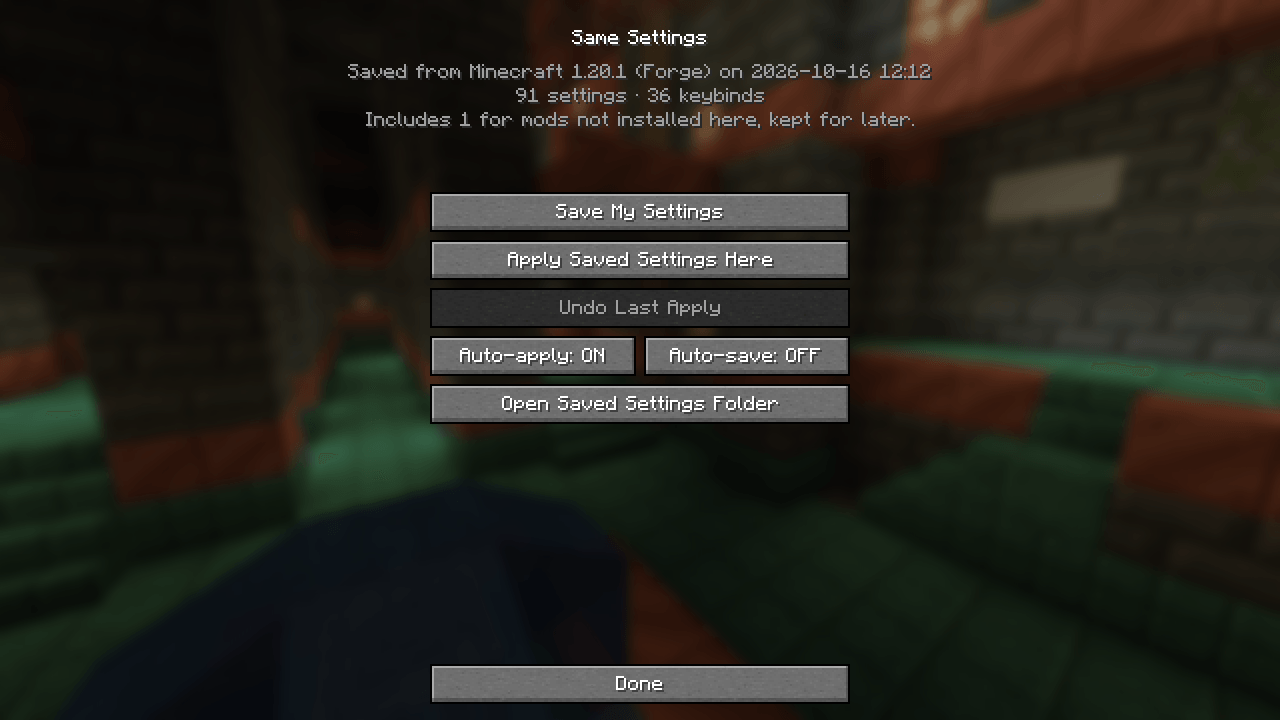
The page (shown in image above and in gallary)
-Save My Settings
-Apply Saved Settings Here
-Undo Last Apply
-Auto-apply (applies your settings to the new instance automatically)
-Auto-save (saves your settings as you adjust them)
-Open Saved Settings Folder
Extra info 🙂
You’re welcome to use it in your modpack, but please know that if you publish the modpack the users will have their own settings on it and not yours if they saved their own since the information is saved in a local file.
Please submit crashes, bugs, and requests here; https://github.com/Ethanolve/SS-Contact
I hope you enjoy it <3
常见问题
Same Settings 支持哪些 Minecraft 版本?
Same Settings 支持 Minecraft Java 版 1.19–26.3,共 27 个版本,可用的加载器:Fabric / Forge / NeoForge / Quilt。下载时注意选择和你游戏版本一致的文件。
Same Settings 怎么安装?
先用 PCL2 或 HMCL 启动器安装对应版本的 Fabric / Forge / NeoForge / Quilt,再把下载的 .jar 文件放进游戏目录的 mods 文件夹,重新启动游戏即可。开启了版本隔离的,mods 文件夹在 versions/版本名 下面。

评论
登录后评论和评分