
Artefacts CIT
Optifine-free CIT resource pack adding custom 2D/3D item models. Plus edition available.
截图
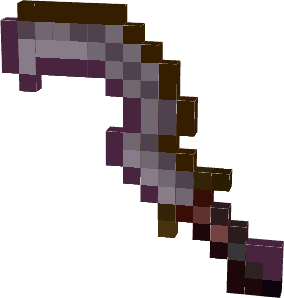
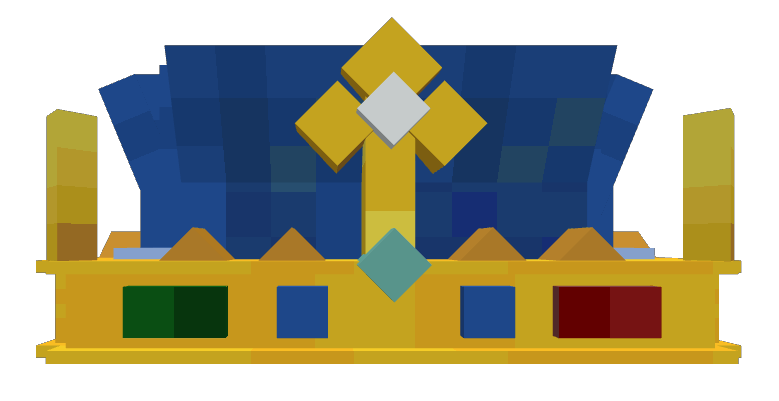

介绍
🏺 Artefacts CIT


CIT resource pack with 2D and 3D models — no Optifine required.
Artefacts CIT adds custom-modeled equipment and decorative items to vanilla Minecraft using item model predicates (custom model data), so you get true CIT-style item reskins without needing Optifine or any client mod.
✨ Features
- Custom models, including:
- Khepesh Royal — a custom-modeled weapon
- Arpegene Crown — a decorative headpiece
- Mitre Papale — a papal-style headpiece
- …and more equipment/decorative pieces
- 2D and 3D models, built for a clean, vanilla-friendly look.
- No Optifine dependency: works out of the box with vanilla Java Edition, using standard custom model data rather than Optifine’s CIT system.
Models
- Khepesh Royal
- Arpegene Crown
- Mitre Papale
🌟 Plus Edition
A Plus version is also available, which folds in additional models ported from other well-known CIT packs:
Reworked to function without Optifine, for an even larger item selection.
🆕 What’s new (26.3 update)
- Support for Minecraft 26.3 (resource pack format 97).
- New pack icons for Artefacts and Artefacts Plus.
- Fixed the PlayStation console models (missing textures) and the PlayStation Headphones model in the Plus edition.
- Fixed untextured faces showing the missing texture on the Couronne du Prince Clerc, the Sainte Mitre and several maeflowers models (towels, curtains, fridges…).
- Plus edition: fixed the bucket sinks (
Bucket_sink_1–3) that no longer loaded, and removed unused horn models. - Lighter PlayStation TV loading screen texture (1024×512).
🕹️ How to use
- Download and install the resource pack into
.minecraft/resourcepacks, then enable it in Options → Resource Packs.
📦 Compatibility
| | |
|—|—|
| Minecraft versions | 1.19.4 · 1.20–1.20.2 · 1.21.x · 26.1.x · 26.2 · 26.3 |
| Type | Resource Pack (client-side) |
| Resolution | 16x |
| License | MIT |
| Source | GitHub |
📥 Installation
- Place the resource pack in
.minecraft/resourcepacks/and enable it in-game.
On 5.1 version only
_Models using stonecutter via Artefacts datapack companion._
_Link to Artefacts CIT datapack_
常见问题
Artefacts CIT 支持哪些 Minecraft 版本?
Artefacts CIT 支持 Minecraft Java 版 1.19.4–26.3,共 21 个版本。下载时注意选择和你游戏版本一致的文件。
Artefacts CIT 怎么安装?
把下载的 .zip 文件(不用解压)放进游戏目录的 resourcepacks 文件夹,进游戏后在「选项 → 资源包」里把它移到右边启用。
Azerxim 的其他作品
查看全部 →
Power Heroes 2 – Comics
Save the world, use your SUPER POWER !!!

Doctor Who Dalek 4 – Invasion
Traveling aboard the T.A.R.D.I.S. and fight evil Daleks.
Quartz UI
A minimalist, white and clear GUI overhaul in 16x — clean and bright, while staying true to vanilla Minecraft's original look and feel.

Woodcutter
Turn the stonecutter into a woodcutting station: convert logs, planks, stairs, slabs and boats for every vanilla and Nether wood type.
评论
登录后评论和评分