Tool Tiers
Adds a custom tier system to tools to give modpack creators more control over what can mine what
介绍
Tool Tiers
ToolTiers modifies the vanilla tool system to be more robust and allow modpack authors to better configure what should be breakable with what
Users
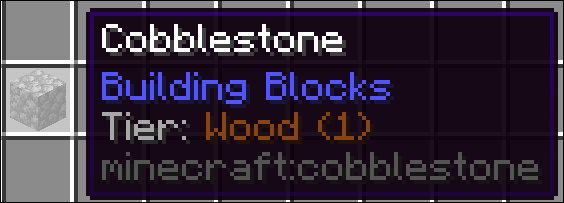
Users will notice a new line in their tooltips informing them of the tier of a given block (This also displays in Jade if you have it installed).
By default, to mine a block, a tool will need to be the exact same tier, or a level above. The level is indicated by the number after the name
Developers
Modpack Developers can use KubeJs to modify and add tiers. If a block has multiple tier tags the highest one will be used.
Translations
If you want to give tiers a custom name or add translations for other languages overwrite the language keys with the following patter tier.tooltiers.<tier_name>. English translations will be automatically generated, but can still be overwritten in en_us.json
Creating tiers
// THIS IS A STARTUP EVENT

ToolTierEvents.register(event => {
  /**
   * This creates a new tool tier with the name 'Example', display color of pure white and level 3,
   * which is the same as iron. It can break all blocks below iron level and all blocks with the
   * same tier. It CANNOT break blocks at iron level. If you wish to change this
   * you have to modify the config to allow tiers to break the same level as them.
   */
  event.create("example", 0xFFFFFF, 3)

  /**
   * This creates a UNIQUE tier. Unique tiers can only break blocks with the exact same tier applied to them.
   * You can use this to make tools which can only break very specific blocks.
   */
  event.create("another", 0xFFFFFF)
})
Registering items to tiers
// THIS IS A STARTUP EVENT

/**
 * The first event parameter dictates the tier to register the items to.
 */
ToolTierEvents.tools('iron', event => {
  /**
   * This registers the 'example_mod:example_tool' item to the iron tier.
   * Only the exact resource location works here as tags are not built at this stage of the loading process yet.
   */
  event.add("example_mod:example_tool")

  /**
   * Remove the given tier assigment from the item.
   * The tier parameter specified does not matter here, any tier will be removed
   */
  event.remove("minecraft:wooden_sword")
})
Registering blocks to tiers
ServerEvents.tags('block', event => {
  /**
   * Block Tiers are represented via tags, so you can use the default kubejs tag event here.
   * This registers the 'example_mod:example_block' to the diamond tier
   */
  event.add('tooltiers:requires/diamond', 'example_mod:example_block')

  /**
   * You can also remove tool requirements from a block like this
   */
  event.remove('tooltiers:requires/diamond', 'minecraft:netherite_block')
})
Debug info
You can use the following command to make it easier to find missing tiers
/**
 * Creates a two files with all items and blocks and their respective tier assignment
 */
/tooltiers dump tiers

/**
 * Creates a two files with all items and blocks with the specified tier
 */
/tooltiers dump tiers <tier>

/**
 * Creates a files with all  blocks and the best attempt at showing their vanilla tier assignment
 */
/tooltiers dump vanilla

/**
 * Creates a files with all blocks which dont already have a tier assignment and the best attempt at showing their vanilla tier assignment
 */
/tooltiers dump vanilla missing_only
常见问题
Tool Tiers 支持哪些 Minecraft 版本?
Tool Tiers 支持 Minecraft Java 版 1.21.1,可用的加载器:NeoForge。下载时注意选择和你游戏版本一致的文件。
Tool Tiers 怎么安装?
先用 PCL2 或 HMCL 启动器安装对应版本的 NeoForge,再把下载的 .jar 文件放进游戏目录的 mods 文件夹,重新启动游戏即可。开启了版本隔离的,mods 文件夹在 versions/版本名 下面。



评论
登录后评论和评分