
截图
介绍
❗[Notice] Google will lock-down Android and your ability to install applications❗
Starting in September 2026, Android will require all apps to be registered by verified developers in order to be installed on certified Android devices, and Google gets to decide who ‘verified developers’ are.
- Your right to freely develop and install whatever apps (
.apkfiles) you want may cease. - App developers will be forced to hand over govt. ids to Google and tie their apps to their real life identities.
- Google gets to decide who gets approved. Being rejected means nobody can install your apps.
- Developers Google arbirarily chooses it doesn’t like, as well as users who reside in sanctioned regions like Russia, may face difficulties or be cut-off entirely from having their apps installable.
Please visit the following resources for more infromation:
Text Effects by Akis
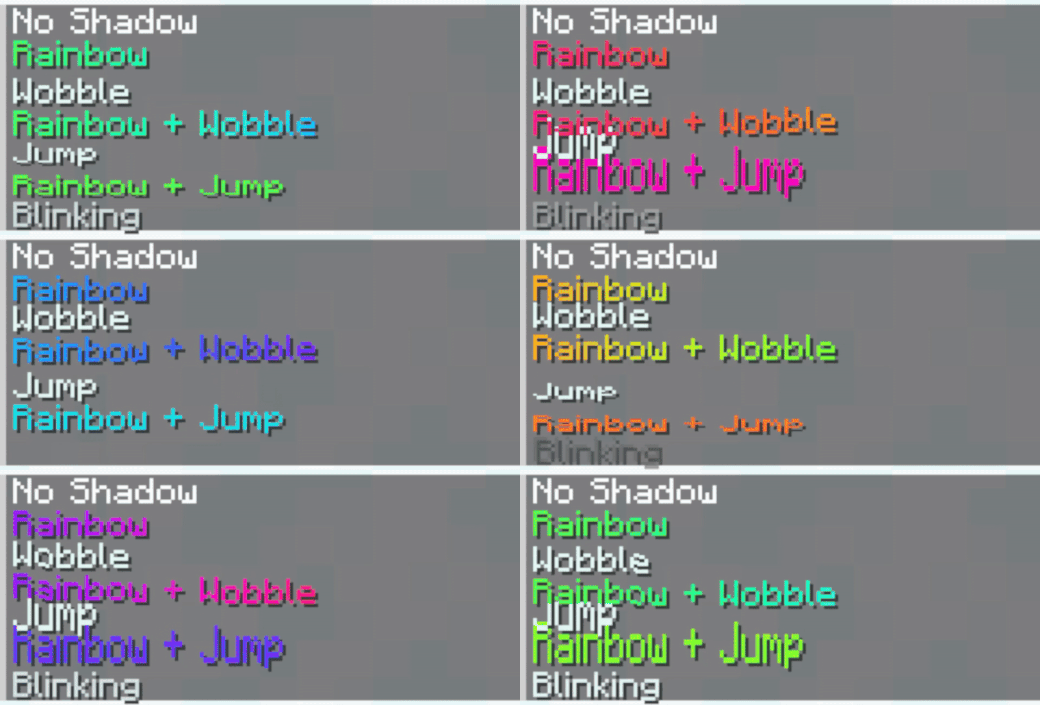
Discover a collection of stunning text effects. Originally made for Nexo, these effects can also be used in vanilla Minecraft by applying the correct hex color codes to your text.
Effects and Their Colors
| Effect | Hex Color |
|————————|:————-:|
| No Shadow | #4e5c24 |
| Rainbow | #e6fffe |
| Wobble | #e6fffa |
| Rainbow + Wobble | #e6fbfe |
| Jump | #e6fbfa |
| Rainbow + Jump | #e6f7fe |
| Blinking | #e6f7fa |
How to Install
Nexo:
- Download the latest version of the resource pack
- Put the ZIP file into your
plugins/Nexo/pack/external_packs - Open
settings.yml, findgenerate_gif_shadersand make sure it’s set tofalse
Check Compatibility for more info - Go into the game and run
/n rl allto reload Nexo - If that doesn’t work, restart your server
- Et voilá, you’re done!
How to Use
- Copy the hex color code for your desired effect.
- Apply it to your text in Minecraft using formatting tools or plugins.
- Enjoy the results!
Compatibility
- As these effects use the rendertype_text core shader, they are incompatible with some plugins that add content using these shaders, such as:
|Plugin|Compatible|Mergable|Disable|
|:-|:-:|:-:|:-:|
|Nexo|⚠️|Manual|generate_gif_shaders in settings.yml|
|Custom Nameplates|⚠️|Manual|?|
|MythicHud|⚠️|Manual|?|
|“Better”Hud|❌|?|?|
Compatible:
✅ – Fully Compatible without doing anything
⚠️ – Requires merging/disabling a setting
❌ – Incompatible/untested
Mergable:
Manual – Requires to be merged manually
Auto – Plugin automatically merges it
No – Not mergable
Disable:
some_setting – Setting to disable if you don’t want to merge
Contact
- if you need help, feel free to join the discord or open a github issue
Preview

Need a reliable server? Check out NeyHost!
NeyHost offers affordable, high-performance servers for Minecraft (Java & Bedrock), 7DTD, Hytale, and more!
常见问题
Text Effects by Akis 支持哪些 Minecraft 版本?
Text Effects by Akis 支持 Minecraft Java 版 1.20.4–1.21.8,共 12 个版本。下载时注意选择和你游戏版本一致的文件。
Text Effects by Akis 怎么安装?
把下载的 .zip 文件(不用解压)放进游戏目录的 resourcepacks 文件夹,进游戏后在「选项 → 资源包」里把它移到右边启用。
YeahAkis_ 的其他作品
查看全部 →
FastChest Revived
Renders chests as normal blocks instead of block entities, so big storage rooms stop eating your FPS

Transparent Scoreboard by Akis
A simple core shader that removes the background of scoreboards

Magical Campfires
Heals you when near campfires! Fully customizable with support for both normal and soul campfires.

Tweaks
Change some values in Minecraft using gamerules
评论
登录后评论和评分