MapScribble
Draw handwritten outlines, lines, and text notes directly on your JourneyMap, Xaero's World Map or FTB Chunks fullscreen map. 地図に手書きで囲み・線・文字メモを描けるクライアントMOD。
截图
介绍
English | 日本語 (below / 下にあります)
English
Overview
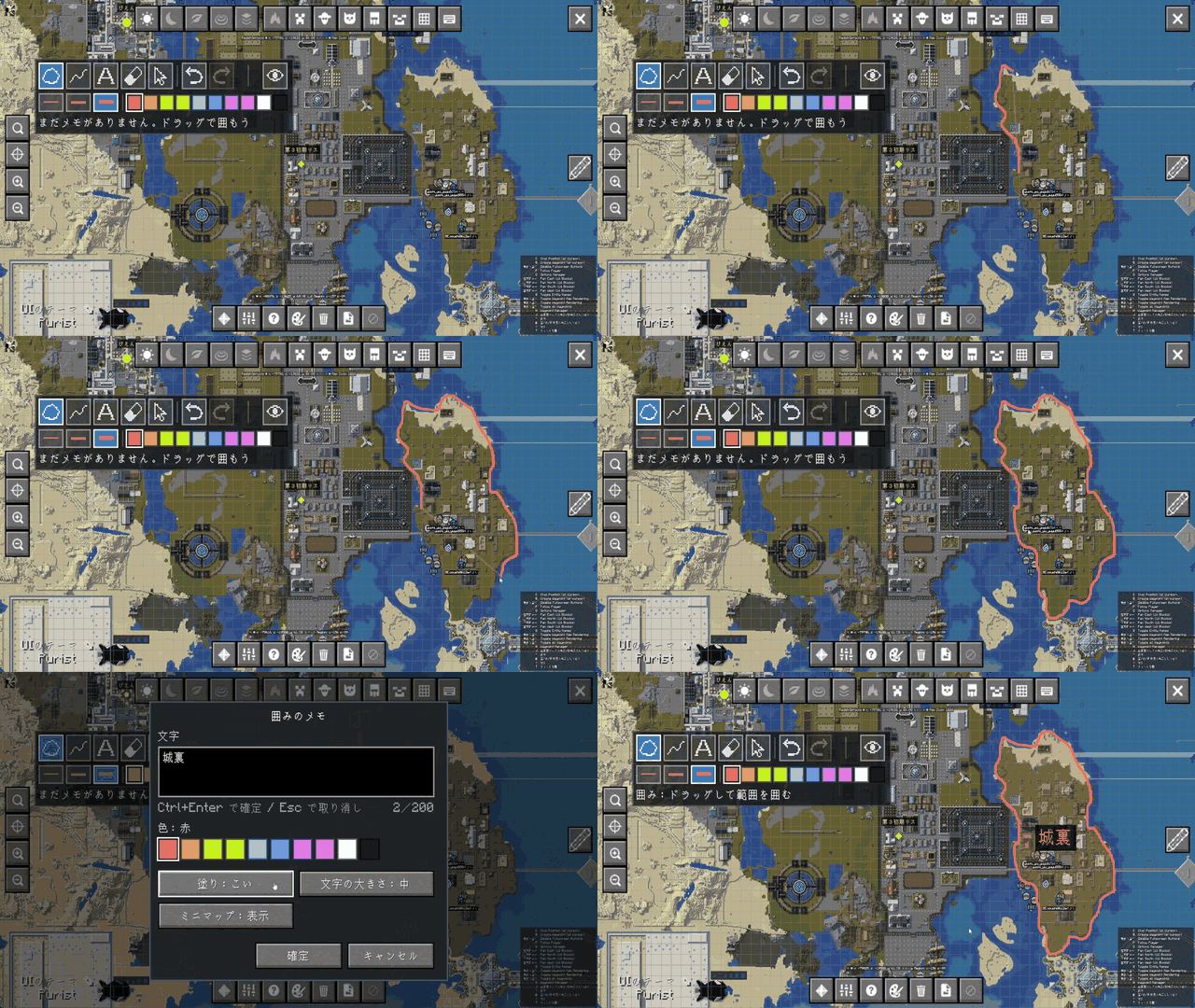
MapScribble lets you draw handwritten notes directly on your map. Outline an area by hand and attach text to it (the main feature), draw freehand lines, or place standalone text markers. Everything is stored on your own client only.
It works with three map mods, and your notes are shared between them: the same notes appear on whichever map you open.
| Map mod | Fullscreen map | Minimap |
|---|---|---|
| JourneyMap | Yes | Yes |
| Xaero’s World Map | Yes | Yes, with Xaero’s Minimap |
| FTB Chunks | Yes | No |
Note types
| Type | How to draw | How it looks on the map |
|---|---|---|
| Outline (main feature) | Drag around an area. The shape closes itself when you release | Hand-drawn outline, translucent fill, text in the center |
| Line | Drag to trace a path (it is not closed) | Hand-drawn line, text near its middle |
| Text | Click a spot | Text only |
- Drawn shapes are stored in sub-block world coordinates, so lines stay smooth and true to your stroke even when you zoom all the way in.
- Each note can be shown or hidden on the minimap individually (shown by default).
Customization
| Option | Choices |
|---|---|
| Color | Red, Orange, Yellow, Lime, Light Blue, Blue, Purple, Pink, White, Black |
| Line width | Thin, Medium, Thick |
| Fill opacity (outlines) | None, Light, Medium, Strong |
| Text size | Small, Medium, Large |
The last color, width and text size you picked are remembered for next time.
How to use
- Open the fullscreen map of JourneyMap, Xaero’s World Map or FTB Chunks.
- Click the pencil button to enter scribble mode (in the right-hand column on JourneyMap; in the top-right corner on Xaero’s World Map and FTB Chunks). Click it again to go back to normal map controls.
- A toolbar appears while scribble mode is on. You can drag it anywhere on the screen.
Tools
| Tool | Key | Action |
|---|---|---|
| Outline | 1 | Drag around an area; the note editor opens when you release |
| Line | 2 | Drag to draw a line |
| Text | 3 | Click to place text |
| Eraser | 4 | Click a note to delete it |
| Edit | 5 | Click a note to change its text, color or style (you can also delete it there) |
Outlines that are too small and lines that are too short are discarded instead of becoming notes.
Note editor
- Multi-line text, up to 200 characters. Enter inserts a line break.
- Pick the color, the fill opacity (outlines only), the text size, and whether the note shows on the minimap.
- Ctrl+Enter or the Save button saves. Esc or Cancel discards (for a new note, the shape is discarded too).
- A text note needs some text; outlines and lines can be saved without any.
Other toolbar buttons
- Undo: Ctrl+Z. Redo: Ctrl+Y or Ctrl+Shift+Z. Up to 100 steps; the history is cleared when you change dimension or server.
- The eye button shows and hides all your notes. You can keep drawing while they are hidden (drawing brings them back).
- The text button hides just the text labels, keeping the outlines and lines visible.
Keys
Tool keys 1 to 5 can be changed in Options → Controls, category MapScribble. The key that toggles scribble mode is in the same place and is unassigned by default — assign one if you want to use it instead of the pencil button.
Where notes are stored
Notes are kept in your game folder, one file per dimension:
<.minecraft>/mapscribble/saves/<world name>/<dimension>.json single player
<.minecraft>/mapscribble/servers/<host_port>/<dimension>.json multiplayer
- Single player worlds are separated by world, and multiplayer by the server address you connected to.
- Notes are yours alone. Nothing is sent to the server and no other player can see them.
- Changes are written about a second after you stop editing, off the main thread.
- A file in a format MapScribble does not understand is neither loaded nor overwritten.
- Notes from version 0.1.0, which were stored under JourneyMap’s
addon-data/mapscribble/folder, are migrated automatically the first time you load the world.
Requirements
One jar per Minecraft version and loader (21 builds):
| Minecraft | Fabric | Forge | NeoForge | Java |
|---|---|---|---|---|
| 1.20.1 | Yes | Yes | – | 17 |
| 1.20.6 | Yes | Yes | Yes | 21 |
| 1.21.1 | Yes | – | Yes | 21 |
| 1.21.4 | Yes | – | Yes | 21 |
| 1.21.11 | Yes | Yes | Yes | 21 |
| 26.1.2 | Yes | Yes | Yes | 25 |
| 26.2 | Yes | Yes | Yes | 25 |
| 26.3 | Yes | Yes | Yes | 25 |
- Fabric builds need Fabric Loader 0.15.0 or later and Fabric API.
- At least one map mod: JourneyMap, Xaero’s World Map (with Xaero’s Minimap for minimap display), or FTB Chunks.
- Client side only. Do not install it on a dedicated server. It works when connecting to vanilla, Fabric, Forge, Paper or Velocity servers.
- JourneyMap’s API classes are not bundled in the jar.
Languages
English, Japanese, German, Spanish, French, Korean, Portuguese (Brazil), Russian, Simplified Chinese and Traditional Chinese.
Known limitations
- FTB Chunks’ minimap is not supported (its fullscreen map is).
- Notes are not shown on JourneyMap’s Webmap.
- JourneyMap 6.0.10 sometimes registers add-on buttons twice; MapScribble keeps only one button of its own.
Source code and license
- Source code: https://github.com/radishsprouts/MapScribble
- Bug reports: https://github.com/radishsprouts/MapScribble/issues
- License: MIT. MapScribble is not an official JourneyMap, Xaero’s or FTB mod.
日本語
概要
地図の全画面マップに、手書きでメモを描けるクライアント専用の MOD です。主な機能は、地図の区画を手書きで囲んで文字を付けることで、ほかに線を引く・文字だけを置くこともできます。メモは自分のクライアントにだけ保存されます。
対応する地図 MOD は3つで、メモは共通です。どの地図を開いても同じメモが出ます。
| 地図 MOD | 全画面マップ | ミニマップ |
|---|---|---|
| JourneyMap | ○ | ○ |
| Xaero’s World Map | ○ | ○(Xaero’s Minimap が必要) |
| FTB Chunks | ○ | ✕ |
メモの種類
| 種類 | 描き方 | 地図での見え方 |
|---|---|---|
| 囲み(主機能) | 地図をドラッグして区画をなぞる。指を離すと始点と終点がつながって閉じる | 手書きの輪郭線、半透明の塗り、中央に文字 |
| 線 | ドラッグした跡をそのまま残す(閉じない) | 手書きの線。文字は線の中ほどに出る |
| 文字 | 地図をクリックした場所に文字だけを置く | 文字だけ |
- なぞった形は小数のワールド座標で保存するので、地図を拡大しても、なぞったとおりの滑らかな形で表示されます。
- ミニマップに出すかどうかは、メモごとに選べます(既定は表示)。
選べるもの
| 項目 | 選択肢 |
|---|---|
| 色 | 赤・橙・黄・黄緑・水色・青・紫・桃・白・黒(10色) |
| 線の太さ | 細・中・太 |
| 塗りの濃さ(囲み) | なし・うすい・ふつう・こい |
| 文字の大きさ | 小・中・大 |
最後に選んだ色・太さ・文字の大きさは、次回も覚えています。
使い方
- JourneyMap・Xaero’s World Map・FTB Chunks のいずれかの全画面マップを開きます。
- 鉛筆のボタンを押して手書きモードに入ります(JourneyMap は画面右の列、Xaero’s World Map と FTB Chunks は画面右上)。もう一度押すと、通常の操作(ドラッグで地図を動かす)に戻ります。
- 手書きモードの間だけツールの帯が出ます。帯はドラッグして画面内の好きな位置へ動かせます。
道具
| 道具 | キー | 操作 |
|---|---|---|
| 囲み | 1 | ドラッグして範囲を囲み、離すと文字入力の画面が開く |
| 線 | 2 | ドラッグした跡を線として残す |
| 文字 | 3 | クリックした場所に文字を置く |
| 消しゴム | 4 | クリックしたメモを消す |
| 編集 | 5 | クリックしたメモの文字・色などを直す(削除もここから) |
囲みが小さすぎる場合・線が短すぎる場合は、メモを作らずに取り消します。
文字入力の画面
- 文字は複数行で、200文字までです。Enter は改行です。
- 色、塗りの濃さ(囲みだけ)、文字の大きさ、ミニマップに出すかどうかを選べます。
- Ctrl+Enter か「確定」で保存し、Esc か「キャンセル」で取り消します(新しいメモなら、描いた形ごと取り消されます)。
- 文字のメモは文字が空のままでは確定できません。囲みと線は文字なしで確定できます。
帯のその他のボタン
- 元に戻す: Ctrl+Z、やり直す: Ctrl+Y または Ctrl+Shift+Z。履歴は100件までで、ディメンションや接続先が切り替わると破棄されます。
- 目のボタンで、自分のメモを地図に出す・隠すを切り替えます。隠している間も描けます(描くと表示に戻ります)。
- 文字のボタンで、文字だけを隠せます(囲みと線はそのまま表示されます)。
キー
道具のキー(1〜5)は「設定 → 操作設定」の分類「MapScribble」で変更できます。手書きモードの切替キーも同じ場所にありますが、既定では未割り当てです。鉛筆のボタンの代わりに使いたい場合は、キーを割り当ててください。
メモの保存先
ゲームのフォルダの中に、ディメンションごとのファイルで保存します。
<.minecraft>/mapscribble/saves/<ワールド名>/<ディメンション>.json シングルプレイ
<.minecraft>/mapscribble/servers/<ホスト_ポート>/<ディメンション>.json マルチプレイ
- シングルプレイはワールドごと、マルチプレイは接続先のアドレスごとに分かれます。
- メモは自分だけのものです。サーバーには何も送らず、ほかのプレイヤーにも見えません。
- 変更から約1秒後に、ゲームの処理を止めない場所でまとめて書き出します。
- MapScribble が知らない形式のファイルは、読み込まず、上書きもしません。
- 0.1.0 で JourneyMap のフォルダ(
addon-data/mapscribble/)に保存されていたメモは、初回の読み込み時に自動で移行します。
対応環境
Minecraft の版とローダーの組み合わせごとに jar が別です(全21構成)。
| Minecraft | Fabric | Forge | NeoForge | Java |
|---|---|---|---|---|
| 1.20.1 | ○ | ○ | – | 17 |
| 1.20.6 | ○ | ○ | ○ | 21 |
| 1.21.1 | ○ | – | ○ | 21 |
| 1.21.4 | ○ | – | ○ | 21 |
| 1.21.11 | ○ | ○ | ○ | 21 |
| 26.1.2 | ○ | ○ | ○ | 25 |
| 26.2 | ○ | ○ | ○ | 25 |
| 26.3 | ○ | ○ | ○ | 25 |
- Fabric 版は Fabric Loader 0.15.0 以上と Fabric API が必要です。
- 地図 MOD のいずれかが必要です(JourneyMap / Xaero’s World Map(ミニマップ表示には Xaero’s Minimap)/ FTB Chunks)。
- クライアントだけに入れる MOD です。サーバー側の導入は要りません(Velocity 配下のサーバーでも同じです)。
- JourneyMap の API は jar に同梱していません。
対応言語
日本語・英語・ドイツ語・スペイン語・フランス語・韓国語・ポルトガル語(ブラジル)・ロシア語・中国語(簡体・繁体)の10言語。
既知の制限
- FTB Chunks のミニマップには表示されません(全画面マップには表示されます)。
- JourneyMap の Webmap(ブラウザで見る地図)には表示されません。
- JourneyMap 6.0.10 がアドオンのボタンを二重に登録することがあり、MapScribble は自分のボタンだけを1つにしています。
ソースコードとライセンス
- ソースコード: https://github.com/radishsprouts/MapScribble
- 不具合の報告: https://github.com/radishsprouts/MapScribble/issues
- ライセンス: MIT。MapScribble は JourneyMap・Xaero’s・FTB の公式 MOD ではありません。
常见问题
MapScribble 支持哪些 Minecraft 版本?
MapScribble 支持 Minecraft Java 版 1.20.1–26.3,共 8 个版本,可用的加载器:Fabric / Forge / NeoForge。下载时注意选择和你游戏版本一致的文件。
MapScribble 怎么安装?
先用 PCL2 或 HMCL 启动器安装对应版本的 Fabric / Forge / NeoForge,再把下载的 .jar 文件放进游戏目录的 mods 文件夹,重新启动游戏即可。开启了版本隔离的,mods 文件夹在 versions/版本名 下面。
评论
登录后评论和评分