
截图
介绍
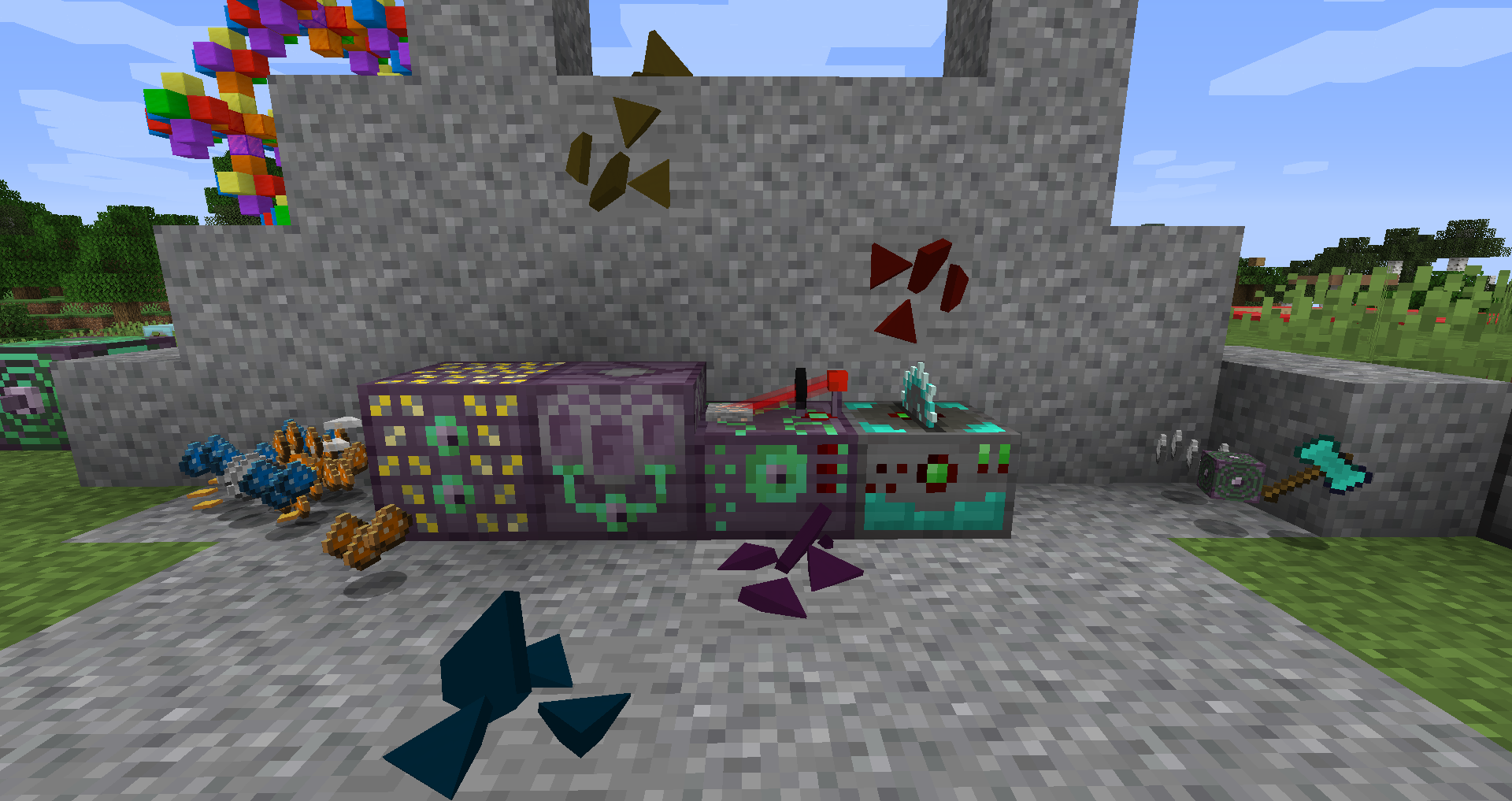
This mod adds a new processing tech tree, where you have to grow crystals to increase yields.
Crystals come in various sizes and tiers, where each tier gives greater yields but needs more and more complex processing and way more material to kick-start the process.
Mine ore -> Crush it -> Dissolve dust -> Grow crystals -> cut crystals into ingots
This mod supports 10 vanilla materials and more can be added via config, each with its unique properties.
It also contains 8 crystal types which are used to create the machines needed for the processing and are used as catalysts for other material growing.
Everything can be adjusted in config.
Default values
Tier 0 yield: up to 2.167x
Tier 1: up to 2.999x
Tier 2: up to 4.151x
Tier 3: up to 5.745x
…
Tier 15: up to 283.727x
Made to support any material (or any fluid as a solvent):
Registering a material in one world only:
1. Open your world folder
2. Create a datapack (https://minecraft.gamepedia.com/Data_pack) inside the datapacks folder
3. It doesn’t matter what namespace you use. When in doubt, use “minecraft”.
4. Inside the namespace folder, create a folder named “qrystal_materials” (or “qrystal_solvents” for registering a solvent).
5. Here put all your material (or solvent) jsons.
Registering a material from your mod:
1. In your mod’s resources/data/your_namespace create a folder named “qrystal_materials” (or “qrystal_solvents” for registering a solvent).
2. Here you put all your material (or solvent) jsons.
Registering a material in a modpack:
1. You’ll need DRP – Global Datapack (https://www.curseforge.com/minecraft/mc-mods/drp-global-datapack)
2. Create a datapack (https://minecraft.gamepedia.com/Data_pack) inside the global_data_packs folder
3. It doesn’t matter what namespace you use. When in doubt, use “minecraft”.
4. Inside the namespace folder, create a folder named “qrystal_materials” (or “qrystal_solvents” for registering a solvent).
5. Here put all your material (or solvent) jsons.
Material json format:
every value that isn't set will default to these:

{
  "name": "", - UNIQUE material name
  "locale": "", - material localisation string
  "seed": "qlear", - seed used to grow higher tiers (only qeri, qawa, qini, qitae, qondo, qoid, qalb; qlear = no higher tiers)
  "color_primary": "FF00FF", - primary color in hex
  "color_secondary": "000000", - secondary color in hex
  "replace_data": false, - Replace temp, locale, seed and colors? (empty entries will not replace existing ones)
"priority_data": 0, - If replace = true, the version with higher priority is kept
"replace_IO": false, - Replace dissolvable and outputs?
  "priority_IO": 0 - If replace = true, the version with higher priority is kept
 "outputs": [ - crystals can be cut into these items
 {
 "item": "", - the Item's ID
 "value": 36 - the Item's value (36 = ingot, 324 = block...)
 }
 ],
"dissolvable": [ - these items can be dissolved
 {
 "item": "", - the Item's ID
 "value": 0 - the Item's value (36 = ingot, 324 = block...)
 }
 ]
}
Solvent json format:
every value that isn’t set will default to these:
{
“fluid”: “”, – fluid ID
“tier”: -1, – solvent tier (0-15)
“priority”: 0 – fluids with more assigned tiers keep the tier with higher priority
}
Report Issues on my GitHub or my Discord
Github: https://github.com/Villfuk02/Qrystal
If you have any questions, ask on my Discord
Discord: https://discord.gg/URZWKRn
Feel free to rework, update or build onto this mod, but make sure to give credit! If you want any help, message me on discord!
常见问题
Qrystal 支持哪些 Minecraft 版本?
Qrystal 支持 Minecraft Java 版 1.15.2,可用的加载器:Fabric / Forge。下载时注意选择和你游戏版本一致的文件。
Qrystal 怎么安装?
先用 PCL2 或 HMCL 启动器安装对应版本的 Fabric / Forge,再把下载的 .jar 文件放进游戏目录的 mods 文件夹,重新启动游戏即可。开启了版本隔离的,mods 文件夹在 versions/版本名 下面。
评论
登录后评论和评分