Slot Highlight for CI Embossed Legacy
Custom slot highlight for Cobblemon Interface Embossed Legacy (Or any other RP).
截图
介绍
Slot Highlight for CI Embossed Legacy
The ultimate interface polish for your Cobblemon adventure.
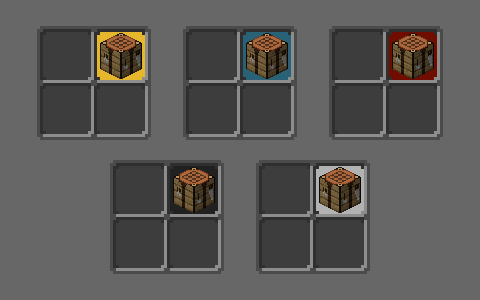
Slot Highlight for CI Embossed Legacy is a 100% client-side mod specifically designed to complement the aesthetics of Cobblemon Interface Embossed Legacy (CIEL). This mod replaces the standard gray inventory selection box with a highlight tailored to the “cut-corner” style of the CIEL resource pack interfaces, customized with various color options.
🚀 Key Features:
- Real-time Customization: Change the highlight color (Amber Yellow, Deep Blue, Crimson Red, Obsidian Black, or Default) instantly from the config menu—no game restart or texture reload required.
- Solution for Version 1.21.1: In this Minecraft version, slot highlights are hardcoded and cannot be modified through conventional resource packs. This mod bypasses that limitation to allow for a fully cohesive UI.
- Full Optimization: The change is achieved by efficiently replacing the game’s original rendering. It is designed to be lightweight, ensuring no impact on performance (FPS) or extra GPU load.
🎨 How to Configure:
If you have Mod Menu installed, simply find the mod in your list and click the Configuration button.
- 🟡 Amber Yellow: Sets a radiant yellow highlight for your slots.
- 🔵 Deep Blue: Sets a cool blue highlight for your slots.
- 🔴 Crimson Red: Sets a vibrant red highlight for your slots.
- ⚫ Obsidian Black: Sets a deep black highlight for your slots.
- ⚪ Default (Gray): The classic look for Cobblemon Interface Embossed Legacy.
🛠️ Dependencies:
To ensure it works correctly, make sure you have:
- Fabric API (Required)
- Mod Menu (Optional, but recommended for easy color switching)
🤝 Support:
Do you like my work? Support me on Buy Me a Coffee
常见问题
Slot Highlight for CI Embossed Legacy 支持哪些 Minecraft 版本?
Slot Highlight for CI Embossed Legacy 支持 Minecraft Java 版 1.21.1,可用的加载器:Fabric。下载时注意选择和你游戏版本一致的文件。
Slot Highlight for CI Embossed Legacy 怎么安装?
先用 PCL2 或 HMCL 启动器安装对应版本的 Fabric,再把下载的 .jar 文件放进游戏目录的 mods 文件夹,重新启动游戏即可。开启了版本隔离的,mods 文件夹在 versions/版本名 下面。
RoyXPlay 的其他作品
查看全部 →
COBBLEVERSE: Traducción al Español
Cobbleverse 整合包的西班牙语翻译。包含 Cobblemon、RCT、Mega Showdown 和装饰内容的文本,以及训练师名称修正。

Cobblemon Interface Embossed Legacy
基于Cobblemon界面/UI的浮雕风格Legacy界面 | CIEL
Cobblemon Interface Embossed Legacy: Modded
CI Embossed Legacy GUI的模组支持 / CI Embossed Legacy GUI的模组兼容 | CIEL Modded
评论
登录后评论和评分