
FFItemRarityModifiers
Adds rarities and modifiers to items. Random chances on crafting, looting, trading, fishing, etc. Highly configurable.
截图
介绍
FFItemRarityModifiers
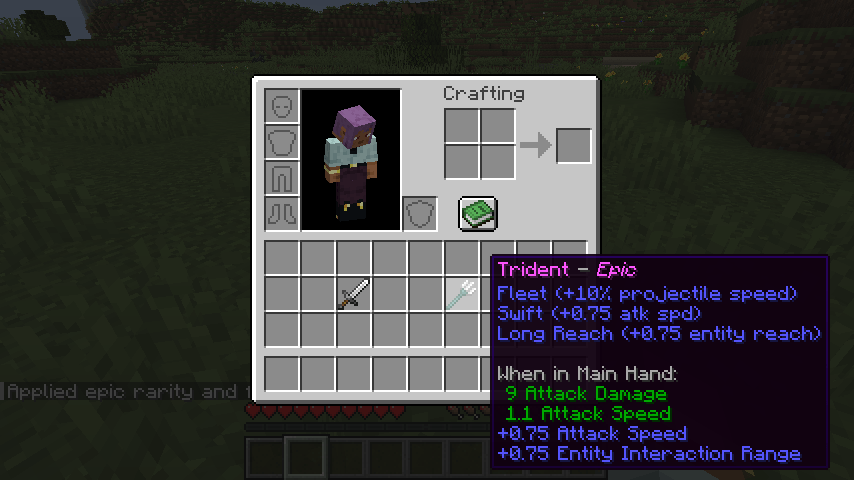
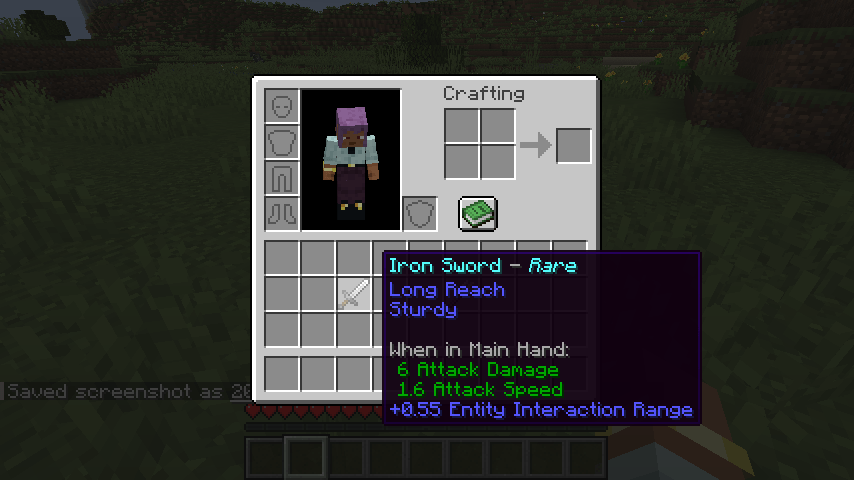
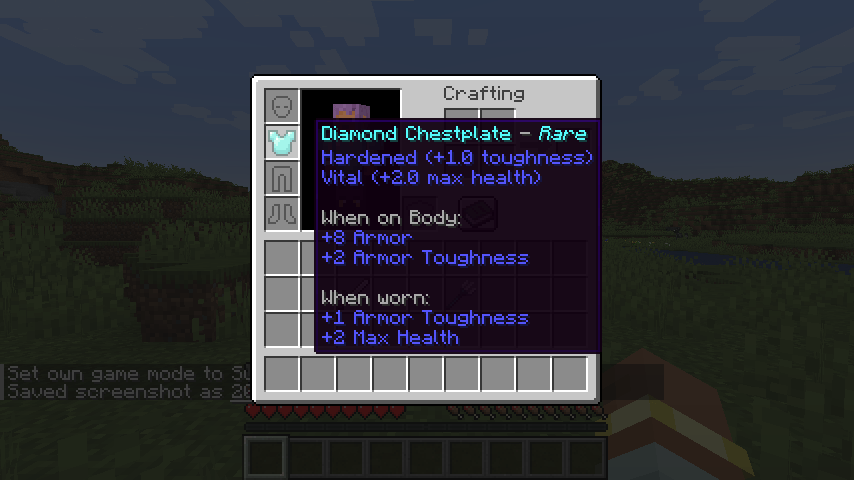
Sometimes the sword you just crafted turns out a little special. FFItemRarityModifiers gives gear a rarity, from Common all the way up to Epic, along with small bonuses. By default there’s a small chance it occurs from crafting, but higher from looting or trading.

How it works
- Every weapon, armor piece and tool gets a rarity when you craft, fish, trade for, loot or pick it up from mobs. Most come out Common, but every so often you’ll land an Uncommon, Rare or Epic one.
- Each item can roll a few small modifiers, like extra damage, faster attacks, stronger arrows, more durability or longer reach. Common items get none; rarer items get more (and stronger) ones. No rarity gets drawbacks by default, though datapacks can add them.
- A datapack-added drawback never appears alongside its matching bonus on the same item.
- Tooltips show the rarity after the item name (“Iron Sword – Rare”) and the modifiers below it. Hold Shift for the exact numbers.
- Villager trades show the rolled item before you buy it. Higher rarities cost more.
- Bows, crossbows, fishing rods, shields, elytra and more count too, and each only rolls modifiers that suit it.
Configuration
You can adjust:
- Server config: whether trades, mob drops and loot tables roll rarities, and debug logging
- Client config: when the rarity and modifier lines show, the tooltip layout for the normal and Shift tooltips, and the good and bad modifier colors
Chances, rarity weights and the modifiers themselves are set with datapacks (see below). Operators can also use /ffitemraritymodifiers apply to give a held item a specific rarity.
Mod compatibility
- Accessory mods: their equippable items can opt in through a tag, with no hard dependency.
Version differences
FFItemRarityModifiers works the same on every supported version and loader.
For datapack makers
Datapacks control nearly everything: how often each source rolls a rarity, how likely each rarity is, what each modifier does, which items can roll, and special rules for specific mobs or loot chests. Click the Wiki link in the sidebar and open the Datapacks page for details.
For mod developers
Other mods can roll rarities for their own rewards with a single call. Click the Wiki link in the sidebar for the API guide and examples.
What’s with the FF prefix?
It stands for Fyxe’s Features! It’s a clean way to easily find all of my mods when changing configs or creating packs. Mods that are a part of the “FF” system are usually smaller and unintrusive.
Feedback
If you have any ideas for improvements, questions, or concerns, I am open to communicating through email: [email protected]
常见问题
FFItemRarityModifiers 支持哪些 Minecraft 版本?
FFItemRarityModifiers 支持 Minecraft Java 版 1.20.6–26.3,共 8 个版本,可用的加载器:Fabric / NeoForge。下载时注意选择和你游戏版本一致的文件。
FFItemRarityModifiers 怎么安装?
先用 PCL2 或 HMCL 启动器安装对应版本的 Fabric / NeoForge,再把下载的 .jar 文件放进游戏目录的 mods 文件夹,重新启动游戏即可。开启了版本隔离的,mods 文件夹在 versions/版本名 下面。
Fyxe 的其他作品
查看全部 →
Fyxe’s PBR Addons
A PBR Extension for various mod blocks and items that includes Normal and Specular maps for LabPBR shaders.

FFNutrition
A lightweight and configurable food nutrition system that works differently from "Spice of" mods and effects max health. A Fyxe's Features mod.

FFFoodSpoilageAndPreservation
A spoilage mod with ways to preserve food. Has support for Cold Sweat, Appleskin, and EMI. Food loses hunger and saturation as it decays. Insanely configurable.

Fyxe’s Scary+
A spooky scary nightmare. Intended for those looking for a hardcore or horror experience.
评论
登录后评论和评分