
MTS/IV I18N
Runtime internationalization (i18n) injector for Immersive Vehicles (MTS/IV) content packs.
截图
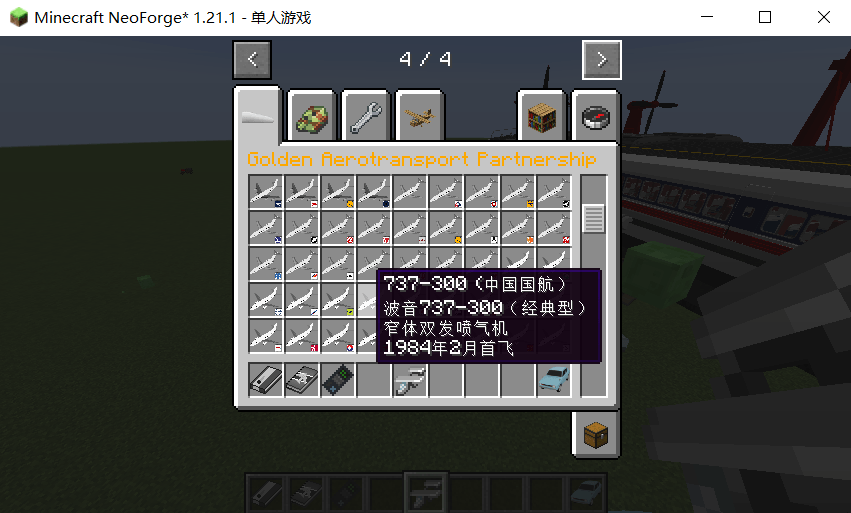
介绍
MTS/IV I18N — Runtime i18n for Immersive Vehicles
MTS/IV I18N is a runtime internationalization injector for Immersive Vehicles (MTS/IV) and its addon content packs. It translates item names, descriptions, and GUI text into the player’s selected game language at runtime via Java reflection — no resource packs needed.
Ships with complete Chinese translations: ~16200 entries across 25+ content packs, 100% complete.
Why Not a Resource Pack?
MTS does not load item names and descriptions from standard Minecraft language files. It uses its own LanguageSystem which stores text in a custom in-memory data structure. Resource packs cannot override MTS text. The only way to localize MTS is at the Java level — by accessing the LanguageSystem via reflection and injecting translated values at runtime.
Features
– Full Chinese translation built-in — 25+ content packs, ~16200 entries
– Multi-language pack system — drop in language packs for any locale
– Runtime injection — modifies MTS LanguageSystem in memory, no pack reloading
– Auto-extraction — scans content pack JARs on first launch, generates templates
– Exact description matching — full sentence-level translations for tooltips
– Late-join injection — translates descriptions even when joining mid-session
Installation
1. Install NeoForge 21.1.232+ for Minecraft 1.21.1
2. Install Immersive Vehicles (MTS) V24+
3. Place mts_i18n-1.0.0.jar in your mods/ folder
4. Launch the game — translations apply automatically based on game language
How to Create Your Own Language Pack
The mod generates template JSON files from all installed MTS content packs on first launch. You can translate these into any language.
Step-by-step:
1. Launch the game once. The mod scans your mods/ folder for MTS content pack JARs and generates template files under mts_i18n/translations/ (one JSON file per content pack).
2. Open the generated JSON files. Each file contains keys in this format:
“`json
{
“[craftspeed] [name]Engine Block”: “”,
“[craftspeed] [desc]A high-performance engine block”: “”
}
“`
The key format is: [systemName] [type]originalEnglishText
– [systemName] is the internal system name (auto-generated, do not change)
– [type] is either [name] or [desc]
– originalEnglishText is the English text from the content pack
3. Fill in the empty values with your translations:
“`json
{
“[craftspeed] [name]Engine Block”: “Motorblock”,
“[craftspeed] [desc]A high-performance engine block”: “Ein leistungsstarker Motorblock”
}
“`
4. Package into a ZIP archive. Collect all translated JSON files into a ZIP.
5. Name the ZIP with your language code and place it in mts_i18n/ directory:
– de_de.zip for German
– ja_jp.zip for Japanese
– fr_fr.zip for French
– es_es.zip for Spanish
– etc.
The language code follows Minecraft’s locale format (ll_cc where ll is language and cc is country/region).
6. Restart the game. The mod auto-detects your game language from Minecraft’s language settings and loads the matching translation pack.
File Structure
“`
[game_dir]/mts_i18n/
├── zh_cn.zip → Chinese pack (auto-loaded when game is set to 中文)
├── de_de.zip → German pack (auto-loaded when game is Deutsch)
├── ja_jp.zip → Japanese pack (auto-loaded when game is 日本語)
├── translations/ → Auto-generated template files
│ ├── craftspeed.json
│ ├── gvp.json
│ ├── mtsofficialpack.json
│ └── … (25+ files)
“`
Notes:
– Multiple language packs can coexist in the mts_i18n/ folder
– Only the pack matching your game language is loaded into the active dictionary
– Other packs are still scanned and their keys recorded as “covered” to prevent duplicate template generation
– Generic ZIP files (not matching xx_xx.zip pattern) are loaded regardless of language (backward compatibility)
How It Works
1. At client startup, the mod scans /mods for MTS content pack JARs
2. Extracts English item names and descriptions from jsondefs/ and language/en_us.json
3. Generates translation template files in mts_i18n/translations/
4. Loads translations from those files and any matching language pack (.zip)
5. Detects the game’s current language from Minecraft.options.languageCode
6. Injects translations into MTS’s LanguageSystem — each entry gets localized text as values[lang_code]
7. Also injects item descriptions when joining a world (late pass for AItemPack)
Built-in Translations
The mod ships with complete Chinese translations:
| Pack | Entries |
|——|———|
| MTS Official Pack | 882 |
| Craftspeed (Racing) | 7625 |
| Craftspeed Wheels | 1844 |
| Craftspeed Parts | 335 |
| GT CRAFT | 397 |
| GT Craft Rims | 372 |
| GT Craft Interior | 375 |
| GT Craft Exterior / Bodykit / Parts | 525 |
| Kaminari Motor Work (KMW) | 1944 |
| Immersive Flight Simulator | 308 |
| IV Airliner Pack | 332 |
| S.L.O.P. Vehicle Pack | 252 |
| MTS Core Handbook | 131 |
| PGTH | 15 |
| Total (25+ files) | ~16200 |
License
MIT License — free to use, modify, and distribute.
常见问题
MTS/IV I18N 支持哪些 Minecraft 版本?
MTS/IV I18N 支持 Minecraft Java 版 1.20.1–26.1.2,共 5 个版本,可用的加载器:NeoForge。下载时注意选择和你游戏版本一致的文件。
MTS/IV I18N 怎么安装?
先用 PCL2 或 HMCL 启动器安装对应版本的 NeoForge,再把下载的 .jar 文件放进游戏目录的 mods 文件夹,重新启动游戏即可。开启了版本隔离的,mods 文件夹在 versions/版本名 下面。
pihoue 的其他作品
查看全部 →
Create: Sentry Mechanical Arm_非官方移植
允许制作机械臂来使用 TaCZ 枪械,并兼容 aeronautics

DebugBridge
A Forge client mod for Minecraft (1.20.1 and 1.21.1 development snapshots) that exposes game state over a local WebSocket server, plus a Vue web UI for visual inspection. Built for AI-assisted Minecraft development and debugging.
评论
登录后评论和评分