Easy Set Home
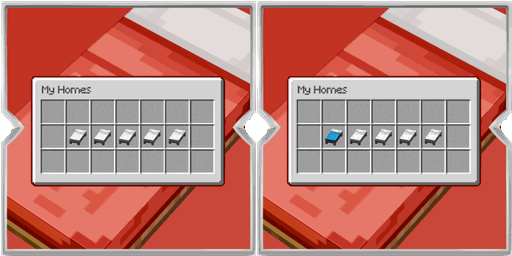
A simple homes mod with a chest style menu. Save your favorite spots, open the menu with a key, then click a bed to set a home, teleport, or remove it.
介绍
Set Homes gives you an easy way to save places you visit often and return to them whenever you want. Instead of typing long commands, you open a clean chest style menu and use the bed slots inside it.

Press the Set Homes key to open the menu. By default this is H, and you can change it in the Controls menu under Set Homes.
Empty bed slots are ready to save a new home. Left click an empty bed to save your current location to that slot. Once a slot has a home, left click it to teleport there. Right click an occupied bed if you want to remove that home, and you will get a short confirmation before it is deleted.
When you hover over a bed slot, a small tip shows what left click and right click will do. Occupied homes can also show their saved coordinates so you always know where each one leads.
Teleporting is meant to feel fair in survival. After you choose a home, there is a short warm up before you arrive. If you take damage during that time, the teleport is cancelled. Removing the home you are trying to reach will also cancel it.
Set Homes is built for players who want fast travel between bases, farms, shops, and other favorite spots without cluttering the screen or learning a long command list. Open the menu, click a bed, and go.
常见问题
Easy Set Home 支持哪些 Minecraft 版本?
Easy Set Home 支持 Minecraft Java 版 1.20.1–26.3,共 4 个版本,可用的加载器:Fabric / Forge / NeoForge。下载时注意选择和你游戏版本一致的文件。
Easy Set Home 怎么安装?
先用 PCL2 或 HMCL 启动器安装对应版本的 Fabric / Forge / NeoForge,再把下载的 .jar 文件放进游戏目录的 mods 文件夹,重新启动游戏即可。开启了版本隔离的,mods 文件夹在 versions/版本名 下面。
Zerw 的其他作品
查看全部 →
No Totem Pop Animation & Particles
图腾触发时保持屏幕清爽。适合PvP、硬核模式和追求干净画面的创作者。

No Rain & Particles
此资源包会移除雨天画面效果,并彻底静音雨声。
Better Nether Portals
可以任意形状或方向建造下界传送门;无需封闭黑曜石框架,用打火石点燃后即可穿过。

The Sift: Backport
The Sift 是即将在后续版本中推出的新维度;此模组将其移植到了旧版本。
评论
登录后评论和评分