
介绍
Keymap Rewrite
Visual key remapping mod for Minecraft


Heads up!
Currently not working w/ Quilt loader 0.18.x betas (0.17.x is still ok), I’m trying to find a proper solution, but in the meantime workaround mentioned Here should do. EDIT: all good
Overview
Latest news
0.7.0
- Custom Config screen, lesser dependencies, much happy!
- Added credits screen for contributors 😀
- Added Japanese key layout, thanks BlueSheep2804!
- Added ZH_CN Language, thanks DarkCrystalll!
Important stuff
- Press the
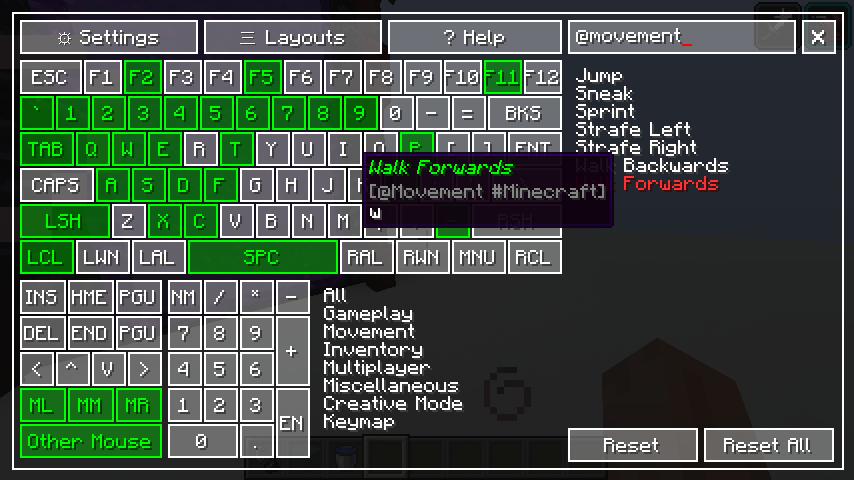
Grave Accent/Backtick`()“, or the key under the Escape key to show the mapper while playing CTRL+F: focus search box- Register all other mouse keys using the
Other Mousebutton by clicking directly on it - You can use
CTRL,SHIFTandALTas keybind modifiers - The modifier system does not block the default use of the modifier keys, that is to say;
- Pressing
CTRL+Qwhile walking, will make you sprint - Pressing
SHIFT+Wwill make you crouch ,but will not make you walk - You can still assign modifier keys by themselves normally
- You cannot bind multiple keymaps to a single combination
Colors
| Color | Legend |
|——————-:|——————-|
| white | Not Assigned |
| green | Assigned |
| yellow | Selected |
| red | Conflict |
| small yellow box | Modifier assigned |
Queries
| Format | Effect |
|—————-:|——————|
| (sample text) | Category |
| @sample_text | Category (slug) |
| {sample text} | Mod name |
| #sample_text | Mod name (slug) |
| [sample text] | Bound key |
| $sample_text | Bound key (slug) |
Screenshots

Support

常见问题
Keymap 支持哪些 Minecraft 版本?
Keymap 支持 Minecraft Java 版 1.17.1–1.19.2,共 3 个版本,可用的加载器:Fabric / Forge / Quilt。下载时注意选择和你游戏版本一致的文件。
Keymap 怎么安装?
先用 PCL2 或 HMCL 启动器安装对应版本的 Fabric / Forge / Quilt,再把下载的 .jar 文件放进游戏目录的 mods 文件夹,重新启动游戏即可。开启了版本隔离的,mods 文件夹在 versions/版本名 下面。运行环境:仅客户端。
评论
登录后评论和评分