Factions ReForged
Claim chunks, declare allies and enemies, and hold territory you can see the edge of. A modern rebuild of the faction mechanic that defined a generation of servers chunk claims, war and alliance, a faction bank, faction chat, and particle borders.
截图
介绍
Factions ReForged — land, allegiance, and the people you hold it with
Claim chunks, declare allies and enemies, and hold territory you can see the edge of. A modern
rebuild of the faction mechanic that defined a generation of servers — chunk claims, war and
alliance, a faction bank, faction chat, and borders drawn in particles that follow the ground.
Your players do not need to install anything. The particle borders, the action-bar territory
names, the chat channels and the claims map are all server-side: they work on a stock client off
the Mojang launcher, with no mod and no resource pack.
The map is a real map
A vanilla map’s scale sets how many blocks each pixel covers. At maximum zoom-out that is sixteen
blocks — exactly one chunk per pixel. A fully zoomed-out vanilla map is already a 128×128 chunk
grid aligned to chunk boundaries, which is precisely what a claims map wants and is not something
anybody designed on purpose.
So /f map item hands you an ordinary filled map that we painted: green yours, blue allied, red
hostile, white everyone else, black wilderness. Colour is relation, not identity — identity needs
a legend and a good memory, relation is the question you are actually asking. The four brightness
levels each map colour has are spent on edges, so a field of flat colour becomes an outlined
territory you can read the shape of.
/f map item <zoom> trades coverage for detail — 64, 32 or 16 chunks across instead of 128 — and
the outline stays one pixel wide at every level. /f map on its own gives the classic chat grid,
for when you have no hands free.
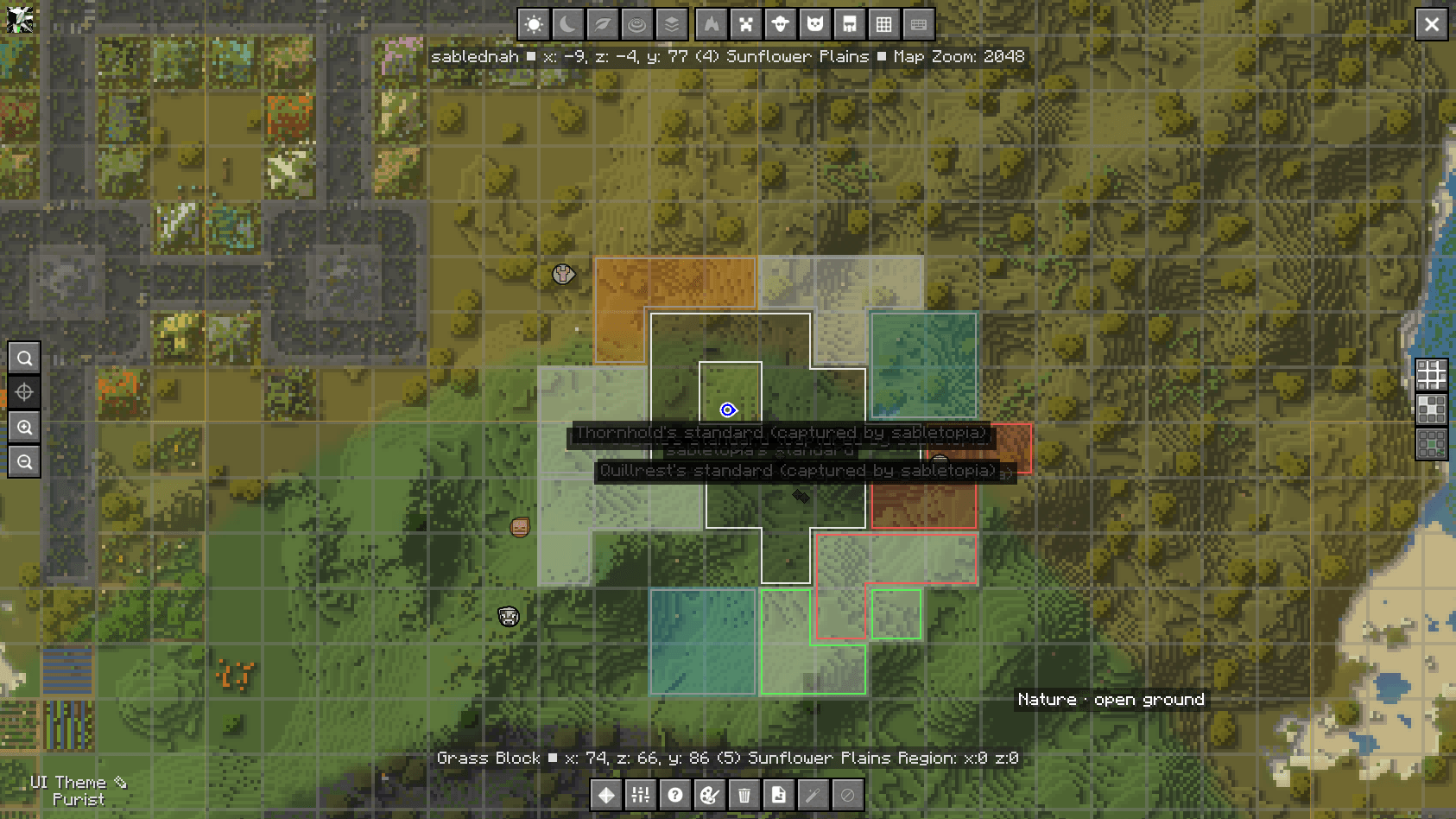
And on JourneyMap, if you brought one. Every faction’s land drawn as a filled region in its own
banner colour, bordered by your relation to the owner — white yours, green allied, red hostile —
with the faction’s land, members and power on hover. Your own and your allies’ standards get pinned.
A toolbar button turns the layer off; another, if you may claim, turns on claim mode, where
left-click takes a chunk and right-click releases it.
Every one of those clicks runs the ordinary command, so nothing on the map can do what a player at a
keyboard could not, and an enemy’s standard is never pinned — you find that by going and looking.
Factions still draws no map of its own and never will; this is somebody else’s map, decorated.
And when a click is refused, the map says why — the server’s own answer, shown over the map for a
few seconds. Without it the reason lands in chat, behind a fullscreen map, and a correct refusal
looks exactly like a broken button.
Or the same claims washed over the real landscape. /f map item terrain draws the rivers,
forest and coastline underneath, so you can see where a border actually falls rather than which
abstract square it is in.
It is deliberately close in — 256 blocks across — and that is not a preference. Claims are known
from the store whether or not the world is loaded, which is exactly why the atlas above can be
complete; terrain is not, and drawing it at one chunk per pixel would mean generating sixteen
thousand chunks and handing you a map of country nobody has walked. So the survey reads only what
is already in memory. Two maps answering two questions: who owns this region, and where exactly is
that line relative to the river.
Borders you can walk
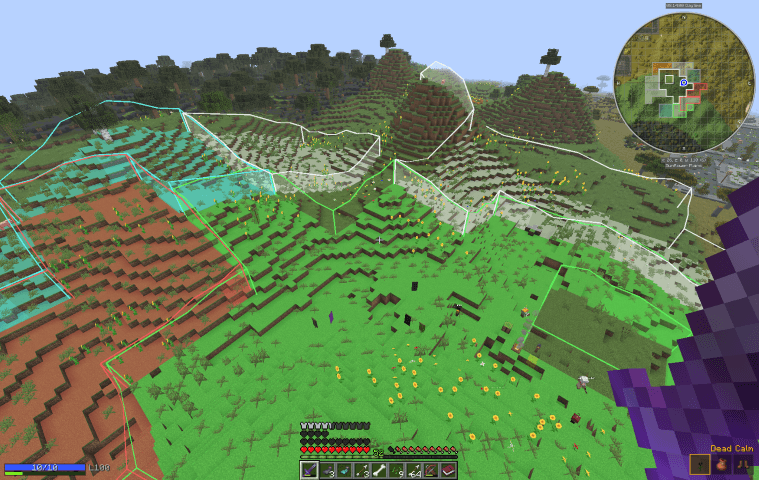
Not a grid. Each side of a chunk is drawn only where ownership actually changes, so interior
lines vanish and what is left is the outline of the territory — the thing you wanted to know.
They are drawn on the line, not in the blocks beside it. Particles sit on the corners of the
block grid — exactly where the boundary is — so there is nothing to work out. Centred inside the
outermost block instead, a border tells you which block is the edge one when the question you
actually have is which side of it you are standing on.
Where two claims meet, the shared line alternates between their two colours and swaps each
pulse, so a border between your land and an ally’s shimmers between the two rather than one colour
winning.
They stand on the ground, not at your feet. Drawn at a flat height a border is buried in the
first hill it crosses and floating over the first valley, and being underground is worst at the
exact moment you are walking over the line. Each column sits on the surface beneath it.
Two ways to see them: /f borders for surveying, or just hold a compass — pick the tool up, see
what you are doing, put it down. The same shape as vanilla’s debug stick, and nobody leaves the
display on and forgets why their screen is full of dust.
Walk across a border and the action bar names whose land you have entered, once, on the way in.
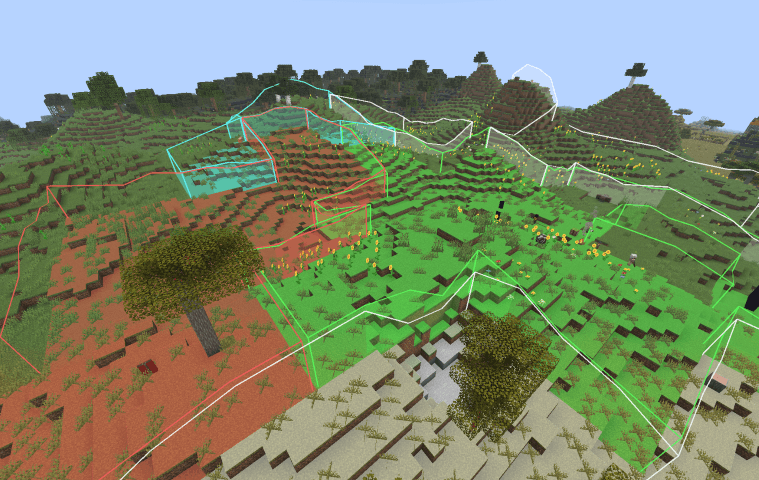
On a modded client the same border is solid. Install Factions client-side and the particles are
replaced by upright panels standing on the ground in your relation’s colour, with the ground itself
tinted under your feet — the same answer the particles give, in a form you can read at a glance from
a hilltop. It is on the ' key by default — re-bind it like any other — and there are two
settings in the client config: how many chunks of wall to draw, and how many chunks of tinted
ground. Nothing here is a fact a vanilla client is missing — that is
the rule the whole client half runs on, and /f borders radius <chunks> widens the particles by
exactly as much for anybody who types it.
Protection that covers the actual thefts
| Blocks | Break and place, members only. Allies do not build in your land by default — an alliance is a diplomatic position and those change. |
| Right-clicks | Doors, buttons, levers, chests, furnaces. Not a list of block types — a list is something somebody has to maintain, and every modded block is missing from it. A stranger who cannot mine your chest could still open it, and that is the theft the claim was bought to prevent. |
| Allies’ harvest | An ally may pick a ripe crop with a right-click, using a mod such as RightClickHarvest, and it replants as usual. That is all they may break: the crop has to be in the factions:harvestable block tag, and the break has to come from a right-click. Turn it off with alliesMayHarvest. |
| Pressure plates | Still work, deliberately. Put one outside the door for visitors: protection you can open a hole in beats protection you have to switch off. |
| Gates, if you say so | A block tag, factions:public_interact, that anybody may right-click in anybody’s land. It ships empty; add fence gates and visitors can walk through while the iron doors stay shut. |
| Item frames, armour stands, paintings | Covered separately, because none of them are blocks and every block-shaped guard misses them. |
| Mobs | Cannot chew through claimed land, answered through Standards’ claims seam so a mob mod does not have to guess — ZombieMod asked for that hook and uses it. |
| Explosions | Filtered per block, so a creeper on the wilderness side of your wall craters the wilderness and leaves the wall standing. You still take the damage. TNT is a separate setting, because on a PvP server it is the siege tool. |
A refusal says no where the no happened — red dust at the exact face you clicked and a low
thud, rather than a line of text at the top of the screen while the disappointment is under your
cursor.
Power — land you hold rather than own
Optional, and off by default: power.mode = fixed is exactly the behaviour above, so switching
to this changes a server rather than arriving with it.
Every player has power. Dying costs some; time online and killing things bring it back. A faction’s
power is its members’ added up — and here is the whole idea:
chunksPerMemberis still the ceiling. Power decides how much of that ceiling you are actually
holding onto.
So power can only ever take entitlement away, never grant more than the fixed rule would. Turning
it on redistributes nobody’s land; it adds a way to lose land by playing badly. And farming power
cannot inflate holdings, because the ceiling is membership — which kills the mob-grinder exploit
without a special case anywhere.
When a faction holds more land than its power covers, a declared enemy may take the difference.
That is the point of the whole system: without it, power is a claim limit with extra steps. Raids
start at their border and eat inward, so nobody reaches past a wall for the chunk with the vault
in it, and each chunk taken reduces the overreach by one — so a faction five chunks over stops being
takeable after five. The attacker is rewarded for noticing, not for attacking.
Four modes, differing only in what counts as losing:
| mode | you lose power when |
|---|---|
fixed |
never — power is inert |
pvp |
a player kills you |
pve |
a mob kills you |
both |
either |
pve is the one no faction plugin has offered, and it fits a survival or apocalypse server
exactly: your borders shrink when the world beats you and grow back as you push out.
Falling in your own lava is not a raid. Environmental deaths never cost power — nobody decided
it and nobody gains from it. Arrows and pets resolve to the person behind them, so a bow kill counts
exactly as a sword kill does.
Experience brings it back. A mob’s XP drop is already Minecraft’s own opinion of how hard it was
to kill — maintained by Mojang and extended for free by every mod on your server — so a boss from a
mob pack is worth more than a zombie without anyone maintaining a list of mob ids.
And nobody finds out by walking home: the victim is told the moment land changes hands, and
/f status says exactly how exposed you are — “you hold 22 chunks on an entitlement of 18; 4 can
be taken.”
The standard — a flag worth taking
Design a banner in a loom, plant it on your land, and it is your faction’s standard. Its colour
and pattern become your identity, printed wherever your name appears — a faction personalised by
something it made rather than a setting it typed.
It must see the sky. That one rule is the whole game. Enemies cannot break your blocks or open
your doors, so the only way anyone reaches your flag is a path you left; without the rule everybody
entombs theirs in a sealed box and the feature is dead on arrival. It is re-checked continuously —
roof it over and it stops earning, uncover it and it resumes.
It also pins the ground it stands on. Nobody can take the chunk your own standard stands in —
not an enemy at any overreach, not in a raid — and unclaiming leaves it alone too. It is your
faction’s core: take the flag down and the ground is ordinary again. A captured flag pins
nothing; a trophy comes down with the land under it.
Flying one is the difference between recovering at full speed and recovering slowly. A reason to
have one and a reason to take somebody else’s, which is the same number seen from two sides.
Breaking a standard is the one deliberate hole in claim protection — an enemy may take your flag
where they can take nothing else of yours.
Carrying it home is the dangerous part. A flag in your hands is a flag you are holding instead
of a sword, you glow red through walls, and its owner is told exactly where you are standing.
Plant it on your own land to fly it as a trophy — where they can come and take it back, and taking
it back is now their raid. Put it in a chest and you stop being a target, and stop denying them
anything.
Fly as many trophies as you can hold. One flag of your own, and every one you have taken. The
power bonus is the same whether you fly one or six — hoarding is not a strategy — but an enemy has
to come and take every one of them before it stops paying. A wall of conquests is armour that
wears away one raid at a time, and each flag in it is standing in the open where somebody can reach
it.
Identified by faction id in the item’s own data rather than by its name, because a name is something
anybody can type into an anvil. Duplicates are inert rather than policed.
Claiming, and walking
/f claim takes the chunk you are stood in, capped per member so recruiting has a point beyond the
numbers and one person cannot fence off a continent. Claims must touch land you already hold, so
territory is one shape rather than a scatter of squares.
/f autoclaim makes the walk the claim — and the feature is knowing when to stop. Running out
of land switches it off rather than repeating itself every sixteen blocks. Walking through somebody
else’s territory says nothing at all, because that is a journey and not a failed claim. A standing
reason is given once, not per chunk.
Diplomacy, and the asymmetry that matters
Allies cannot hurt each other, which sounds obvious and was missing until 1.1.0 — an alliance
stopped you being overclaimed and did nothing whatever to stop you being shot. pvp.betweenAllies
turns friendly fire back on for a server that wants it.
Allies must agree; enemies need not. An alliance holds only when both factions have declared
it. A war needs one declaration. You cannot conscript a friend, and you cannot decline to be
somebody’s target by not filing the paperwork.
/f peaceful opts a faction out entirely — it cannot declare and cannot be declared upon, in
both directions, so opting out is not the same as disarming yourself while everyone else keeps
shooting.
A faction the server runs can answer by reputation. A quest camp or a town guard has a leader
who never logs in, so an alliance offered to it would wait for ever. Link it to a Standards
reputation standing and it offers back once your leader has earned its trust, and withdraws if that
trust is lost, with a gap between the two so nobody flickers in and out. Earn your way through the
gate by doing the camp’s quests. Or mark the link auto and nobody has to ask: the alliance forms
the moment your leader is trusted, with a title on screen saying the camp’s doors and chests are
yours now. Off unless you configure a link.
/f status answers the questions nothing else will. An offered alliance is announced once and
never mentioned again, so an offer made while you were offline is otherwise invisible forever;
being declared upon is worse, in that you find out by being killed. Everything is split by
direction — an offer to you is a decision waiting on you, an offer from you is a wait —
because a single “pending” list hides which is which behind a name you have to recognise.
Somebody with no faction gets a status too: their invitations and their outstanding requests,
which are the two lists otherwise invisible to exactly the person who most needs them.
Joining, both ways round
/f invite finds a specific person, which only helps if an officer already knows who they want.
/f request is the other direction — for the player who logged in an hour ago, read a tag in
chat, and knows nobody. It is shown only to whoever can answer it, because a request nobody sees
sits there until the asker concludes they were ignored.
Faction chat, and the mute that holds
/f chat cycles public → faction → ally. /f c <message> sends one line without switching, which
is most of what people actually want. /f chatspy lets staff watch.
It runs through Standards’ chat router rather than its own event listener, and that is not a
detail: a channel that cancels chat itself runs before the mute check, so a muted player would
simply switch channel and carry on. A mute that only silences public chat is not a mute.
Money
A faction bank. Deposits are ungated — a member funding the next claim should never need
permission to give money away — and withdrawals are officer-gated, because that is the direction
that can grief.
Faction-to-faction payment, with a reason, which is how tribute and ransom get paid. Money
arriving with no explanation is money the recipient treats as a bug.
Claims can cost money, at a price that rises with every chunk held: a flat price means the
largest faction, the one that needs land least, buys it most easily. Refunds are priced at the
position the chunk occupied rather than today’s price. Off by default, so a server with no economy
mod never finds claiming silently impossible.
For server owners
Every behaviour above is a config value, and the comments say why rather than what. PvP between
factions, PvP inside one, connected claims, chunks per member, border refresh rate and radius, the
held tool, ally permissions, explosion handling, claim costs and refunds, who may accept a request.
A modpack can build a faction in code with FactionsApi — create it, make it peaceful, claim
its land and give it back — and the calls are safe to repeat on every start. They never take a chunk
a player holds.
/f fixture seed invents nine neighbour factions with every relation state — allied, offered,
hostile, neutral, peaceful — because two people cannot test a relation system and inviting six
friends to sit still while you declare war on them is not a test plan. Off unless you ask for it.
Strings live in Standards’ single messages.yml, so there is one file for the whole server, one set
of colour rules and one merge-on-upgrade behaviour.
Editing inside somebody’s claim — /f bypass
Protection has no back door for operators, on purpose. Instead there is a state you enter
deliberately: /f bypass on, do the job, /f bypass off.
An always-on override would mean every operator spends every session able to break somebody’s base
by accident, with nothing on screen to say whose land they are stood on — and the resulting mistake
looks exactly like a grief to the faction that finds it. So the protection stays real the rest of
the time, which is what makes it a protection.
It drops when you log out. Come back tomorrow and you have to decide again. Editing claimed land
should cost a thought every time.
Takes on / off / toggle like every switch in Standards, so a macro or a command block can turn
it off reliably rather than guessing. Every use is written to the server log — the person asking
about an override afterwards is never the person who used it.
Gated on factions.bypass, the only permission node this mod declares, so a moderator can be
trusted with it without being made a full operator. Everything else under /f is gated on your rank
inside your own faction, which is game state rather than a permission: you become an officer by
being promoted, and no permissions mod should be able to hand that out.
One place to look — /f panel
Power, land, entitlement, bank, standard, trophies, raid record, allies, enemies and the member
list, without stringing five commands together. /f panel prints all of it as text on any client.
Install Factions on the client as well and the same command draws a pane on the inventory
screen: tabs, a scrolling member list, and promote / demote / kick beside each name if you are a
leader or an officer. It opens from a button on
Standards‘ action bar and
closes with the same button.
With no faction, the pane says what one is for and offers a button to create it; a leader can rename
the faction or set its tag from the title line. Anything needing words opens the chat box pre-filled
rather than a home-made text field, so the command you send is one you can read first.
The client half is optional and always will be. Every button sends the command you could have
typed, so the pane is a nicer surface for answers a vanilla player already gets — never a capability
they do not have. Your players install nothing unless they want to.
Requirements
Built for three Minecraft lines. Take the jar that names your version — every file carries it,
so factions-1.2.0+mc26.1.2.jar is the 26.1 one, and take the matching Standards jar with it.
| Minecraft | NeoForge | Java | Depends on |
|---|---|---|---|
| 1.21.11 | 21.11+ | 21 | SableCraft Standards 1.8.0+ |
| 26.1.x | 26.1+ | 25 | Standards 1.8.0+ |
| 26.2.x | 26.2+ | 25 | Standards 1.8.0+ |
⚠ 26.x needs Java 25, not 21. That is Minecraft’s requirement rather than ours, and it is the
one thing here that will stop a server booting — with an error that does not obviously say so.
Standards is a hard dependency and deliberately so: the claims and groups seams, the message
catalogue, the safe-landing search, the teleport warmups, the chat router and the economy are all
borrowed rather than reimplemented. Install both on the server; your players install neither.
Raids — an attack that is an event, not a discovery
Being at war is a standing relation. /f raid <faction> is an event: it is announced to the
whole server, everyone involved lights up by side, and it ends in a way somebody won.
Four ways out, and only one of them is the clock:
- Their standard is taken and planted on your own land — the attackers win. The flag is the
objective, which is what turns a raid from a stretch of time into something with a point. Note
where the win is: stealing it is one lucky sprint, and the walk home through the people whose
flag it is is the part worth playing. So the raid keeps running after the theft — the attackers
can go for land as well, and a raid can be lost on the road thirty seconds from the gate. - Ground is taken from a faction flying no standard — the attackers win. With nothing to steal,
their land is the only thing taking costs them; the one-claim-per-raid limit means it costs
exactly one chunk. Raise a flag and it becomes the objective again, even mid-raid. - Every attacker is dead or logged off — the defenders win. “We repelled them” has to be a
real outcome, or defending is just waiting. - The timer runs out — the defenders held.
A raid cannot be declined, and it does not need to be. What protects a small faction is that
a raid requires defenders online to declare. A decline would have been the wrong tool: the
faction that most needs protecting is the one with nobody online, and they are not there to decline
anything. So nobody is raided in their sleep, and a raid is always a fight.
There is a cooldown before the same attacker may raid the same target again — per pair, so a
busy server is not frozen, but “declare a raid every ten minutes forever” is not a strategy.
A raid never survives a restart. It is a fight between people who are present; one that outlived
a server bounce could expire while nobody was online to defend it.
Everybody in it gets a clock. A countdown on the action bar, tightening as it runs — 4m 12s,
then 45s, then a bare number in the last ten seconds — for every member of both factions, not
just whoever is swinging. A defender knowing how long they must hold is exactly as useful as an
attacker knowing how long they have left, and a raid whose end surprises one side is a raid that
gets re-fought out of confusion. Bystanders get the announcements and no clock.
And it all goes on the board. /f raids top ranks factions by raids won, and /f who carries a
faction’s record. Four numbers rather than won and lost, because which end you win at is the
interesting part: taken counts raids won attacking, held counts raids won defending. A
brilliant raider who cannot hold their own ground and a fortress nobody can crack are different
achievements, and one column would hide the difference.
A faction that has never raided is simply absent — a leaderboard of everybody is a list. A faction
that has disbanded keeps its place, marked as gone, wearing the name it last had: the raids
people fought against them still happened, and if disbanding erased your opponents’ wins it would
be the cheapest grief in the mod.
Optionally, raids are what move land
Off by default, so nothing changes on a server that updates. Turned on, land only changes hands
during a declared raid — overclaiming becomes an event with a beginning and an end, defenders get
a fair chance to be there, and nobody logs in to find they were quietly eaten overnight.
Friendlier to a server where people have jobs; worse for one that wants land permanently contested.
Which is why it is a setting rather than a decision made for everybody.
Credits and licence
MIT. All original work.
Inspired by MassiveCraft’s Factions, which defined this genre — read for intent, then built for
modern Minecraft. No code is taken from it.
By Sablednah. Source, issue tracker and design notes on GitHub.
常见问题
Factions ReForged 支持哪些 Minecraft 版本?
Factions ReForged 支持 Minecraft Java 版 1.21.11–26.3,共 4 个版本,可用的加载器:NeoForge。下载时注意选择和你游戏版本一致的文件。
Factions ReForged 怎么安装?
先用 PCL2 或 HMCL 启动器安装对应版本的 NeoForge,再把下载的 .jar 文件放进游戏目录的 mods 文件夹,重新启动游戏即可。开启了版本隔离的,mods 文件夹在 versions/版本名 下面。
sablednah 的其他作品
查看全部 →
CityWorld ReForged
A procedural NeoForge world generator that fills Minecraft with endless, fully-furnished cities — roads, buildings, mines, sewers, farms and wild nature — deterministically built from your world seed.

SableCraft Standards
Do you have Standards? Every server command you end up needing, and an economy other mods can drive. /fly, /god, /home, /warp, /tpa, /back, /top, /kit, /vanish, /invsee, mail, mutes, bans - the set every server installs , built to work WITH other mods!

LegendQuest ReForged
A complete RPG character system for Minecraft: races, classes, skills, feats and karma, all defined in datapacks rather than code. Server-authoritative - vanilla clients can join and play.
ZombieMod ReForged
59 zombie types with hand-built AI, and the JSON to write your own. Your players join with a vanilla client.
评论
登录后评论和评分