
截图
介绍
Introduction
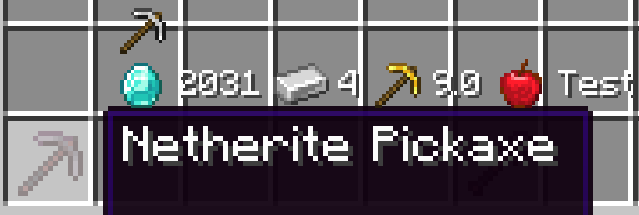
Iconify has one goal: make comparing items easier. It does so by adding additional information to the items’ tooltips, but labels them with icons instead of text. For example, an items durability (max uses) is marked with a diamond, and the value is displayed after that.
Iconify replaces Equipment Tooltips. The name was changed because the mod is much more versatile now.
Screenshot of an early version (0.1.0)
API and Data Packs
New icons can be added with data packs. Likewise, mods can also add new icons and even new text functions, which allow custom information to be displayed next to the icon.
At the time of writing (before initial release), the API is very unstable. Expect major code changes in the future. Because of this, I will omit most information about it for now. The wiki on GitHub will contain more information once the API is more stable.
Icons
Icons check for items that match certain conditions and display themselves when their conditions match. Icons also have a texture and text function associated with them.
Text Functions
Text functions create text based on the item. For example, the food text function will show the hunger and saturation restored by food items. Icons will display the text produced next to their image.
常见问题
Iconify 支持哪些 Minecraft 版本?
Iconify 支持 Minecraft Java 版 1.16.3–1.17.1,共 4 个版本,可用的加载器:Forge。下载时注意选择和你游戏版本一致的文件。
Iconify 怎么安装?
先用 PCL2 或 HMCL 启动器安装对应版本的 Forge,再把下载的 .jar 文件放进游戏目录的 mods 文件夹,重新启动游戏即可。开启了版本隔离的,mods 文件夹在 versions/版本名 下面。
SilentChaos512 的其他作品
查看全部 →
Silent Lib (silentlib)
让模组的编写和维护更加轻松的前置库。

Silent Gear
可升级的工具、武器和盔甲。自定义材料系统!

Scaling Health
修改玩家、模组生物的生命值等属性!《困难生活》的精神续作。

Silent’s Gems
可自定义的工具!多彩的建筑方块!实用的小工具!
评论
登录后评论和评分