
End netherite
Texture Pack Name: End Netherite - Purple Netherite Description: Hey, fellow Minecrafters! Have you ever felt that the standard netherite gear just looked a bit too gloomy? I always thought it lacked that magical touch. So, I decided to give it a fresh,
截图

介绍
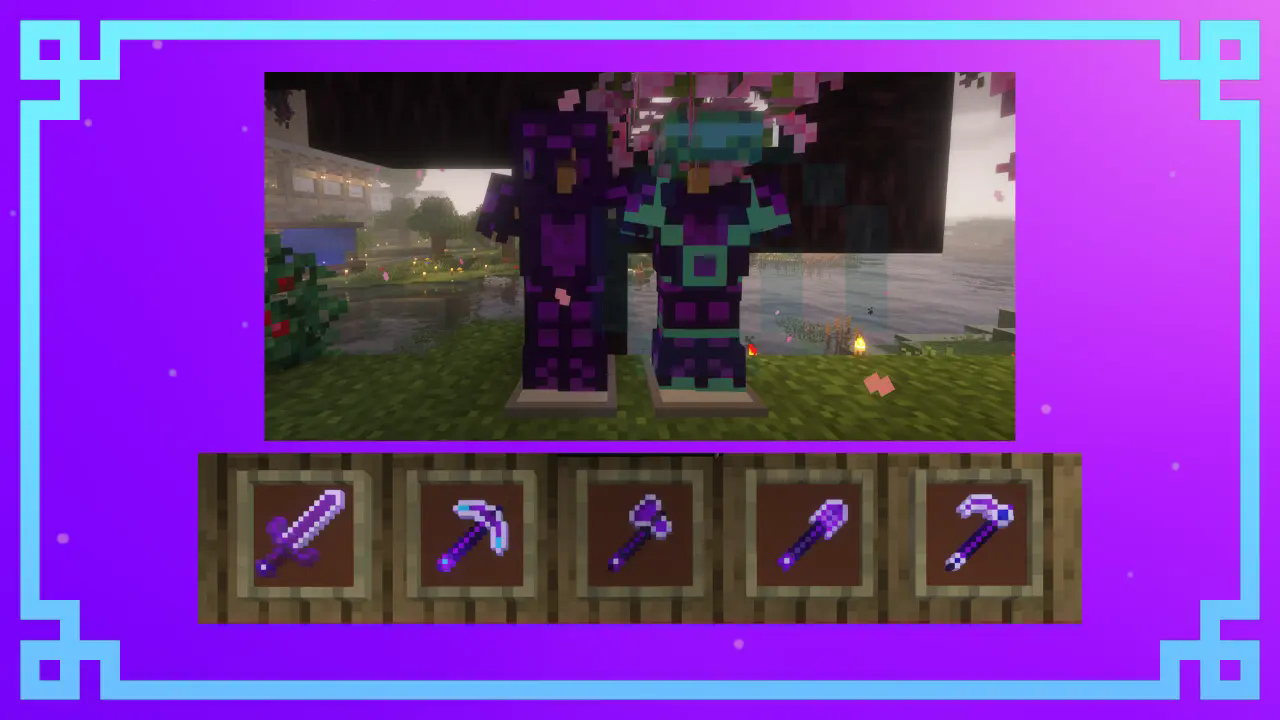 Netherite retextured
Hey, fellow Minecrafters! Have you ever felt that the standard netherite gear just looked a bit too gloomy? I always thought it lacked that magical touch. So, I decided to give it a fresh, mystical twist inspired by the End dimension. Introducing End Netherite, where your netherite tools and armor get a stunning purple makeover, as if they were infused with the power of the End!
What does End Netherite change?
Netherite Armor: Completely revamped with a rich purple glow that makes it look like it was crafted in the End itself. Now you’ll look both stylish and powerful.
Netherite Sword: The sword features a sleek, purple blade with intricate runic designs that make it feel like a legendary End weapon.
Netherite Tools (Pickaxe, Axe, Shovel, Hoe): These tools now shimmer with a purple tint, giving the impression they’ve absorbed mysterious End energy. Perfect for taking on any dimension!
Netherite Block: Recolored into a deep, rich purple, this block is perfect for End-themed builds or just showing off your rare materials.
Why should you try End Netherite?
Standout Look: With these vibrant, eye-catching textures, your gear will stand out whether you’re exploring the Overworld or battling in the End.
End Dimension Vibes: If you’re a fan of the End, this pack will bring that eerie, mystical atmosphere right into your netherite gear.
Easy Installation: It’s super simple to install—just drop it into your resource packs folder, and you’re ready to show off your new, enhanced netherite gear.
I’ve worked hard to make sure everything looks just right, so give it a try and let me know h
ow it looks in your world!
常见问题
End netherite 支持哪些 Minecraft 版本?
End netherite 支持 Minecraft Java 版 1.20–1.21.1,共 9 个版本。下载时注意选择和你游戏版本一致的文件。
End netherite 怎么安装?
把下载的 .zip 文件(不用解压)放进游戏目录的 resourcepacks 文件夹,进游戏后在「选项 → 资源包」里把它移到右边启用。
评论
登录后评论和评分