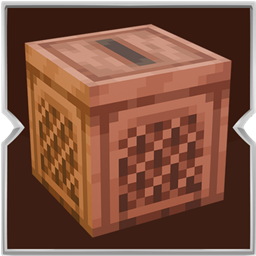
Jukebox: Backport
Play the music discs stored in the chest above a jukebox, one after another, in slot order.
介绍
Put a chest directly on top of a jukebox and place your music discs inside it. The jukebox takes the discs in the order of the chest slots, plays each song, and puts the disc back when the song ends. After a short pause, it takes the next disc.

If the chest holds one disc, that song keeps repeating. If it holds several discs, they play in order and return to the first disc after the last one.
How to use it:
- Place a chest or a trapped chest directly above a jukebox.
- Put your music discs in the chest, in the order you want to hear them.
- Wait for the jukebox to take the first disc and start playing.
- Click the jukebox if you want to skip the current song.
- The disc goes back into the chest and the next one starts immediately.
- Only the chest sitting on the jukebox is used.
- A double chest does not combine both halves into one playlist.
- If the chest is full when a disc needs to return, that disc drops on the ground.
- If there is no chest above the jukebox, it behaves like a normal jukebox.
While a playlist is playing, music notes float around the front and sides of the jukebox. The jukebox also has its own wooden look, with a framed checkerboard side and a thin slot on top. If you leave the world and come back, the song that was playing continues.
常见问题
Jukebox: Backport 支持哪些 Minecraft 版本?
Jukebox: Backport 支持 Minecraft Java 版 1.20.1–26.3,共 4 个版本,可用的加载器:Fabric / Forge / NeoForge。下载时注意选择和你游戏版本一致的文件。
Jukebox: Backport 怎么安装?
先用 PCL2 或 HMCL 启动器安装对应版本的 Fabric / Forge / NeoForge,再把下载的 .jar 文件放进游戏目录的 mods 文件夹,重新启动游戏即可。开启了版本隔离的,mods 文件夹在 versions/版本名 下面。
Zerw 的其他作品
查看全部 →
No Totem Pop Animation & Particles
图腾触发时保持屏幕清爽。适合PvP、硬核模式和追求干净画面的创作者。

No Rain & Particles
此资源包会移除雨天画面效果,并彻底静音雨声。
Better Nether Portals
可以任意形状或方向建造下界传送门;无需封闭黑曜石框架,用打火石点燃后即可穿过。
The Sift: Backport
The Sift 是即将在后续版本中推出的新维度;此模组将其移植到了旧版本。
评论
登录后评论和评分