
截图
介绍
Sign Edit Lite (Fabric and NeoForge)
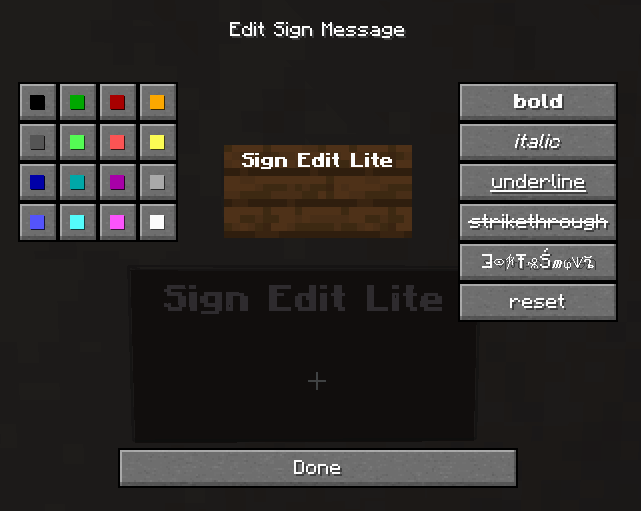
Add color and formatting options to signs.

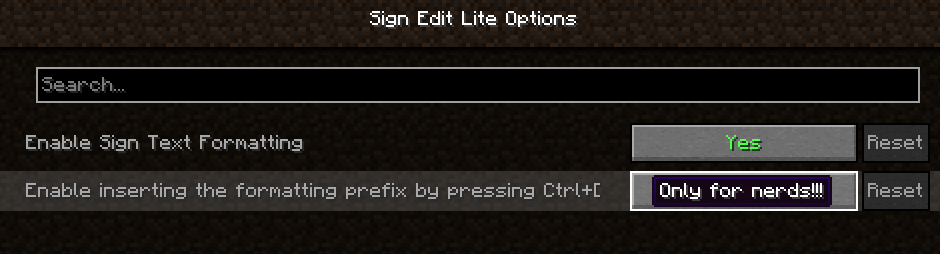
The mod comes with usual Mod Menu integration.

An additional extra for nerds, who prefer typing raw formatting codes, is the option to enable the insertion of the formatting character ‘§’ by pressing Ctrl+[.
Requires (Fabric)
- Fabric API
- Cloth Config API
- Optional, but recommended Mod Menu
License
Standard MIT license. Feel free to learn from it and incorporate it in your own projects.
Some parts of the code are based on the source code of Text Utilities, which is LGPL-3 licensed.
Source code
Available on GitLab or on GitHub.
The source code has lots of comments to help learning Minecraft modding.
Related projects
- Text Utilities adds color and formatting options to signs, book and anvils, but unfortunately it has not been updated to Minecraft 1.21.5 version at the time of writing, and it is a Fabric only mod.
- Iron Signs adds vibrant, high contrast, painted signs, which can be colored and formatted similarily. It also enables coloring and formatting Vanilla wooden signs exactly tha same way as this mod. I wonder who wrote that mod.
Thanks
Thanks to Chaws for making available the source code of Text Utilities.
See also
My other mods on Modrinth and on CurseForge.
常见问题
Sign Edit Lite 支持哪些 Minecraft 版本?
Sign Edit Lite 支持 Minecraft Java 版 1.20.2–26.2,共 21 个版本,可用的加载器:Fabric / NeoForge。下载时注意选择和你游戏版本一致的文件。
Sign Edit Lite 怎么安装?
先用 PCL2 或 HMCL 启动器安装对应版本的 Fabric / NeoForge,再把下载的 .jar 文件放进游戏目录的 mods 文件夹,重新启动游戏即可。开启了版本隔离的,mods 文件夹在 versions/版本名 下面。运行环境:客户端和服务端都要装。
pinter.gabor 的其他作品
查看全部 →
Balanced Ore Detector
Fully configurable Ore Detectors that do not break the balance of the game, and still make prospecting a challenge, without forcing you to hollow out the entire world.

EarlyToBed
In the beginning of the game you have to kill three sheep to create your first bed. How can you sleep soundly after such a brutal act? So I created the wooden shears to allow a less violent start.

DirtCheap
Dirt must be dirt cheap. But in Minecraft cobblestone is cheaper than dirt, because it is free. I did not like it, so I made dirt really cheap by adding a few recipes that allow duplication of dirt blocks.

Iron Signs
Create signs in all colors of Minecraft.
评论
登录后评论和评分