介绍
Welcome to Summonable Steve!
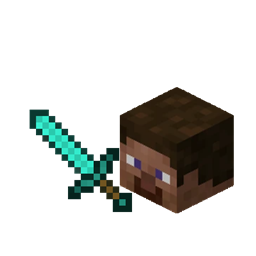
Summonable Steve is a mod where you can summon a boss mob named “Steve”. He has the default Steve skin, as he is meant to represent you.
Steve’s Behavior
- Steve will walk around randomly and defeat any pigs, cows, sheep, and chicken, as he is just like the player and needs his food.
- When the player is near him, he will stare at them until they leave. (Meant as a threat)
- When attacked, Steve will hunt down the player from a far distance until they are defeated.
- Steve is very powerful and has a lot of health and defense. Be prepared if you wish to fight him.
- When defeated, steve will drop “Steve’s Sword”. Steve’s Sword is extremely powerful and has a high enchantability. Steve’s sword is made of very strong diamonds, but cannot be upgraded to netherite due to it’s immense power.
Summoning Steve
- Steve can be summoned by placing a blue wool, a light blue wool on top, and finally, a player head.
- Player heads will spawn on the floor at any defeated player’s location.
- Steve will not de-spawn. Once summoned, Steve will not attack the player, but once attacked, he must be defeated for the player to be able to relax
Version Support:
Currently, Summonable Steve is availible for the following versions:
- 1.21.1 NeoForge
I am working on adding newer versions for you all to enjoy.
Future Updates:
Here is a list of planned features for Summonable Steve:
- Steve will be able to chop trees and mine blocks
- Steve will be able to provoke mobs (Not the Player)
- Please leave any suggestions in the Comments
Create a Server with Summonable Steve! Use this link to get 25% off your first purchase:
https://url-shortener.curseforge.com/G5e0U
Note: This is not an ad link. It will take you directly to BisectHosting.
常见问题
Summonable Steve 支持哪些 Minecraft 版本?
Summonable Steve 支持 Minecraft Java 版 1.21.1,可用的加载器:NeoForge。下载时注意选择和你游戏版本一致的文件。
Summonable Steve 怎么安装?
先用 PCL2 或 HMCL 启动器安装对应版本的 NeoForge,再把下载的 .jar 文件放进游戏目录的 mods 文件夹,重新启动游戏即可。开启了版本隔离的,mods 文件夹在 versions/版本名 下面。
Cactusblade511 的其他作品
查看全部 →
CactusBlade511’s Medicines
为 Minecraft 添加半写实风格药物与疾病的模组!

Some Cool Auto Farms
A working and efficient Kelp Farm, Bamboo Farm, and a Sugarcane farm using observers and pistons.

Long-Range TNT Cannon
A Long-Range TNT cannon that shoots over 100 blocks

Cactusblade511’s Cosmetics
Many functional and cosmetic armor sets that include set bonuses for uses other than combat
评论
登录后评论和评分