HudBase – Customizable HUD
A customizable Minecraft HUD inspired by Lunar Client, with draggable and resizable modules.
介绍
HudBase
HudBase is a fully customizable Minecraft HUD mod inspired by clients such as Lunar Client.
Create your own HUD by adding, removing, moving and resizing modules directly in-game.
Features
-
Fully customizable HUD
-
Drag-and-drop module positioning
-
Proportional module resizing
-
Automatic position saving
-
Transparent HUD modules with readable text shadows
-
Multilingual interface
-
Support for different keyboard layouts
-
Easy-to-use HUD management menu
Available modules
HudBase currently includes:
-
FPS
-
Coordinates (X/Y/Z)
-
Real-world clock
-
Ping
-
CPS (left/right clicks per second)
-
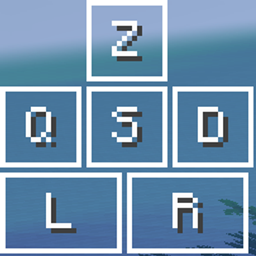
Keystrokes (ZQSD/WASD + mouse buttons)
-
Armor & held item
-
Health
-
Hunger
-
Armor points
-
Active potion effects
-
Compass
-
Speed
-
World time
-
Weather
-
Held item name
-
Mobs killed
Customization
Each HUD module can be positioned freely on the screen and resized between 50% and 300% of its original size.
Positions are automatically saved in the HudBase configuration, so your HUD layout is preserved between game sessions.
Languages
The interface and module names automatically adapt to the Minecraft language selected by the player.
Currently supported:
-
French
-
English
-
Spanish
-
German
-
Italian
-
Brazilian Portuguese
-
Russian
-
Chinese
Compatibility
HudBase is designed to provide a simple and flexible foundation for creating a completely personalized Minecraft HUD.
常见问题
HudBase – Customizable HUD 支持哪些 Minecraft 版本?
HudBase – Customizable HUD 支持 Minecraft Java 版 1.20.1,可用的加载器:Forge。下载时注意选择和你游戏版本一致的文件。
HudBase – Customizable HUD 怎么安装?
先用 PCL2 或 HMCL 启动器安装对应版本的 Forge,再把下载的 .jar 文件放进游戏目录的 mods 文件夹,重新启动游戏即可。开启了版本隔离的,mods 文件夹在 versions/版本名 下面。
LongName 的其他作品
查看全部 →
WaterAudio
WaterAudio adds adjustable speakers and a subwoofer to Waterframe and Watermedia, allowing extreme volume and bass boost customization.

Aether Shaders
A shader pack based on Bliss, optimized for dynamic skies and a completely revamped lightning system

Quick Transfer
Quick Transfer allows you to quickly move items by holding Shift + Left Click and dragging your mouse over them. Every hovered item is instantly transferred, making inventory management fast and effortless.
评论
登录后评论和评分