DICE[sable]
Dice adds throwable dice to Create: Aeronautics. Roll, throw, and collect physics-enabled dice made from wood, stone, diamond, or iron. Includes decorative full-size dice and throwable 1/8-scale Physics features require Create: Aeronautics.
介绍
🎲 Dice
Throwable, tumbling physics dice for Create: Aeronautics.
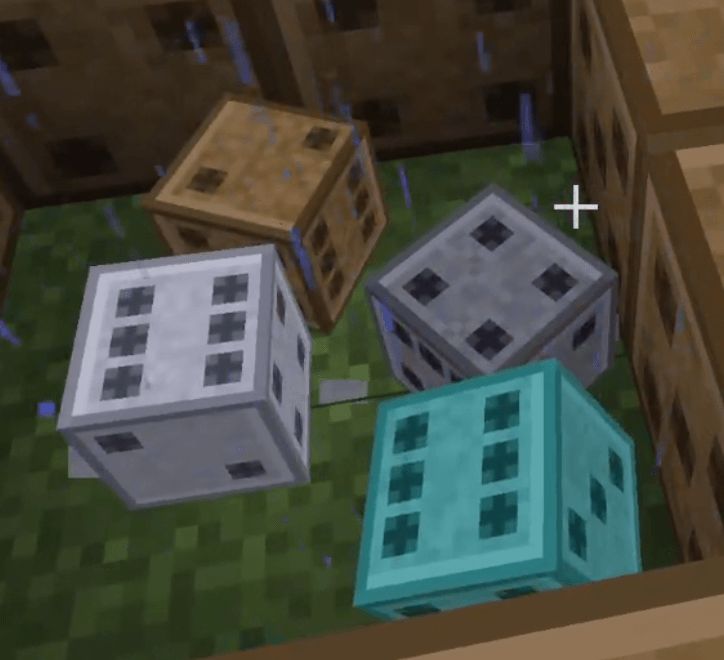
Dice adds a set of decorative dice blocks that come to life through Create: Aeronautics’ Sable physics engine. Pick one up, give it a flick, and watch it bounce, spin, and settle like the real thing — then scoop it back up and roll again.
Each die comes in two forms: a full 1:1 block for building and display, and a small 1/8 block (an 8×8×8 cube) that you can physicalize and throw as a free-tumbling rigid body.
Materials that actually behave differently
Every die is tuned in Sable to match its material, so weight and buoyancy feel right:
- 🪵 Wood — light; bobs and drifts.
- 🪨 Stone — a solid, honest roll.
- 💎 Diamond — dense and deliberate.
- ⚙️ Iron — heavy; drops fast and hits hard.
Each item’s tooltip shows its mass, volume, and density, so you always know how a die will play before you throw it.
How to play
- Sneak + right-click (holding a 1/8 die) — throw it out into the world as a physics body.
- Left-click a die — knock it flying in the direction you’re looking.
- Sneak + left-click — make it hop and tumble in place, like shaking the dice in your hand.
- Sneak + right-click (empty hand) — recover the die back into an item.
Crafting
Craftable on both the crafting table and the stonecutter — combine eight of a material into a full die, or cut a full die into eight small ones.
Requirements
- Minecraft 1.21.1 · NeoForge
- Create: Aeronautics (Sable) — required for the physics (throwing, tumbling, rolling). Without it, the dice still work as ordinary blocks and items, with full crafting and tooltips — they simply won’t physicalize.
常见问题
DICE[sable] 支持哪些 Minecraft 版本?
DICE[sable] 支持 Minecraft Java 版 1.21.1,可用的加载器:NeoForge。下载时注意选择和你游戏版本一致的文件。
DICE[sable] 怎么安装?
先用 PCL2 或 HMCL 启动器安装对应版本的 NeoForge,再把下载的 .jar 文件放进游戏目录的 mods 文件夹,重新启动游戏即可。开启了版本隔离的,mods 文件夹在 versions/版本名 下面。
评论
登录后评论和评分