
Exposure: Space
Astrophotography expansion for Exposure. Discover 200 real cosmic objects and build your own space catalog.
截图


介绍
Exposure: Space
Astrophotography progression for Exposure.
Point your camera at the night sky, hunt real cosmic objects, develop the photos and fill your personal star album.
What does it add?
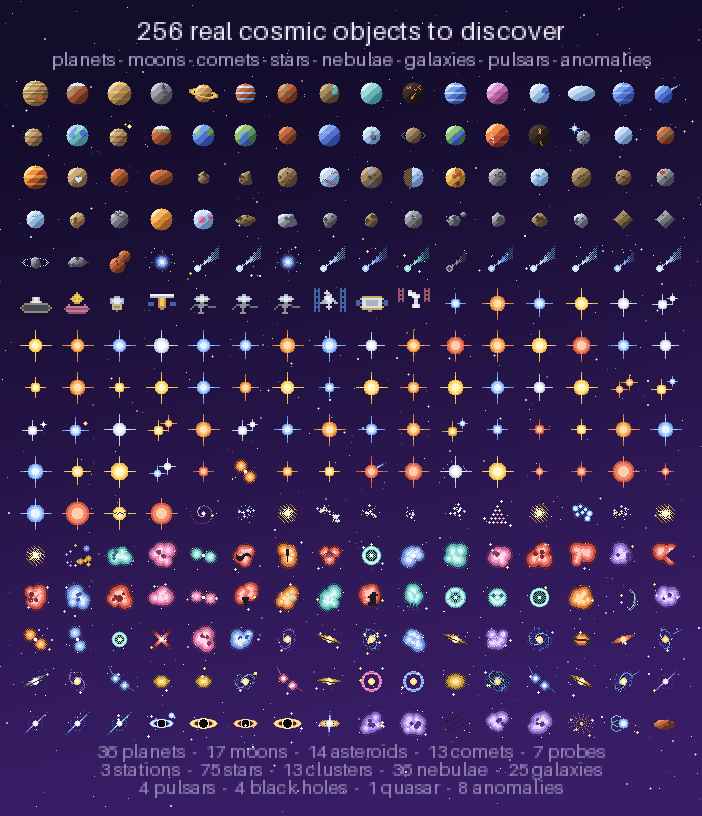
🔭 256+ real cosmic objects — from the Moon’s craters to Sagittarius A*. Planets, exoplanets, moons, comets, asteroids, star clusters, nebulae, galaxies, pulsars, quasars and a few anomalies. Every single one has its own pixel-art texture, description and reward.
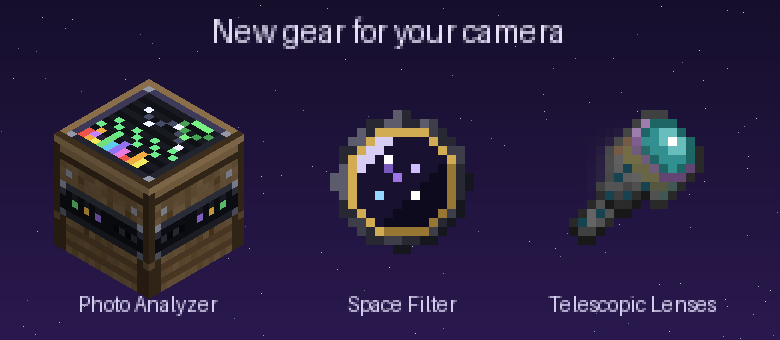
📷 Telescopic lenses (5 tiers) — from the humble Bad lens to the Sculk lens that sees absolutely everything. Higher tiers reveal rarer, fainter objects.
🟣 Space Filter — a camera attachment with deep space trapped in its glass. Required to capture cosmic objects; install it together with a lens.
🪐 Objects live in the actual sky. They appear on real night-sky positions, hide behind terrain, scale with your zoom — and not every object shows up every night. Some, like Halley’s Comet, are a once-in-a-lifetime sight. The ISS, Hubble and comets even move across the sky in real time.
🌠 Night sky events — some nights a Meteor Shower, an Aurora Storm or a Deep Sky Night rolls in: appearance chances get boosted, the Analyzer works up to 2× faster, and event-exclusive objects show up — fireballs, auroras, STEVE, the Zodiacal Light and the Gegenschein exist only during their events.
📡 Night Analyzer — a craftable observatory block. Right-click it to learn what’s happening in the sky tonight: event name, luck and analysis multipliers, how many exclusive objects are up there. No chat spam — checking the sky is part of the hobby.
🛠 Photo Analyzer — an astronomer’s desk with a spectrum screen (and Wi-Fi, obviously). Feed it a developed photograph: it identifies the object, writes it into your album and pays out rewards into 8 output slots.
📖 Cosmic Album — a craftable book (amethyst + paper + book + leather) that collects every object you’ve studied as a glued-in polaroid: photo, story, object type, and a “Visit on Wikipedia” link for the real thing. Fill all 200+ pages if you dare.
🧭 Villager trades — cartographers (levels 4–5) and wandering traders sell archival photographs of cosmic objects, ready for the Analyzer. Event-exclusive ones are never sold — those you earn.
🏆 Advancements — a full tree: first analysis, halfway there, complete album, event photography and a few secrets.
🔁 Repeat rewards — by default, an object’s full reward becomes available again every 5 in-game days (configurable, or disable it entirely).
🌑 Dark-room friendly — Exposure’s Lightroom normally refuses to print in the dark. Cosmic photos are exempt: astrophotography should be developed at night.
📐 Camera Stand support — aim and capture through a mounted camera.
🍪 Cosmic Leftover — a creative-only snack that fills your hunger and unlocks the entire album in one bite.
⚙️ Fully data-driven — objects and events are JSON in a datapack (data/<ns>/cosmic_object/, data/<ns>/cosmic_event/), plus live-editable external folders (config/exposure_space/objects/, config/exposure_space/events/) for adding your own without rebuilding anything. Admins get /cosmicevent. ModMenu config screen included.
Requirements
| Mod | Why |
|—|—|
| Exposure | the camera itself |
| Exposure: Expanded | tier-1 telescopic lens |
| Architectury API, Prism, Cloth Config | libraries |
Minecraft 1.21.1, Fabric & NeoForge. On Fabric you also need Fabric API; ModMenu optional but recommended.
Quick start
- Craft a Space Filter and a Telescopic Lens, install both on your camera.
- Wait for night, raise the viewfinder and scan the sky — found objects get a target lock.
- Take the shot, develop the film, print the photo in a Lightroom.
- Put the photograph into the Photo Analyzer and collect your reward.
- Craft the Cosmic Album and admire your growing collection.




常见问题
Exposure: Space 支持哪些 Minecraft 版本?
Exposure: Space 支持 Minecraft Java 版 1.21.1,可用的加载器:Fabric / NeoForge。下载时注意选择和你游戏版本一致的文件。
Exposure: Space 怎么安装?
先用 PCL2 或 HMCL 启动器安装对应版本的 Fabric / NeoForge,再把下载的 .jar 文件放进游戏目录的 mods 文件夹,重新启动游戏即可。开启了版本隔离的,mods 文件夹在 versions/版本名 下面。运行环境:客户端和服务端都要装。
评论
登录后评论和评分