Extra Inventory Tab
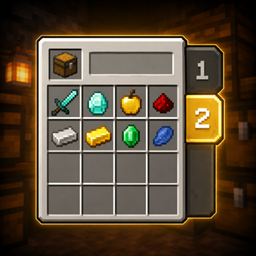
Add extra inventory pages and easily switch between them using simple tabs.
截图
介绍
Extra Inventory Tabs
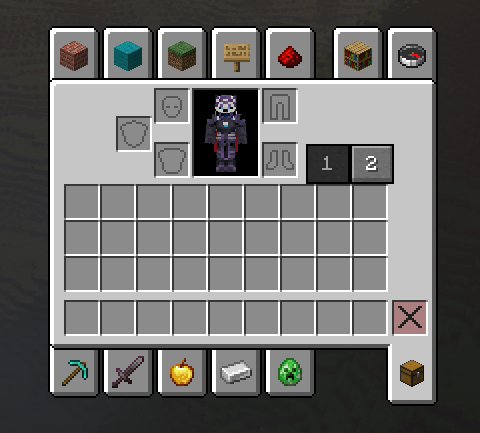
Extra Inventory Tabs expands your Minecraft inventory by adding additional inventory pages that can be accessed through simple tabs directly inside the vanilla inventory screen.
No backpacks, no extra containers, and no complicated menus — just more inventory space while keeping the familiar Minecraft inventory experience.
Features
- Extra inventory page for additional storage
- Simple inventory tabs to switch between pages
- Seamlessly integrated into the vanilla inventory screen
- Your items remain stored in their respective inventory pages
- Fast and intuitive switching
- Lightweight and simple
- Designed to feel like a vanilla Minecraft feature
- Perfect for exploration, mining, building, modpacks, and everyday survival
How It Works
Open your inventory normally and use the new tabs to switch between your inventory pages.
Your original inventory remains unchanged, while the additional tab gives you another page where you can store more items.
No commands or special items are required.
Why Extra Inventory Tabs?
Minecraft inventories can fill up extremely quickly, especially when exploring large modpacks or collecting building materials.
Instead of adding backpacks or completely replacing the inventory system, Extra Inventory Tabs keeps things simple:
Same inventory. More space. One click away.
Perfect For
- Survival worlds
- Exploration
- Large modpacks
- Builders
- Mining sessions
- Players who want more inventory space without backpacks
If you enjoy simple Quality of Life mods that improve Minecraft without changing the core experience, Extra Inventory Tabs is made for you.
常见问题
Extra Inventory Tab 支持哪些 Minecraft 版本?
Extra Inventory Tab 支持 Minecraft Java 版 1.16.5–26.2,共 4 个版本,可用的加载器:Fabric / Forge / NeoForge。下载时注意选择和你游戏版本一致的文件。
Extra Inventory Tab 怎么安装?
先用 PCL2 或 HMCL 启动器安装对应版本的 Fabric / Forge / NeoForge,再把下载的 .jar 文件放进游戏目录的 mods 文件夹,重新启动游戏即可。开启了版本隔离的,mods 文件夹在 versions/版本名 下面。
Iandrex 的其他作品
查看全部 →
One Piece World Like (Mine mine no mi Version)
一个适用于《Mine Mine no Mi》模组的 Minecraft 附加内容,让世界变成《海贼王》的风格,加入岛屿系统、无风带、红土大陆和颠倒山。

One Piece World Like (Mine Piece Version)
为 Mine Piece 模组打造真正的《海贼王》风格世界,加入自定义海洋、岛屿、征服系统和伟大航路探索。

Real Invisibility – Mobs, Armor, Nickname, TAB
Makes invisibility truly invisible by hiding armor, held items, name tags, TAB entries, and making mobs ignore invisible players.

Ground Sleep
Sleep directly on the ground. No bed required. Ground Sleep lets you rest anywhere while respecting Minecraft's normal sleeping rules.
评论
登录后评论和评分