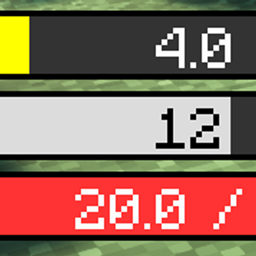
Player Health Display 玩家血量显示
Replace the vanilla health bar with a layered display for health, armor, and absorption.
介绍
Player Health Display
modid: playerhealthdisplay
Name (ZH): 玩家血量显示
Name (EN): Player Health Display
Upload name: Player Health Display 玩家血量显示
Summary: Replace the vanilla health bar with a layered display for health, armor, and absorption.
Categories: Utility & QoL; Map and Information
Status: Released
Supported versions: 1.20.1 Forge
QQ group: 1059554309
What it is
Standalone UI mod (no hard deps). Stacked bar for health, armor, absorption—built for high HP. Default vanilla position. Soft-compatible with Unorthodox or alone.
How to play
Enables on install. Config toggles enable, position, size, color, text. Mode colors: Hardcore red+black line; Creative/Spectator blue; Survival red. Armor/absorption layers only when >0.
Notes
Widen bar or hide text at very high HP. Reflects Body Refining, Blood Contract, Godhood bonuses live.
FAQ
Q: Restore vanilla bar? A: Disable custom bar in config and rejoin.
Q: Numbers cut off? A: Widen bar or hide text.
常见问题
Player Health Display 玩家血量显示 支持哪些 Minecraft 版本?
Player Health Display 玩家血量显示 支持 Minecraft Java 版 1.7.10–1.21.1,共 3 个版本,可用的加载器:Forge / NeoForge。下载时注意选择和你游戏版本一致的文件。
Player Health Display 玩家血量显示 怎么安装?
先用 PCL2 或 HMCL 启动器安装对应版本的 Forge / NeoForge,再把下载的 .jar 文件放进游戏目录的 mods 文件夹,重新启动游戏即可。开启了版本隔离的,mods 文件夹在 versions/版本名 下面。
plasmaflea 的其他作品
查看全部 →
Unorthodox -WanHunFan 旁门-万魂幡
Collect souls into a soul banner, summon ghost soldiers, and refine spirits for power and XP.
Unorthodox – Binding Rope 旁门-捆妖绳
Throw a binding rope to immobilize weaker mobs and drag them while upgrading the artifact with XP.
Unorthodox – Bigu 旁门-辟谷
Eat a bigu pill for permanent saturation so you rarely need food again.
Unorthodox – Blood Contract 旁门·血契御兽
Blood-bind mobs to inherit half their stats and unique talents while they are loaded anywhere on the server.
评论
登录后评论和评分