A.M.A.D.A. MC 2
A community modpack to join the A.M.A.D.A. Earth Station or to make your own.
介绍

A.M.A.D.A. – Alliance Making Awesome Design & Art. With Blocks.
The A.M.A.D.A. is the community of danatur.tv. For a long time I wanted to start a nice little community server and here it is. With this mod pack you can join the A.M.A.D.A. Earth Station as a follower subscriber or streamer or you can build your own. Now officially sponsored by BisectHosting.
You want to play on your own server with friends?
Don’t know how to setup one? Just rent an already configured server! Click on the picture below, select a plan (at least 4GB), use the code AMADA get 25% off your first month and enjoy playing with your friends!

Community Server for 1.18.1
With the Content Creator integration (CCI) it is even possible to have the Twitch chat and events in the game. With one step further you also can have your audience to influence your game.
Mods
I tried to have a Vanilla like experience with some QOL mods and extras to make life a little easier and more beautiful. And as I really like to explore there are some exploration mods added as well.
However we also added Create an Tinker for more techie stuff.
Here are some highlights. See all included mods and relations here.
Additional Lanterns
Adorn
Alex’s Mobs
AmbientSounds 5
Aquaculture 2
Awesome Dungeon
Awesome Dungeon Edition Nether
Better Animals Plus
Biomes O’Plenty
Content Creator Integration
Create
Decorative Blocks
Doggy Talents
EmbellishCraft
Exploration+
Extended Lights
Farmer’s Delight
FrostRealm
Macaw’s Bridges
Macaw’s Doors
Macaw’s Fences and Walls
Macaw’s Lights and Lamps
Macaw’s Paintings
Macaw’s Roofs
Macaw’s Trapdoors
Macaw’s Windows
Nature’s Compass
Packing Tape
RevampedWolf
Storage Drawers
Waystones
and more…
Help
OptFine
Due to licensing restrictions it is not allowed to include OptiFine to the mod pack. If you want to use OptiFine you need to install OptiForge to the Modpack and install OptFine as well.
You can download OptiForge here or add it to the A.M.A.D.A. MC 2 mod pack via the Curseforge app. You can download OptiFine here.
Content Creator Integration (for streamers who want to use Content Creator Integration in their stream)
This mod pack includes the Content Creator Integration mod. With this mod you can connect Streamelements or Streamlabs with Minecraft. If connected you can have the Twitch chat in your Minecraft chat, alerts on events like follows, subs, raids, hosts and so on. Viewers also can send chat commands to do something in your game. However there is no detailed documentation. So here are some basic points to set it up.
Streamelements
1. Copy your Streamelements JWT token from the Streamelements backend (the long one on the left side).

2. After you started the mod pack for the first time you will find a folder in you Minecraft installation: A.M.A.D.A. MC/config/contentcreatorintegration In this folder you find a file called contentcreatorintegration.toml Open it with an editor.
3. Paste the token between the empty brackets behind streamElementsTokens = [] Don’t forget the quotes around the token.
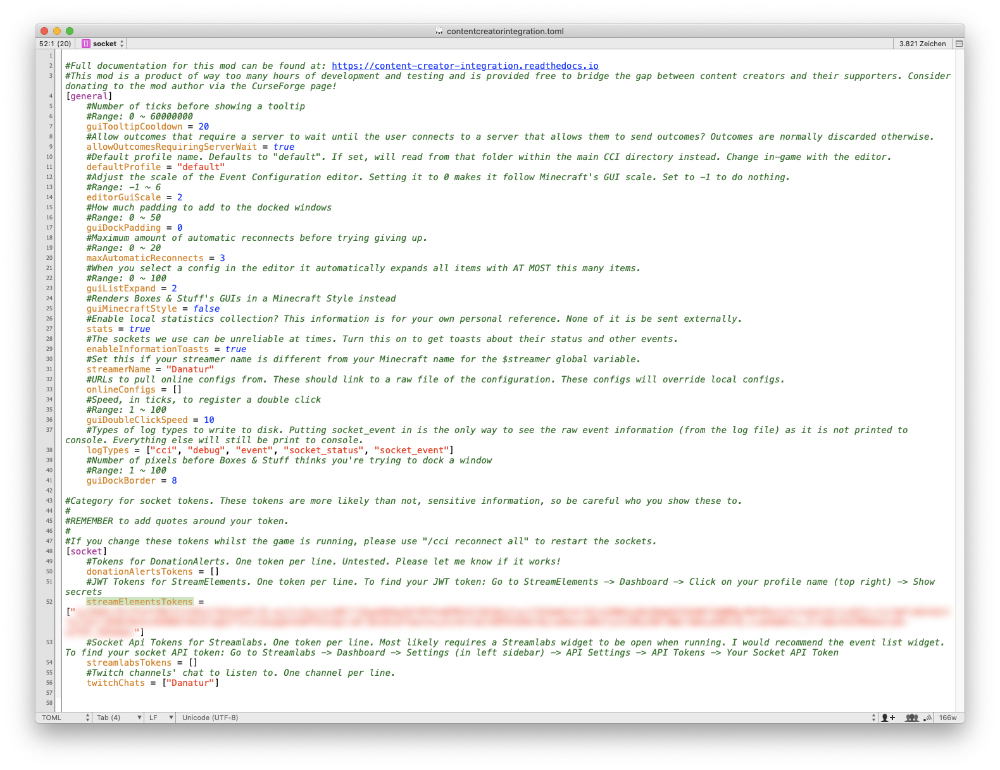
4. Start the game. While the game is starting you should get some toast messages on the side that you connected to Streamelements and Twitch chat. (It is possible that you only see squares instead of text. I think it’s happening because the fonts are not loaded. When the game is fully loaded you also see the text.)
Streamlabs
1. Copy your Streamlabs socket token from the Streamlabs backend.

2. After you started the mod pack for the first time you will find a folder in you Minecraft installation: A.M.A.D.A. MC/config/contentcreatorintegration In this folder you find a file called contentcreatorintegration.toml Open it with an editor.
3. Paste the token between the empty brackets behind streamlabsTokens = [] Don’t forget the quotes around the token.

4. Start the game. While the game is starting you should get some toast messages on the side that you connected to Streamlabs and Twitch chat. (It is possible that you only see squares instead of text. I think it’s happening because the fonts are not loaded. When the game is fully loaded you also see the text.)
Contact
Join our Discord: discord.danatur.tv
Watch the live streams here: danatur.tv
常见问题
A.M.A.D.A. MC 2 支持哪些 Minecraft 版本?
A.M.A.D.A. MC 2 基于 Minecraft Java 版 1.18.1,使用 Forge 加载器。
A.M.A.D.A. MC 2 怎么安装?
点本页「前往下载」拿到整合包文件(Modrinth 的是 .mrpack,CurseForge 的是 .zip),在 PCL2 或 HMCL 启动器里选择「导入整合包」,启动器会自动装好 Minecraft、加载器和全部模组。建议在启动器里给游戏分配 4–6 GB 内存。
A.M.A.D.A. MC 2 开服需要多大内存?
推荐服务器内存 12 GB。在线人数多、或者建了大量机器和区块加载器时,可以再加 2–4 GB。
怎么和朋友一起玩 A.M.A.D.A. MC 2?
点本页的「一键开服」,选好配置后会自动安装 A.M.A.D.A. MC 2 的服务端,几分钟就能开好。把服务器地址发给朋友,大家用同一个版本的整合包连进去就行。

评论
登录后评论和评分