介绍
中文介绍正在准备中,下面暂时显示原文。
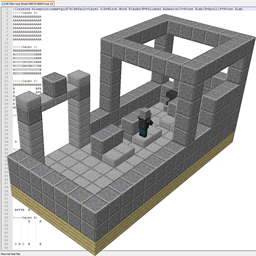
A simple usable command to export blueprints for the Minecraft Wiki.
Usage of command: /parseStructure x1 y1 z1 x2 y2 z2
Exports to Running Folder in file in format of MCWiki-<WorldName><Current System Time in Milliseconds> as a txt file.
Version 1.2 now saves in the Running Folder/MCWikiExport/<WorldName>-<Current System Time>
Current System time in yyyy-MM-dd_HH.mm.ss
Planned Features: Worldedit Compatibility – So you don’t have to manually type in coords.
常见问题
MC Wiki Blueprint Export 支持哪些 Minecraft 版本?
MC Wiki Blueprint Export 支持 Minecraft Java 版 1.11.2,可用的加载器:Forge。下载时注意选择和你游戏版本一致的文件。
MC Wiki Blueprint Export 怎么安装?
先用 PCL2 或 HMCL 启动器安装对应版本的 Forge,再把下载的 .jar 文件放进游戏目录的 mods 文件夹,重新启动游戏即可。开启了版本隔离的,mods 文件夹在 versions/版本名 下面。


评论
登录后评论和评分