
Tensura: Archive Boot
Bring Tensura's animated startup crystal to NeoForge's first loading window, before normal Minecraft mods initialize.
截图
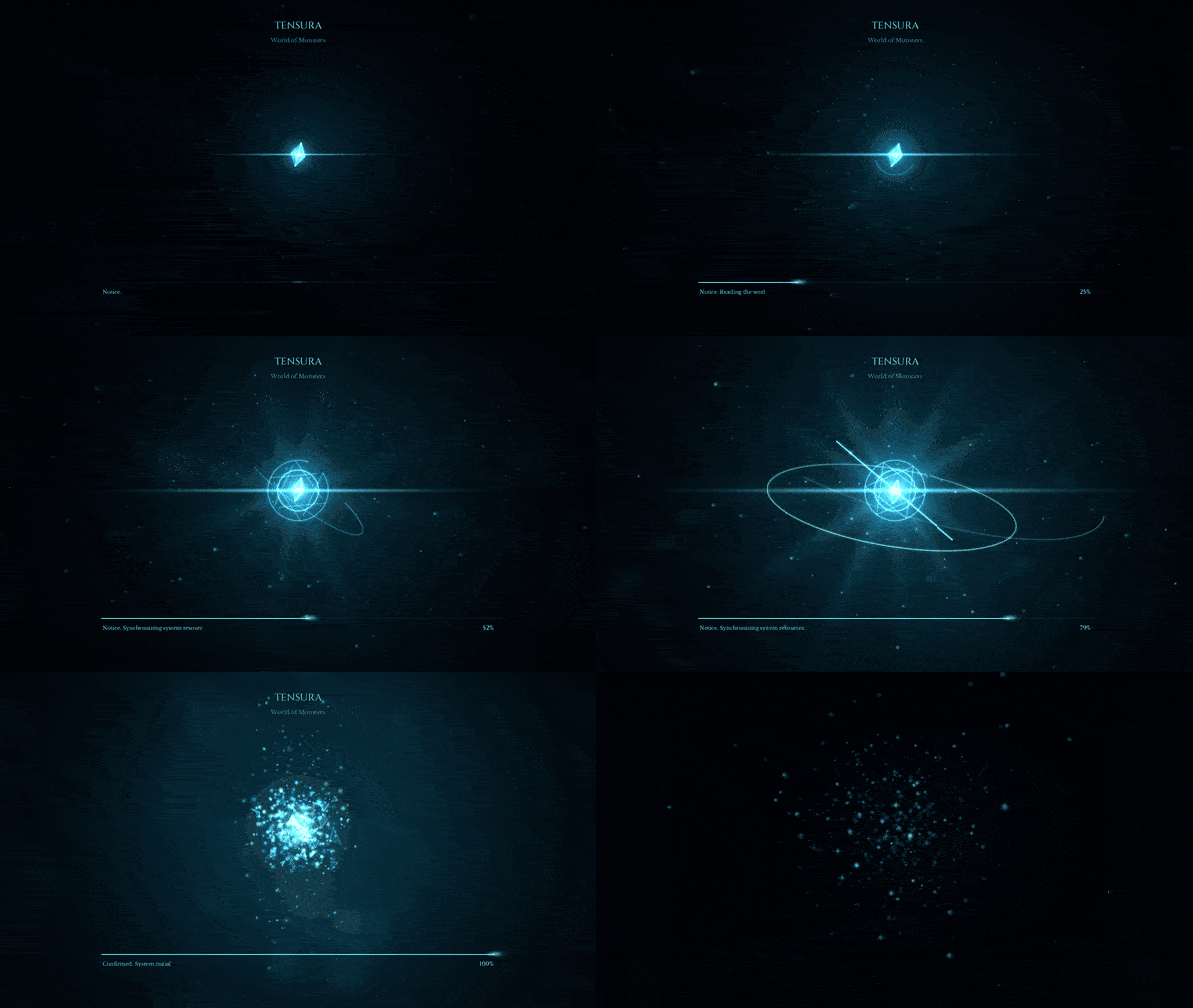
介绍
中文介绍正在准备中,下面暂时显示原文。
◆
NEOFORGE EARLY-WINDOW PRESENTATION
Tensura: Archive Boot
Let the awakening begin earlier.
Bring Tensura’s luminous startup crystal to NeoForge’s first loading window, before ordinary Minecraft mods and menus initialize.
Startup
A crystal before the world.
A rotating crystal fills the early loading window and follows its actual framebuffer size through the handoff to Minecraft. It uses an activity animation during this stage rather than an overall completion percentage.
Optional Tensura: MainMenu supplies the later loading overlays and menu presentation. Archive Boot can use shared reduced-motion preferences when that configuration is available.
Installation
Choose your early window.
Client only. Minecraft 1.21.1, NeoForge and Java 21. The helper was built against NeoForge 21.1.250. No additional gameplay mod is required.
Close Minecraft, put the Archive Boot JAR in the client’s
mods folder, and update the existing settings in config/fml.toml:earlyWindowControl = true earlyWindowProvider = "tensuraarchive"
Keep a copy of the previous provider value. Before removing the helper, restore it; NeoForge’s normal provider is
"fmlearlywindow". Archive Boot is a loader library and has no ordinary Mods-list entry.Installation
Bring it to your world.
Tensura: MainMenu is optional. Tensura: Reincarnated, GUI and HUD are not required. Restart Minecraft after changing early-window settings.
常见问题
Tensura: Archive Boot 支持哪些 Minecraft 版本?
Tensura: Archive Boot 支持 Minecraft Java 版 1.21.1,可用的加载器:NeoForge。下载时注意选择和你游戏版本一致的文件。
Tensura: Archive Boot 怎么安装?
先用 PCL2 或 HMCL 启动器安装对应版本的 NeoForge,再把下载的 .jar 文件放进游戏目录的 mods 文件夹,重新启动游戏即可。开启了版本隔离的,mods 文件夹在 versions/版本名 下面。
Hecrius 的其他作品
查看全部 →
Smooth Loading Screens
by Hecrius, SentiBuzz
减少启动时的卡顿,并让创建世界的加载界面保持流畅响应!
2万
9 天前
CurseForge
Tensura: Main Menu
by Hecrius, SentiBuzz
Tensura 主题电影感前端,包含动态镜湖、加载水晶、进入世界过渡效果、主题菜单、环形暂停菜单和可自定义字体。
4,018
6 天前
CurseForge

Custom FPS Crosshairs
by Hecrius, SentiBuzz
完全可自定义的 VALORANT 风格 Minecraft 准星,带实时编辑器、可分享代码、动态效果,最多 10 个配置档。
2,662
19 天前
CurseForge
Tensura: Death Screens
by Hecrius, SentiBuzz
受《转生史莱姆》启发的死亡动画,可选择配置并安全预览,重生后还有匹配的过渡动画回到世界。
2,619
2 天前
CurseForge
评论
登录后评论和评分