介绍
Banner mod
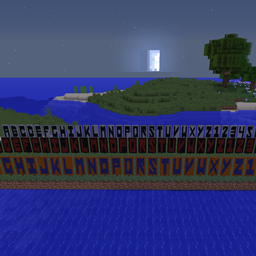
A simple mod making it easier to create your own banners.
Installation
Simply drop the jar from the releases page into your mods folder to start using the mod. If you want to run this on a server, you only need to install the mod there, people who join your server don’t need to install the mod themselves.
Configuration
You can choose the language the mod runs in by setting the appropriate language in bannermod.cfg. Currently, the following languages are supported:
* English (en_us)
* German (de_de)
* Spanish (es_es)
If you want to add support for another language, take a look at TranslationHelper#init() to see how translations are added and create a pull request.
Permission
This mod uses one permission, `bannermod.use`. This is granted to OPs by default and required to run the `/banner` command and all of its subcommands.
Usage
There are three sub-commands for this mod, two of which will give you banners:
/banner help [subcommand] // Displays a help text
/banner word <word or character> [textColor] [baseColor] // Gives you banners based on the word or character you provided
/banner special (name) [textColor] [baseColor] // Gives you a special banner as configured in special.json
Single character
/banner word A
This will give you a banner for the letter A with the default colors, white for the banner and black for the text on it.
Whole word
/banner word Walmart
This will give you banners in the default colors for the characters W, A, L, M, R and T.
Different colors
/banner word Walmart 14 15
or
/banner word Walmart red black
This will give you the same banners as with the last command, except now the base color is black and the text color is red. For a list of color codes, see the relevant entry in the Minecraft wiki.
Special
/banner special <name> [textColor] [baseColor]
This will give you special preconfigured Banners, which are defined in the special.json, which you can edit yourself, see the characters.json file for reference about the JSON structure.
常见问题
BannerMod 支持哪些 Minecraft 版本?
BannerMod 支持 Minecraft Java 版 1.12.2,可用的加载器:Forge。下载时注意选择和你游戏版本一致的文件。
BannerMod 怎么安装?
先用 PCL2 或 HMCL 启动器安装对应版本的 Forge,再把下载的 .jar 文件放进游戏目录的 mods 文件夹,重新启动游戏即可。开启了版本隔离的,mods 文件夹在 versions/版本名 下面。
评论
登录后评论和评分