Item Codex
mod that adds a gui that mod makers can add item entries to via datapacks to tell players what items do and how you get them
介绍

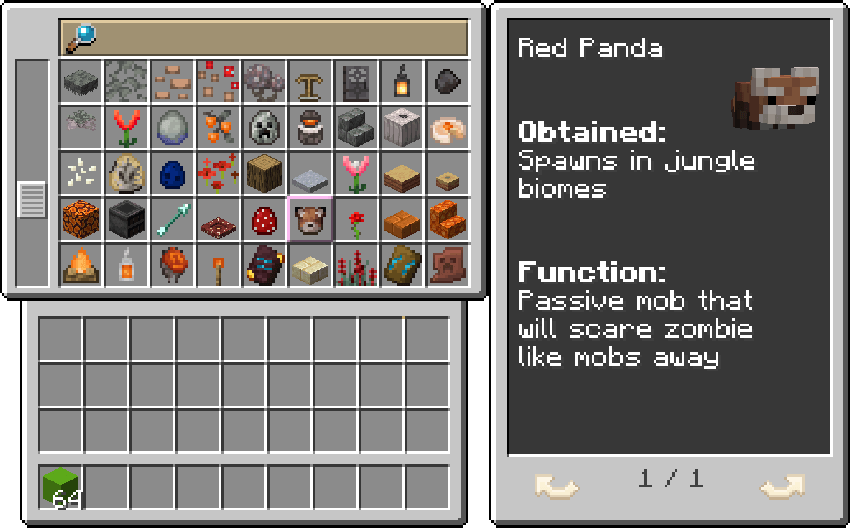
The Item Codex is a mod built for mod / modpack makers to show to players what items do and how they can be obtained without having to use third party apps!
To open the screen you can click the default keybind of “K” but this can be changed at any time in controls under the gameplay category
Some features you can showcase within the UI in the first update:
- Villager Professions
- Mobs with baby models
- Armor Trim Patterns
- Mob Effects
- Armors / Tools
- Banner Patterns
- Pottery Sherds
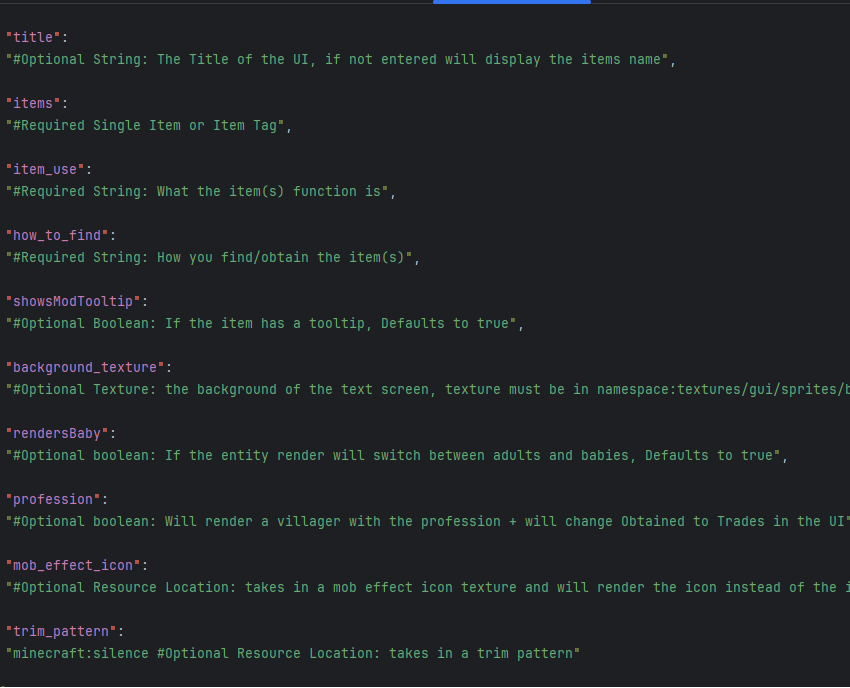
Within the base version we have added support for all Belgie’s mods but if you want to add support for your mods you can with a datapack by adding jsons in “data/namespace/item_codex/item.json”
Options you can customize:
There is also a debug option for adding your own items in the screen, inside of the item_codex config you can enter a list of mod ids (example: “minecraft”), once you have the list of mod ids you can run the command “/refresh_codex” and you will see how many items within the mod ids have not been registered within the item codex screen
常见问题
Item Codex 支持哪些 Minecraft 版本?
Item Codex 支持 Minecraft Java 版 1.21.1–26.3,共 10 个版本,可用的加载器:Forge / NeoForge。下载时注意选择和你游戏版本一致的文件。
Item Codex 怎么安装?
先用 PCL2 或 HMCL 启动器安装对应版本的 Forge / NeoForge,再把下载的 .jar 文件放进游戏目录的 mods 文件夹,重新启动游戏即可。开启了版本隔离的,mods 文件夹在 versions/版本名 下面。

评论
登录后评论和评分