
Seed Protection
Hate that when you jump or even just walk on crops they instantly break and you have to replant them again? This mod fixes this issue and also makes sure that mobs cant break ur crops either.
介绍
Seed Protect is a simple utility mod that stops farmland from being trampled. No more accidentally destroying your crops when you jump, and no more uprooted fields from wandering mobs. Install it and your crops stay safe — automatically.



📦 Installation
- Install the mod loader of your choice (Fabric, Forge, or NeoForge).
- Place the
seedprotect-<version>.jarfile into your.minecraft/modsfolder. - Launch Minecraft and enjoy — no configuration needed.
Works on: single-player worlds, LAN worlds, and dedicated servers.
🎥 How It Works
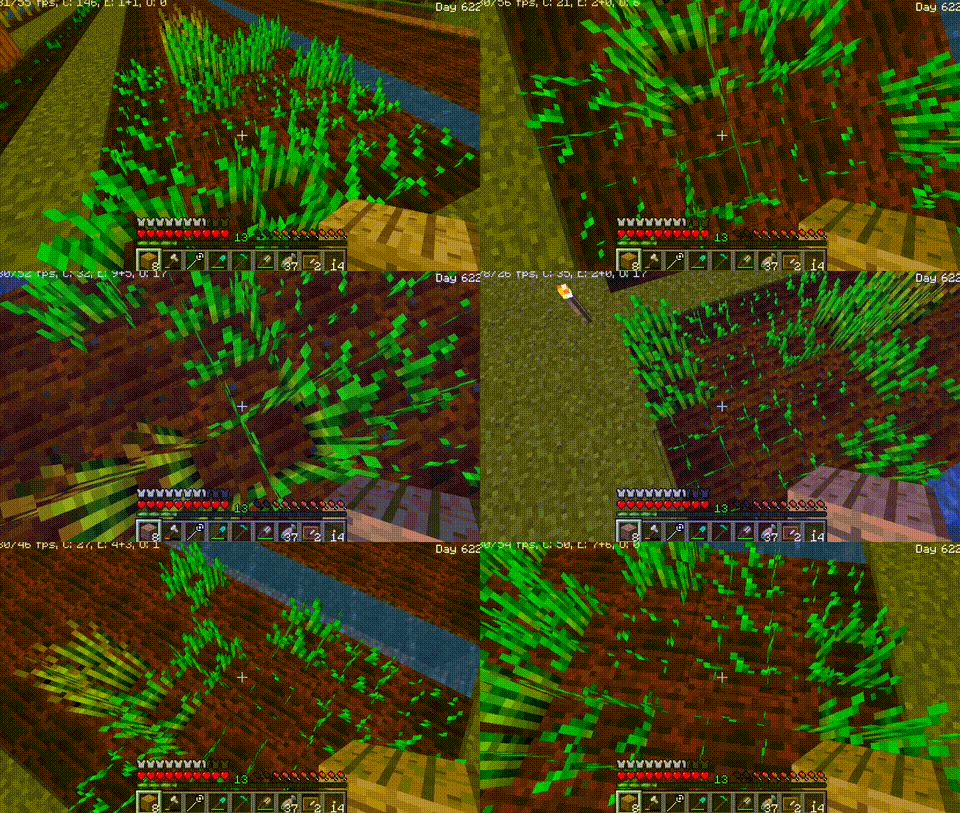
The moment you step onto your farmland or a mob wanders across it, the game tries to turn the farmland into dirt — destroying your planted crops. Seed Protect cancels that change before it happens. Your farmland stays as farmland, your crops stay planted, and you never have to replant after a clumsy jump or a zombie stroll.
✨ Features
- No more accidental trampling — Players can jump, sprint, or walk on farmland without turning it to dirt.
- Mob-proof fields — Cows, zombies, villagers, and any other mobs cannot uproot your crops.
- Fall damage preserved — Jumping on farmland still hurts the player (as in vanilla), but the farmland stays intact.
- Zero configuration — Install the mod and it runs immediately; no commands, no items, no menus.
- Server-side logic — Works on dedicated servers without requiring clients to install the mod (though clients are also supported).
- Multi-loader support — Available for Fabric, Forge, and NeoForge across multiple Minecraft versions.

🧩 Compatibility
| Minecraft Version | Loader | Status |
|---|---|---|
| 1.20.1 | Forge | ✅ Supported |
| 1.20.1 | Fabric | ✅ Supported |
| 1.21.1 | Fabric | ✅ Supported |
| 1.21.1 | NeoForge | ✅ Supported |
| 1.21.11 | Fabric | ✅ Supported |
| 26.1.2 | Fabric | ✅ Supported |
Required dependencies: None.
Known incompatibilities: None known.
Works alongside: All performance mods (Sodium, Lithium, etc.), shader loaders (Iris, Oculus), and content mods.
❓ FAQ
Does this need to be installed on the server?
Yes. The mod is required on both the client and the server for full functionality. On dedicated servers, the server must have the mod installed to prevent mob trampling. If you’re playing single-player or LAN, install it on the client side.
Does this change vanilla mechanics?
It suppresses farmland trampling, but does not alter anything else. Fall damage, crop growth, and all other mechanics remain unchanged.
Is it compatible with OptiFine?
Yes, Seed Protect has no rendering changes and works fine alongside OptiFine.
Does this mod work with modded crops?
Yes. Seed Protect prevents farmland from turning into dirt regardless of what crop is planted on it — it works with any mod that uses vanilla farmland mechanics.
I found a bug, where do I report it?
Please use the issue tracker. Include your Minecraft version, mod loader, and any crash/log files.
💖 Support the Project
If you find this mod useful, consider supporting development:

📝 Modpacks & License
Licensed under the MIT License. You are free to include this mod in any modpack (Modrinth, CurseForge, or otherwise) with attribution. Do not redistribute the JAR files outside of approved platforms.
<details>
<summary>Credits</summary>
- Original Author: Itamio
- Contributor (Porting & Multi-Version Support): Asd1281yss
- Based on the original 1.12.2 Forge mod by Itamio, ported and modernized to support Fabric, Forge, and NeoForge across multiple versions.
- Source code: GitHub
- Issues: GitHub Issues
</details>
常见问题
Seed Protection 支持哪些 Minecraft 版本?
Seed Protection 支持 Minecraft Java 版 1.12.2–26.1.2,共 5 个版本,可用的加载器:Fabric / Forge / NeoForge。下载时注意选择和你游戏版本一致的文件。
Seed Protection 怎么安装?
先用 PCL2 或 HMCL 启动器安装对应版本的 Fabric / Forge / NeoForge,再把下载的 .jar 文件放进游戏目录的 mods 文件夹,重新启动游戏即可。开启了版本隔离的,mods 文件夹在 versions/版本名 下面。
Noobyboom 的其他作品
查看全部 →
Create big cannons – Explosive TNT
让TNT像机械动力:大炮模组中的爆炸炮弹一样爆炸。(专为1.8.9起床战争中的TNT和火球客户端可用而制作)

Keep Inventory
Enforces keepInventory gamerule to always be true. Never lose your items on death!

Ultra Fast Fps Display
A colorful display of your current fps red = bad, yellow = ok, green = playable, purple = fantastic
Instant Auto Totem
Hate dying because you forget to keep a Totem of Undying in your offhand? This mod fixes that.
评论
登录后评论和评分