HBM’s Nuclear Tech Mod+Refined Strotage
Automatically fills HBM CE Assembly Machine recipes from a connected Refined Storage network.
截图
介绍
HBM RS Autofill is a small compatibility addon for HBM’s Nuclear Tech Mod: Community Edition and Refined Storage on Minecraft 1.12.2.
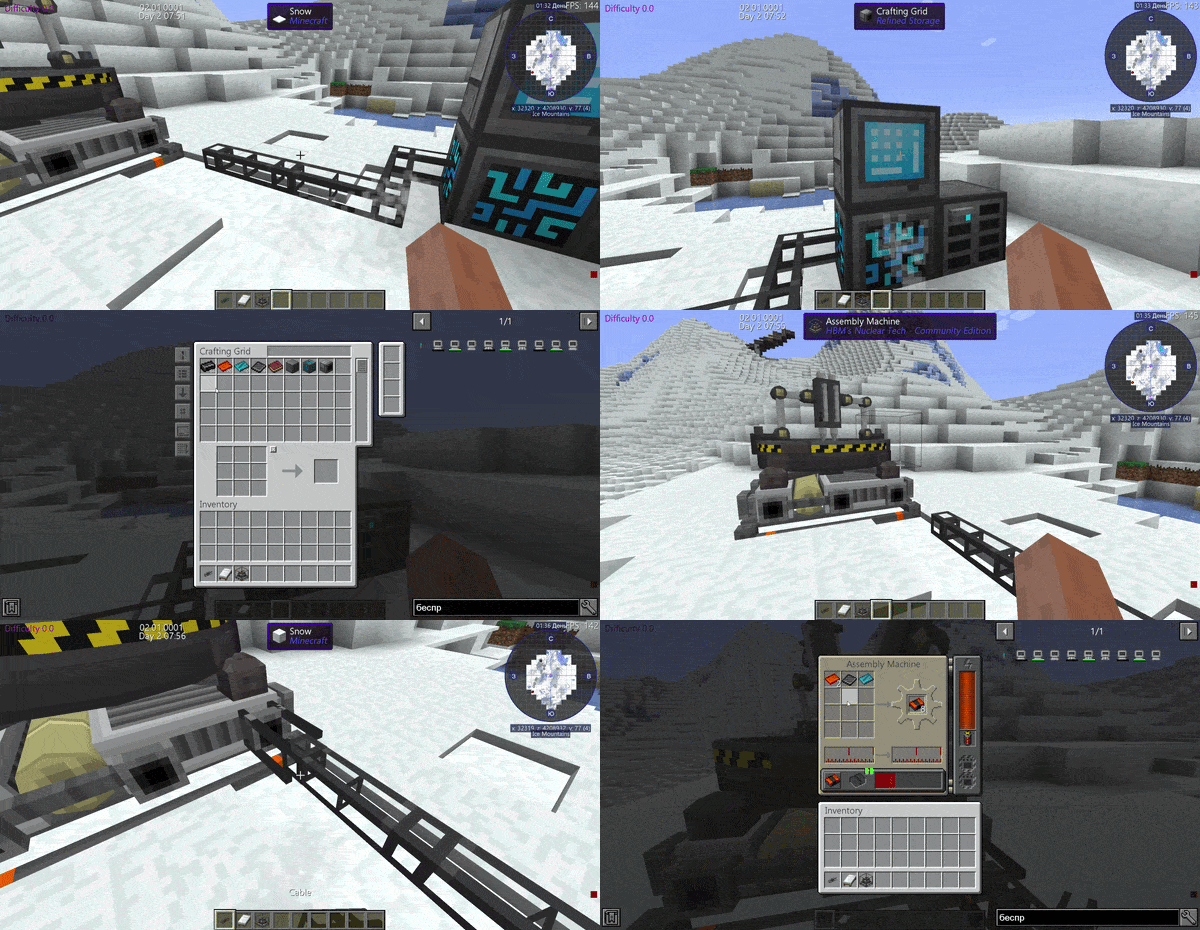
When you select a recipe in the HBM Assembly Machine, the addon can automatically pull the required item ingredients from your Refined Storage network and place them into the machine’s input slots. No more running back and forth between storage and the assembler.
Features:
Automatically fills missing item ingredients for the selected Assembly Machine recipe.
Works with Refined Storage cables connected to HBM Assembly Machine IO ports.
Supports Refined Storage Wireless Transmitters as a wireless fallback.
Adds a small visual cable attachment so RS cables look connected to the machine.
Respects HBM recipe requirements, blueprint pools, wildcard damage, NBT-aware stacks, and Ore Dictionary ingredients.
Only fills recipe input slots, leaving batteries, blueprints, upgrades, and outputs alone.
Configurable scan speed, transfer limit, cable visuals, and wireless support.
How to use:
1. Place an HBM Assembly Machine.
2. Select a recipe in the machine.
3. Connect a Refined Storage cable/network block to one of the machine’s IO port positions, or place a powered RS Wireless Transmitter in range.
4. Make sure the required ingredients are available in your RS storage.
5. The addon will automatically move the missing items into the Assembly Machine.
Requirements:
Minecraft Forge 1.12.2
HBM’s Nuclear Tech Mod: Community Edition
Refined Storage
Current limitations:
– Item ingredients only.
– Fluids are not moved automatically yet.
常见问题
HBM’s Nuclear Tech Mod+Refined Strotage 支持哪些 Minecraft 版本?
HBM’s Nuclear Tech Mod+Refined Strotage 支持 Minecraft Java 版 1.12.2,可用的加载器:Forge。下载时注意选择和你游戏版本一致的文件。
HBM’s Nuclear Tech Mod+Refined Strotage 怎么安装?
先用 PCL2 或 HMCL 启动器安装对应版本的 Forge,再把下载的 .jar 文件放进游戏目录的 mods 文件夹,重新启动游戏即可。开启了版本隔离的,mods 文件夹在 versions/版本名 下面。
SilverMistDev 的其他作品
查看全部 →
StockBridge:Refined Strotage+Create
将机械动力自动化接入精致存储 2。一个方块即可将整个 RS 网络作为物品栏提供给仓库、漏斗和机械手使用。
This is unreal(ARG)
一款故事向恐怖 ARG。你在一个狭小的世界中醒来——这里并非真实。
Lost in Oldcraft.jar
恐怖来袭。你加载了一个旧版 Alpha 地图,还有别的东西跟着你一起进来了。

Don’t Go Out(Dweller)
夜晚有东西出来。每晚它都更近。不要出去。
评论
登录后评论和评分