
FlexSpecMod
Customize your F3 debug screen with fake FPS, CPU, GPU, and memory to flex your specs.
介绍
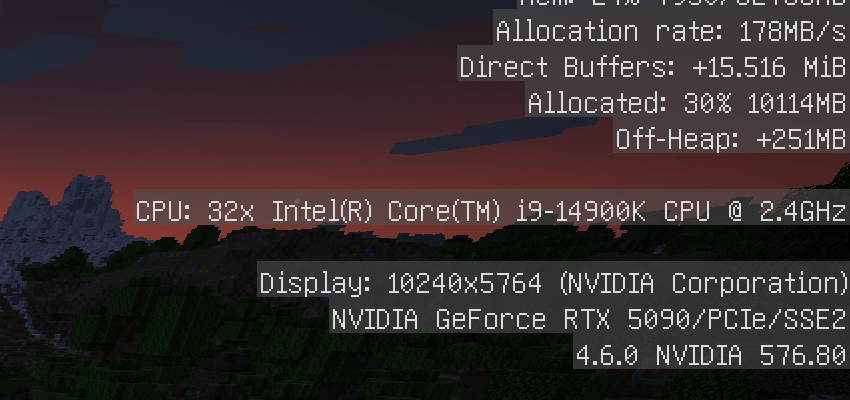
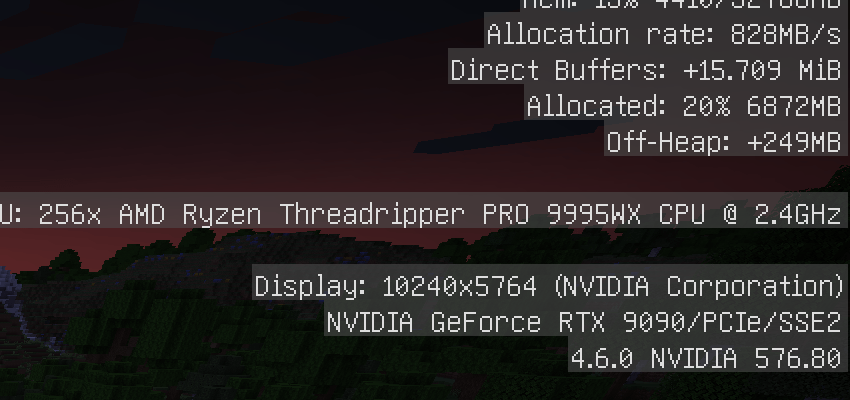
FlexSpecMod
Flex Spec Mod lets you fake your system specs shown in Minecraft’s F3 debug screen.
Want to show off an imaginary RTX 5090 or a 32-core CPU? How about a 1000+ FPS screenshot? Now you can.
This mod doesn’t affect actual performance — it’s entirely cosmetic and client-side only.
Perfect for screenshots, videos, or just flexing with friends.
Features
– Fake FPS with custom framerate multipliers
– Override displayed memory and allocated RAM
– Spoof your CPU name (e.g., “32x Intel(R) Core(TM) i9-14900K CPU @2.4GHz”)
– Fake your GPU brand, model, and driver version (e.g., “NVIDIA GeForce RTX 5090”)
– Not limited to real hardware — you can invent future parts like “NVIDIA RTX 9090 Ti” or “Intel Core Ultra 9-9285K”
– Modify display resolution shown on screen (scaled or fixed pixel size)
Configuration
After launching the game once, the config file will be generated here:
[GameDirectory]/config/flexspecmod.json
You can edit:
– Framerate multiplier (e.g. `3.639`)
– Memory size in MB
– CPU and GPU info
– Display size (multiplier or fixed resolution)
Technical
– Requires Fabric, Fabric API
– Client-side only — no server required
– Compatible with most mods (e.g. sodium, indium and distant horizons)
常见问题
FlexSpecMod 支持哪些 Minecraft 版本?
FlexSpecMod 支持 Minecraft Java 版 1.20–1.21.8,共 15 个版本,可用的加载器:Fabric。下载时注意选择和你游戏版本一致的文件。
FlexSpecMod 怎么安装?
先用 PCL2 或 HMCL 启动器安装对应版本的 Fabric,再把下载的 .jar 文件放进游戏目录的 mods 文件夹,重新启动游戏即可。开启了版本隔离的,mods 文件夹在 versions/版本名 下面。

评论
登录后评论和评分