
截图
介绍

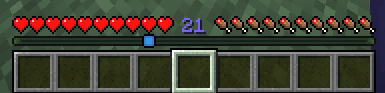
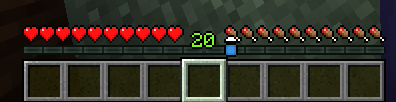
A small mod that you can use to _visually tweak_ how the level indicator looks (toggle shadow or outline, change the text color or the _Y position_) and toggle whether the experience bar should still appear while the locator bar waypoints are present.
The settings can be accessed via ModMenu in-game or directly with the file .minecraft/config/xdbar.properties!
There are some cool examples at the gallery tab!
Contributing
If you want to report an issue, suggest an idea or anything alike, feel free to open an Issue or a Pull Request on the Github page! Do keep in mind that not all ideas are to be implemented, but they’re always welcome.

常见问题
XDBar 支持哪些 Minecraft 版本?
XDBar 支持 Minecraft Java 版 1.21.6–26.3,共 11 个版本,可用的加载器:Fabric / Quilt。下载时注意选择和你游戏版本一致的文件。
XDBar 怎么安装?
先用 PCL2 或 HMCL 启动器安装对应版本的 Fabric / Quilt,再把下载的 .jar 文件放进游戏目录的 mods 文件夹,重新启动游戏即可。开启了版本隔离的,mods 文件夹在 versions/版本名 下面。运行环境:仅客户端。
Lukiiy 的其他作品
查看全部 →
Flat Drops
Rotates most items & blocks to appear as if they're on the ground in the drop animation

F3Mod
A personal mod that "reworks" the F3 menu to include more data, make some features toggleable (graph & entity ids) and adds an API!

F3DeathCoords
A simple mod that displays your death pos in the F3 Menu using the F3Mod!
F3DeathCoords
A simple mod that displays your death pos in the F3 Menu using the F3Mod!
评论
登录后评论和评分