Jester Stalkers Java Edition 2.0.0
A creepy jester stalks you as the nights go on — a slow-burn chase on night 3, a break-in chase if you sleep past night 5, ambient screams from nearby Jesters, and real jumpscares (camera shake, screams, screen flash) when he catches or kills you.
截图


介绍
Jester Stalkers
A creepy jester is watching you sleep — and hunting you down.
Jester Stalkers adds four twisted jester mobs to your world, each with their own unsettling behavior. This isn’t a “spawn and forget” mob pack — it’s a scripted horror experience built to catch you off guard.
Features
The Evil Jester (Day 3): Once night 3 arrives, an Evil Jester spawns close to a random player and begins a slow-burn chase — the screen darkens, a thick fog closes in, and an on-screen counter ticks down as he gets closer.
The Bent Jester: A twisted, bent-armed variant that stalks the shadows.
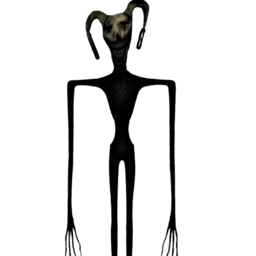
The Long Boy Jester: An eerie, elongated jester that screams from the darkness when it senses you nearby.
The Jester (Chase): Try to sleep past night 5 and you’ll wish you hadn’t — a warning whispers that something’s outside, then a Jester bursts in and chases you with a shaking “RUN” prompt until you escape. Sleeping is locked out entirely until he’s gone.
Jumpscares: Get caught by any of the four Jesters and you’re hit with a genuine jumpscare — a camera jolt, a scream, and a flash across your screen. Die to one, and a custom jumpscare stinger plays over a “The Jester Got You” death screen.
Ambient dread: The Long Boy Jester and the Chase Jester scream on a loop whenever they’re near, so you always know something’s close.
Manual trigger: Use !TheDoorJester in chat to summon the night-5 chase on demand, any day.
Requirements
Minecraft Java Edition Forge 1.21.1 NEEDS
GeckoLib
常见问题
Jester Stalkers Java Edition 2.0.0 支持哪些 Minecraft 版本?
Jester Stalkers Java Edition 2.0.0 支持 Minecraft Java 版 1.21.1,可用的加载器:Forge。下载时注意选择和你游戏版本一致的文件。
Jester Stalkers Java Edition 2.0.0 怎么安装?
先用 PCL2 或 HMCL 启动器安装对应版本的 Forge,再把下载的 .jar 文件放进游戏目录的 mods 文件夹,重新启动游戏即可。开启了版本隔离的,mods 文件夹在 versions/版本名 下面。
评论
登录后评论和评分