
MCDisplays
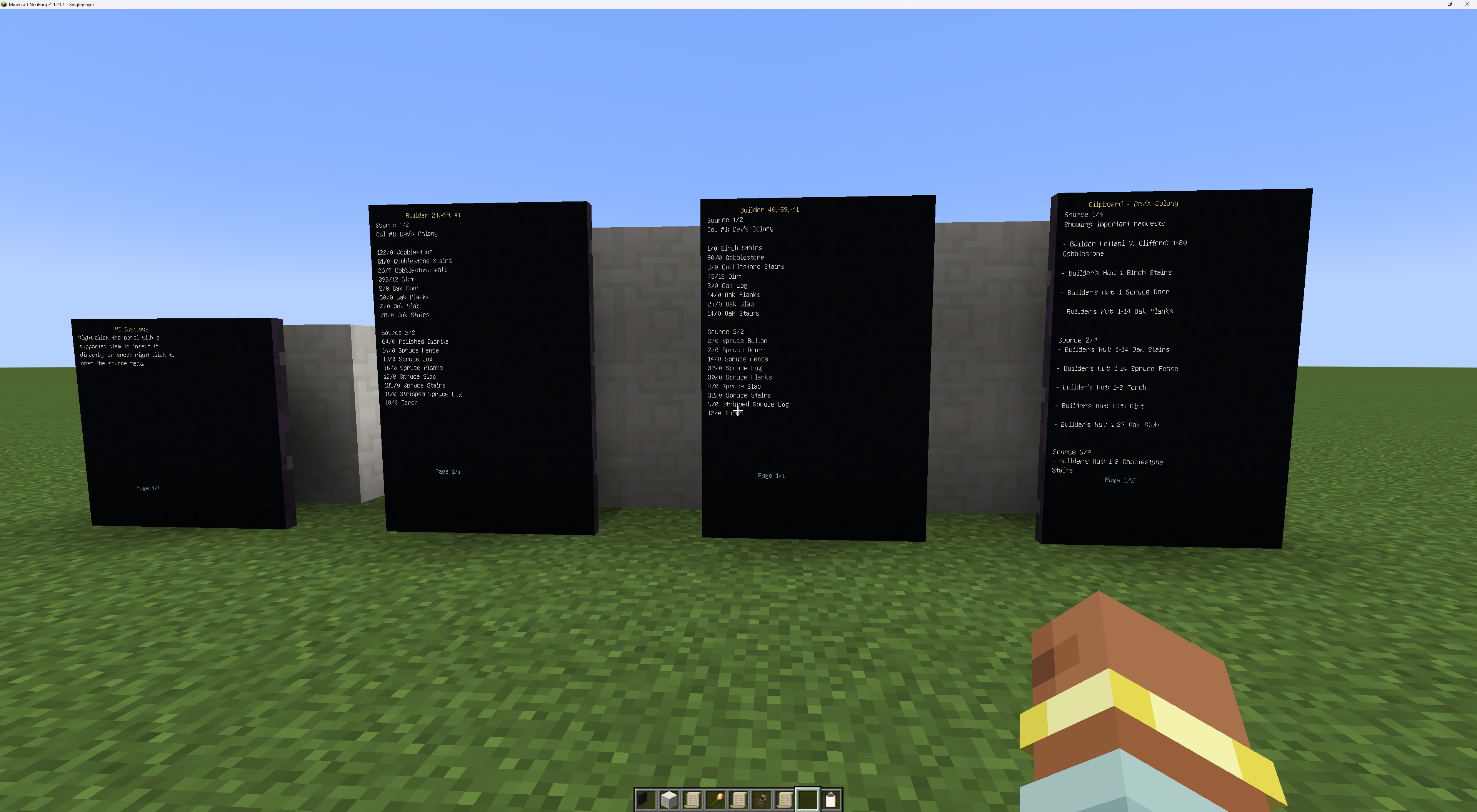
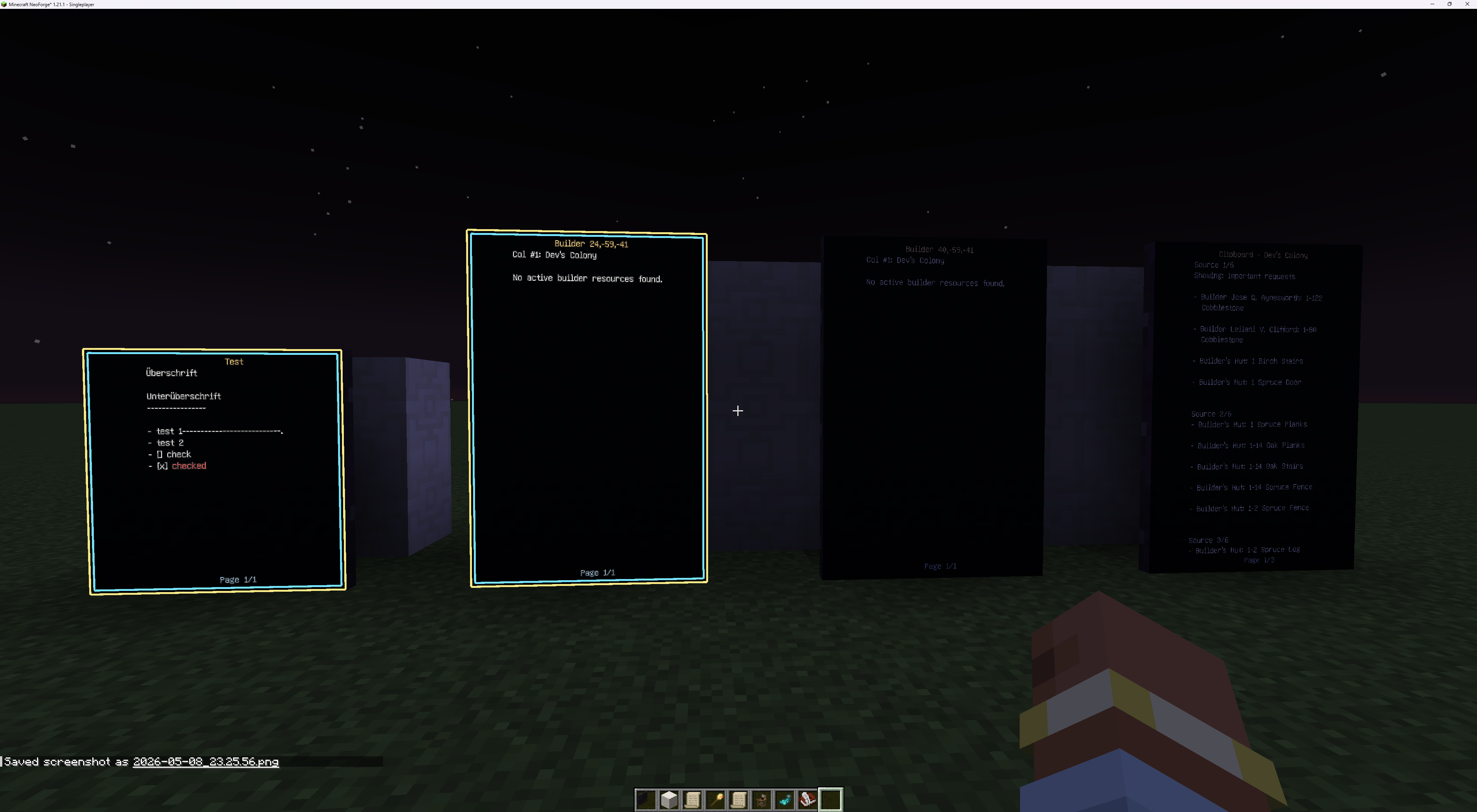
A small addon mod to display informations (from books/quil, minecolonies resourcescroll and clipboard) keep up to date.
截图
介绍
Short Description
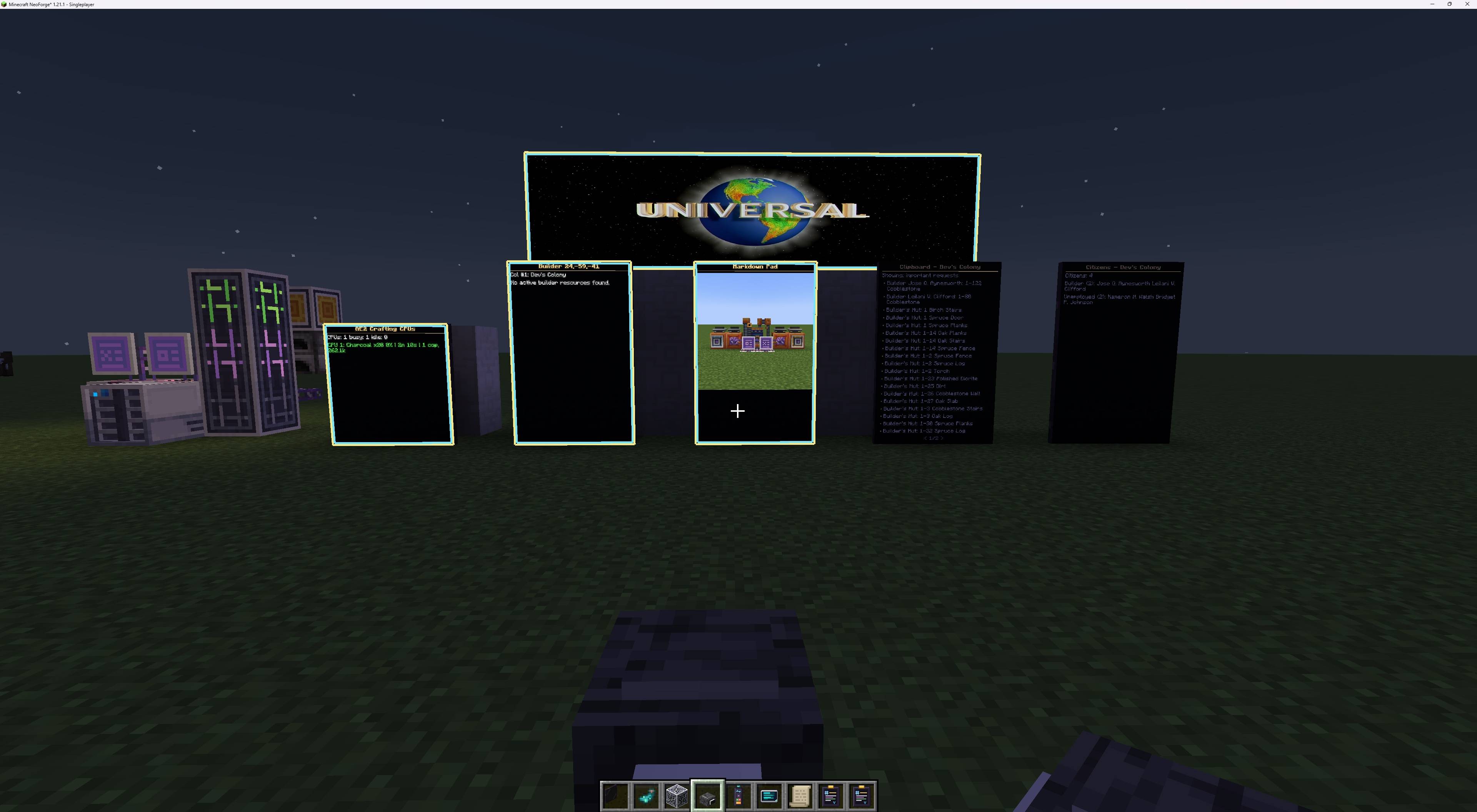
Modular multiblock wall displays for Minecraft! Build giant cinema screens with online video streaming & spatial audio, write rich formatted notes with the in-game Markdown Pad, or track live MineColonies colony data and AE2 Crafting CPUs directly on your walls.
Long Description
MC Displays brings clean, immersive, and fully modular multiblock display walls to Minecraft. Whether you want to build a massive 16×9 movie theater with live online video streaming, design high-tech colony control rooms, monitor AE2 autocrafting jobs, or write formatted in-game signage with a live-preview Markdown editor, MC Displays does it all seamlessly.
Display panels automatically merge into seamless multiblock screens of any size (from a simple 1×1 plaque to giant stadium walls). Content scales cleanly to fit your display geometry, auto-refreshes in real time, and supports glowing neon illumination in the dark.
Available for Minecraft 1.21.1 (NeoForge) and 1.20.1 (Forge).
✨ Flagship Features
🎬 Cinema Projector & Video Streaming (Powered by WATERMeDIA)
Turn any display wall into a real in-game cinema!
- Real-Time Video Playback: Stream YouTube, Twitch, Kick, direct MP4, WebM, and HLS (
.m3u8) live streams straight onto your screen walls. - Cinema Remote Linking: Simply right-click a display cluster with the Cinema Remote, then right-click your Cinema Projector to bind them wirelessly.
- Borderless Fullscreen Auto-Scaling: Videos dynamically adapt to your wall’s aspect ratio and resolution without unsightly letterbox borders.
- Nighttime Cinema Lighting: Displays render cinema feeds at full brightness in the dark for an authentic theater experience.
- Modern 480×320 Player Interface: Enjoy a spacious GUI featuring live status badges (Link / Playback / Engine), a 1-click clipboard paste button (
Paste), quick clear (X), and instant playback diagnostics.
🔊 3D Spatial Cinema Acoustics
- Toggleable Sound Origin: Choose whether sound emanates directly from the Cinema Projector block (booth speaker) or the Screen wall via a simple 1-click toggle in the GUI.
- Continuous Camera-Independent Ticking: Walk freely around the room or look away—audio volume and spatial falloff continue to track your movement smoothly without cutting out.
- Natural Linear Distance Falloff: Sound fades realistically with distance rather than abruptly dropping to zero.
– Zero-Latency Real-Time Controls: Volume (0–100%) and Range (8–128m) sliders update instantly in your headphones as you drag them.
📝 Markdown Pad & In-Game Visual Editor
The Markdown Pad is a dedicated handheld authoring tool for creating beautiful custom screen documents.
- Live WYSIWYG Preview: View your rendered document side-by-side with your text editor in real time.
- Syntax Wiki Sidebar: Built-in multi-page documentation with 1-click syntax insertion for headers, bold, italics, tables, and colors.
- Rich Typography & Formatting:
- Headers (
#to######), blockquotes, ordered lists, unordered lists, and task checkboxes (- [x]) - Tables with pipe syntax (
| header |) and column alignment - Code blocks (
```) and inline code (code) - Color tags:
[red],[green],[blue],[gold], hex codes ([color=#ff8800]), and reset tags ([/])
- Headers (
– Remote Image Loading: Embed web images with <img src="https://..." width="100" />. Images download asynchronously, cache safely to disk, and respect configurable domain blacklists.
🏛️ Colony Dashboard (MineColonies Integration)
Keep tabs on your growing civilization with a dedicated wall-mounted monitoring station!
- Six Live Views:
- Citizens: Full population directory grouped by profession, including citizen names, age, and gender.
- Builders: Active builder work orders, target building levels, and real-time construction percentages.
- Sick: Directory of sick citizens, their diagnosed diseases, and home coordinates.
- Deaths: Colony graveyard log recording citizen casualties and circumstances.
- Statistics: Global colony metrics (ores mined, blocks placed, enemies slain, food consumed).
- Warehouse: Colony warehouse building levels and storage capacity utilization.
- How to Use:
- Sneak-right-click any MineColonies building to link the dashboard item.
- Right-click in your hand to cycle between the six views.
3. Insert it into a display wall—it continuously auto-refreshes every 5 seconds.
⚡ AE2 Crafting-CPU Monitor (Applied Energistics 2 Integration)
Monitor your ME Network’s crafting operations at a glance!
- Live Crafting Status: Displays active crafting jobs, storage capacity, and coprocessor counts for all connected Crafting CPUs.
- Visual Alert System: Jobs exceeding warning or alert thresholds change colors automatically so bottlenecks are spotted instantly.
– How to Use: Sneak-right-click any ME Network block (cables, controller, or crafting units) to link, then insert the item into any display panel.
📖 Vanilla Book & Quill Support
- Written Books and Books & Quills can be placed directly into any display panel.
- Pages scale smoothly across the multiblock wall.
– Turn pages manually with an empty hand (right-click right half for next page, left half for previous page).
🛠️ Display Controls & Quality of Life
- Multiblock Assembly: Place display panels adjacent to each other on the same wall plane. They automatically merge into a single seamless screen.
- Inserting Items: Right-click a display with any supported item (Markdown Pad, Books, Colony Dashboard, AE2 Monitor) to mount it.
- Glow & Neon Frame: Right-click with a Glow Ink Sac to illuminate text with full-brightness outlines and a glowing frame border. Right-click with a standard Ink Sac to turn illumination off.
- Accessing Settings: Sneak-right-click any display panel with an empty hand to open the display management menu.
- Multiplayer Protection & Privacy:
- Displays are automatically claimed by the player who first places content into them.
– Owners can toggle Private Mode to prevent other players from removing items, turning pages, or modifying settings.
🔨 Crafting Recipes
All blocks and tools are fully craftable in survival mode:
- Display Panel: 4 Smooth Stone, 4 Glass Panes, and 1 Redstone Dust (yields 4 panels).
- Cinema Projector: 4 Smooth Stone, 2 Redstone Lamps, 2 Iron Ingots, and 1 Daylight Detector.
- Cinema Remote: 4 Iron Ingots, 1 Redstone Dust, and 1 Ender Pearl.
- Markdown Pad: 1 Book, 1 Feather, 1 Ink Sac, and 1 Redstone Dust.
- Colony Dashboard: 1 MineColonies Clipboard (or Book), 4 Iron Ingots, and 1 Redstone Dust.
– AE2 Crafting-CPU Monitor: 1 Illuminated Panel (or Quartz Glass), 4 Iron Ingots, and 1 Certus Quartz / Fluix Dust.
⚙️ Configuration
MC Displays provides full server and client configuration options:
- Display Dimensions: Configure the maximum allowable multiblock width and height (default up to 16×16 or unlimited).
- Refresh Rates: Customize the automatic update interval for live colony and network feeds.
- Media Safety: Set domain blacklists to control which external image and video hosting domains can be loaded on client screens.
– Manual Page Turning: Toggle whether players can flip through pages with empty-hand clicks.
🔌 Compatibility & Requirements
| Minecraft Version | Mod Loader | Recommended Java |
|---|---|---|
| 1.21.1 | NeoForge (21.1+) | Java 21 |
| 1.20.1 | Forge (47.4+) | Java 17 |
Optional Integrations:
- WATERMeDIA: Required for online video streaming and cinema playback. (Add the WATERMeDIA YouTube addon for YouTube streams).
- MineColonies: Required for Resource Scrolls, Clipboards, and the Colony Dashboard.
– Applied Energistics 2: Required for the AE2 Crafting-CPU Monitor.
❤️ Credits & Acknowledgments
- Special thanks to Bludeuwedd, creator of the original Colony Dashboard mod, for collaborating and granting permission to integrate the Colony Dashboard into MC Displays.
- Special thanks to the WATERMeDIA development team for their multimedia playback framework.
常见问题
MCDisplays 支持哪些 Minecraft 版本?
MCDisplays 支持 Minecraft Java 版 1.20.1–1.21.1,共 2 个版本,可用的加载器:Forge / NeoForge。下载时注意选择和你游戏版本一致的文件。
MCDisplays 怎么安装?
先用 PCL2 或 HMCL 启动器安装对应版本的 Forge / NeoForge,再把下载的 .jar 文件放进游戏目录的 mods 文件夹,重新启动游戏即可。开启了版本隔离的,mods 文件夹在 versions/版本名 下面。
BlackLightningStudio 的其他作品
查看全部 →
AE2Colonies (Applied Energistics 2 × MineColonies)
Seamlessly integrate your MineColonies warehouse directly into your Applied Energistics 2 ME Network!
Endgame Colonies
The ultimate fusion of civilization building, industrial automation, and deep exploration.
评论
登录后评论和评分