
截图
介绍
感谢 NerdyPuzzle 制作了用于制作 1.20.1 版本的插件,也感谢 Azzier 制作了用于制作 1.19.2 和 1.18.2 版本的插件
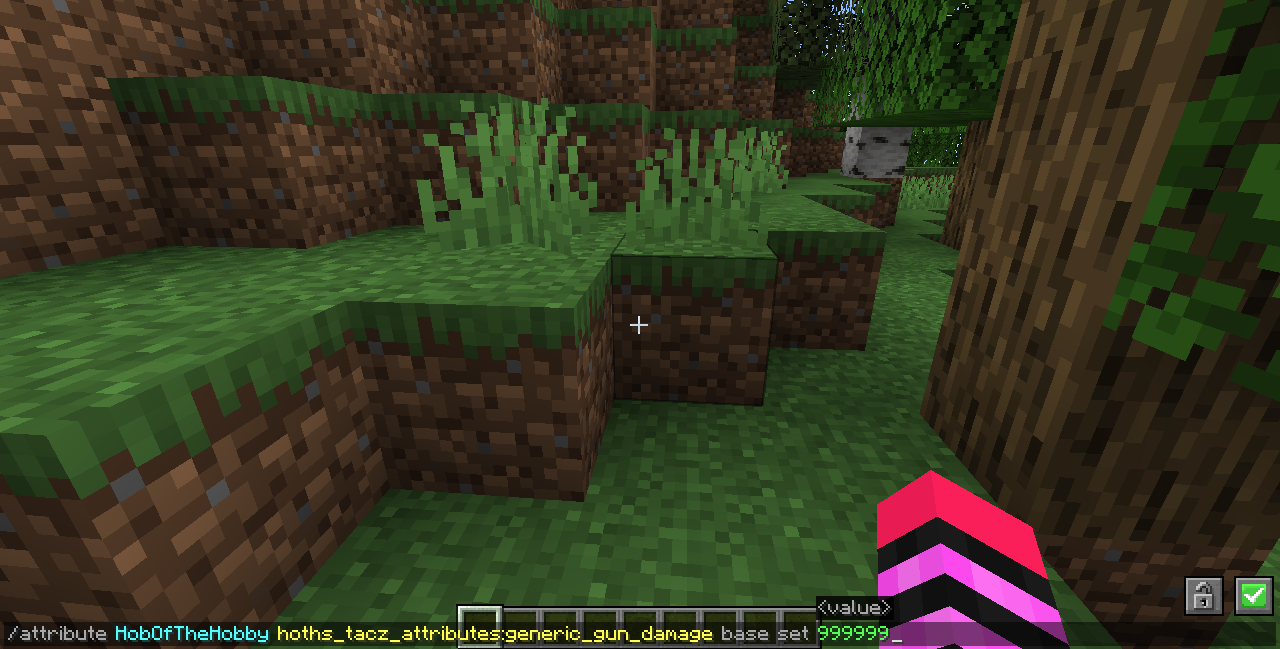
本模组仅添加属性,因此本模组本身只能通过命令使用。本模组的主要用途是作为整合包作者的实用工具,供他们使用能够修改属性的模组来进行平衡和/或等级进度调整。
无论你拥有哪些 TaCZ 枪械包和附加包,只要枪械使用 TaCZ Bullet 伤害类型或 Explosion Player 伤害类型,这七个属性就始终会生效:
hoths_tacz_attributes:firemode_auto_damage
hoths_tacz_attributes:firemode_burst_damage
hoths_tacz_attributes:firemode_semi_damage
hoths_tacz_attributes:generic_gun_damage
hoths_tacz_attributes:melee_gun_damage
hoths_tacz_attributes:ads_gun_damage
hoths_tacz_attributes:hipfire_gun_damage
1.20.1 版本中除上述七个属性外所支持的枪械包列表:
最高至 1.0.3 版本的 TaCZ Base Gun Pack 枪械
最高至 0.2.2 版本的 Lesraisins Append Pack 枪械
最高至 1.3v 版本的 Fibers’ Guns Pack 枪械
最高至 1.1 版本的 Elite x Quality Guns 枪械
仅对受支持枪械生效的伤害属性列表:
单把枪械伤害属性(例如 hoths_tacz_attributes:glock_17_damage)
hoths_tacz_attributes:pistol_damage
hoths_tacz_attributes:smg_damage
hoths_tacz_attributes:shotgun_damage
hoths_tacz_attributes:sniper_damage
hoths_tacz_attributes:rifle_damage
hoths_tacz_attributes:machine_gun_damage
hoths_tacz_attributes:heavy_weapons_damage
本模组添加的游戏规则列表:
TaCZ Melee Firemode Damage
(当枪械设置为 AUTO、BURST 和 SEMI 开火模式时,允许 TaCZ 的特殊近战攻击受到对应开火模式伤害属性的加成)
TaCZ Melee Generic Attack Damage
(允许 TaCZ 的特殊近战攻击受到 minecraft:generic.attack_damage 属性的加成)
TaCZ Melee Generic Gun Damage
(允许 TaCZ 的特殊近战攻击受到 hoths_tacz_attributes:generic_gun_damage 属性的加成)
TaCZ Melee Weapon Group Damage
(允许 TaCZ 的特殊近战攻击受到枪械所在创造模式标签页的伤害属性的加成)
TaCZ Melee Individual Gun Damage
(允许 TaCZ 的特殊近战攻击受到所使用枪械的伤害属性的加成)
如果你对任何特定 TaCZ 枪械包有支持请求,只需留下评论即可。此外,以下是在 Mcreator 中制作本模组时已知的怪癖:
Mcreator 不允许将自定义按键绑定设置为鼠标右键,因此如果你想使用 ads 或 hipfire 属性,并且希望自动完成,你需要使用其他模组来设置“Set to TaCZ AIM”按键绑定。
没有基于配件的伤害属性(我找不到让 Mcreator 获取 NBT 标签的 NBT 标签的方法,因此无法制作类似消音器伤害属性这样的东西)
如果你的主手持有 TaCZ 枪械,适用的伤害属性将加成你使用 TaCZ Bullet、Explosion Player 和 Player 伤害类型造成的任何伤害。(最容易被滥用的就是 Explosion Player 伤害类型,因此请小心这种边缘用法)
如果我以后在不同版本之间发布任何更新,都会通过这个 Youtube 频道发布:
常见问题
Hoth’s TaCZ Attributes 支持哪些 Minecraft 版本?
Hoth’s TaCZ Attributes 支持 Minecraft Java 版 1.18.2–1.20.1,共 3 个版本,可用的加载器:Forge。下载时注意选择和你游戏版本一致的文件。
Hoth’s TaCZ Attributes 怎么安装?
先用 PCL2 或 HMCL 启动器安装对应版本的 Forge,再把下载的 .jar 文件放进游戏目录的 mods 文件夹,重新启动游戏即可。开启了版本隔离的,mods 文件夹在 versions/版本名 下面。运行环境:仅服务端。
HobOfTheHobby 的其他作品
查看全部 →
Hoth’s ProjectE Utilities
为 Project E 模组添加一系列内容。
Hoth’s Cobblemon Utilities
一系列功能,助你自定义 Cobblemon 体验。
Hoth’s Create Utilities
为机械动力添加一系列提升体验的功能。
Hoth’s Waystones Keybind
允许玩家在传送石碑之间传送的按键绑定。
评论
登录后评论和评分