
介绍
This mod allows modpacks to provide different launch-level configuration options that users can select between either on first launch or by pressing the Config button of the Launch Configuration mod (changes made this way only come into effect after a restart).
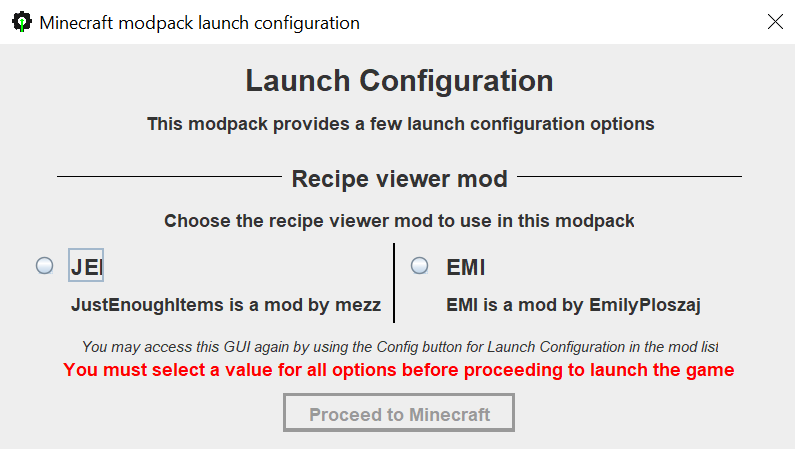
This mod’s configuration file is located at config/launchconfiguration_settings.json. An example settings file that corresponds to the picture above:
{
  "description": "This modpack provides a few launch configuration options",
  "options": [
    {
      "name": "Recipe viewer mod",
      "description": "Choose the recipe viewer mod to use in this modpack",
      "values": [
        {
          "name": "JEI",
          "description": "JustEnoughItems is a mod by mezz",
          "behaviours": [
            {
              "type": "disable_mod",
              "modId": "emi"
            }
          ]
        },
        {
          "name": "EMI",
          "description": "EMI is a mod by EmilyPloszaj",
          "behaviours": [
            {
              "type": "disable_mod",
              "modId": "jei"
            }
          ],
          "fallback": true
        }
      ]
    }
  ]
}
Behaviour supported currently:
- disabling a mod (e.g. choosing between JEI and EMI, or TOP and Jade) – type
disable_mod, withmodIdbeing the ID of the mod to disable - copying files (e.g. choosing between 2 template configs) – type
copy_file, withfrombeing the source path of the file (relative to game dir root) andtobeing the target destination to copy to (relative to game dir root)
Note: the UI uses Swing, the built-in UI library in Java. To avoid issues with Mac users, the GUI is spawned in a different child process.
常见问题
Launch Configuration 支持哪些 Minecraft 版本?
Launch Configuration 支持 Minecraft Java 版 1.21.1–1.21.7,共 7 个版本,可用的加载器:NeoForge。下载时注意选择和你游戏版本一致的文件。
Launch Configuration 怎么安装?
先用 PCL2 或 HMCL 启动器安装对应版本的 NeoForge,再把下载的 .jar 文件放进游戏目录的 mods 文件夹,重新启动游戏即可。开启了版本隔离的,mods 文件夹在 versions/版本名 下面。
Matyrobbrt 的其他作品
查看全部 →
Forgified Fabric API
基于 NeoForge 实现的 Fabric API

Sinytra Connector
让你在 NeoForge 上玩 Fabric 模组

Connector Extras
将Connector与第三方API集成
Eating Animation [Neo/Forge]
Eating Animation 模组的 Neo/Forge 移植版
评论
登录后评论和评分