介绍
The problem
Install Punchy and Essential
together, put on an outfit that covers your arms, and your hands disappear. The item
you are holding just floats in front of you.
Neither mod is broken. They simply disagree about who draws your arms — and the result
is that nobody does.
What this mod does
It gets them to share the work, so your outfit shows up on your own hands:
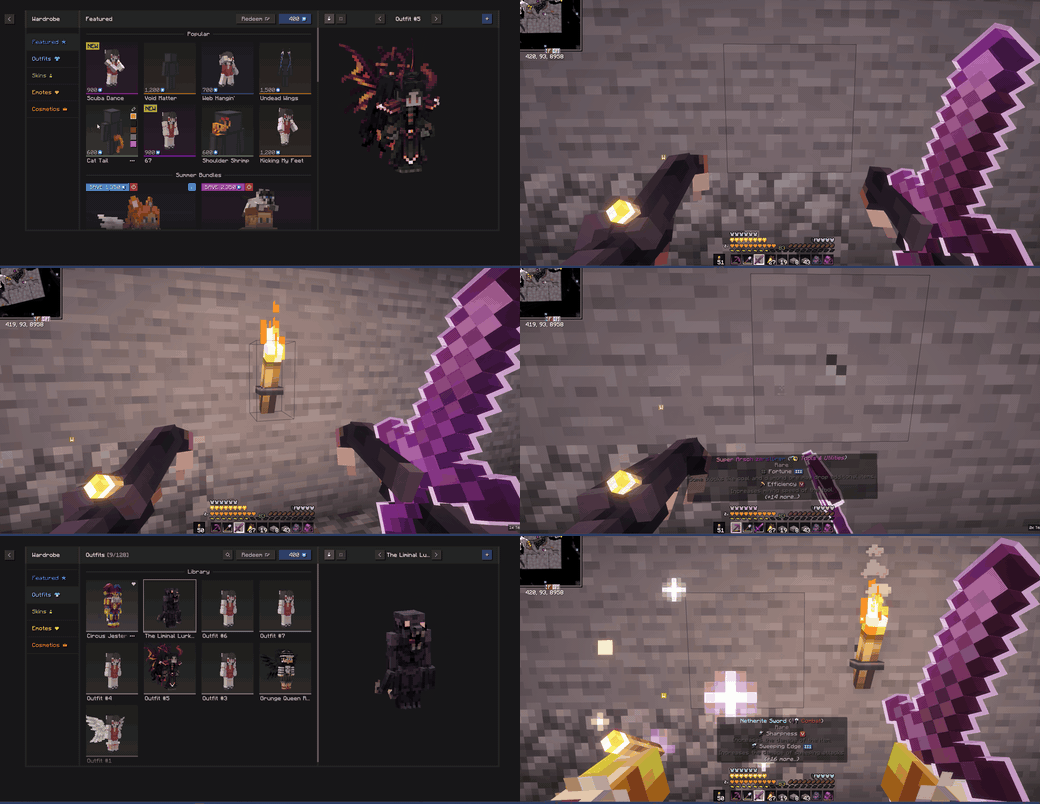
- Your outfit is drawn on your first-person arms. Sleeves, gloves, claws — whatever
your cosmetic puts on the arms, you now see it in first person too. - It moves with Punchy. Swinging, mining, blocking, sprinting — the outfit follows
every animation instead of hovering in place. - Outfits without sleeves still work. If nothing covers your arms, you simply get
your normal skin hands back.
Change outfits in the wardrobe and your hands change with them. There is nothing to set
up, no keybinds, no menu.
Installation
- Make sure you already have Fabric Loader
0.19.3 or newer, Punchy and
Essential installed. - Download the mod and drop
the.jarinto yourmodsfolder. - Start the game. That’s it.
Client-side only — nothing to install on a server, and it works on servers that don’t
have it.
Will it work for me?
| Minecraft | 26.1, 26.1.1, 26.1.2, 26.2 |
| Loader | Fabric |
| Punchy | 2.6.1 and 2.7d |
| Essential | 1.3.10.x and 1.4.0.x |
| Java | 25 |
Essential is optional. Without it the mod just sits there doing nothing, so it is safe to
leave in a modpack.
No versions for 1.20 or 1.21. Minecraft changed how it draws things in 26.0, and this
mod plugs straight into that new system. Supporting older versions would mean writing it
a second time from scratch. See TECHNICAL.md if you want the details.
Something looks wrong?
<details>
<summary>My hands are still invisible</summary>
Check that Punchy is actually enabled (Mod Menu → Punchy → the mod’s own toggle), and
that this mod appears in your mod list. If both are fine,
open an issue and
include the log — the section below explains how to make it useful.
</details>
<details>
<summary>The outfit sits in the wrong place, or my skin shows through it</summary>
That’s worth reporting. Before you do, check whether it also looks wrong in third person
(press <kbd>F5</kbd>) — if it does, the cosmetic itself is off and there is nothing this
mod can fix.
</details>
<details>
<summary>How do I report a bug properly</summary>
Open config/punchy-essential-compat.json, set "debugLogging": true, restart, wear the
outfit that misbehaves, and play for a few seconds. Your logs/latest.log will then list
every cosmetic you are wearing and what it covers. Attach that log to the
issue along with a
screenshot.
</details>
Settings
You do not need to touch these — the defaults are what you want. The file appears at
config/punchy-essential-compat.json after the first launch.
| Setting | Default | What it does |
|---|---|---|
renderCosmeticsOnFirstPersonArms |
true |
Draw your outfit on your first-person arms. Turn off to keep plain skin hands. |
unmaskFirstPersonArms |
true |
Safety net so your hands never go invisible, even if something unexpected happens. |
debugLogging |
false |
Writes a report about your worn cosmetics to the log. Turn on when reporting a bug. |
logErrors |
true |
Report problems in the log instead of failing quietly. |
firstPersonParts |
["LEFT_ARM", "RIGHT_ARM"] |
Which body parts to draw in first person. Leave it alone. |
If something goes wrong while drawing, the mod switches that part off for the rest of the
session and falls back to normal visible hands. It will not crash your game.
Built with AI assistance
This mod was written with the help of AI (Claude). The
conflict was tracked down by taking both mods apart and reading what they actually do,
and every connection point was checked against the real game files.
What has been tried, and what hasn’t:
- ✅ Minecraft 26.2 with Punchy 2.7d and Essential 1.4.0.3 — played in the game. The
clip above was recorded on it. - ⚠️ Minecraft 26.1.x with Punchy 2.6.1 and Essential 1.3.10.x — checked against those
files, but nobody has played it yet. It should work.
Tell me if it doesn’t.
For developers
TECHNICAL.md has the full write-up: what each mod does to the render
pipeline, why they collide, how the fix hooks in, and how to build it without Gradle.
Contributions are welcome — especially ports to older Minecraft versions.
Credits
This is an independent compatibility patch. It is not affiliated with, endorsed by, or
supported by either project, and it contains no code from either.
License
MIT — do what you like with it.
常见问题
Punchy × Essential Compat 支持哪些 Minecraft 版本?
Punchy × Essential Compat 支持 Minecraft Java 版 26.1–26.2,共 4 个版本,可用的加载器:Fabric。下载时注意选择和你游戏版本一致的文件。
Punchy × Essential Compat 怎么安装?
先用 PCL2 或 HMCL 启动器安装对应版本的 Fabric,再把下载的 .jar 文件放进游戏目录的 mods 文件夹,重新启动游戏即可。开启了版本隔离的,mods 文件夹在 versions/版本名 下面。
评论
登录后评论和评分