
介绍
This mod adds the Sound Block.

It looks and acts a lot like a note block, however instead of notes it can play any sound in the game, including sounds from other mods.
How it Works
Right click the block to open the sound picker. Sounds are sorted into categories like Blocks, Mobs & Entities, Items and more, or you can just search for what you want. Pick a sound, then set the pitch and hit Done. You can also preview sounds before saving.
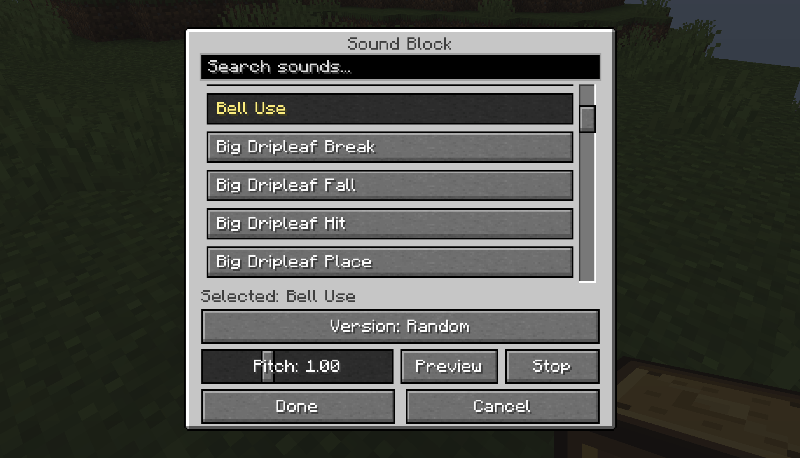
Left click the block or power it with redstone to play the sound. Range and volume work just like a note block.
Some sounds come in several versions. The block can pick one at random like vanilla does, or you can pick one specific version.
To stop a sound early, there’s a Stop button in the block’s GUI, and breaking the block will also do the same.
Config
Music tracks, music discs, event, ambient, weather and other sounds are off by default, though any of them can be enabled in the config. When on a server, server config takes precedent. Modded sounds are on by default but can be turned off.
(Also configurable via ModMenu or Forge config)
Crafting Recipe
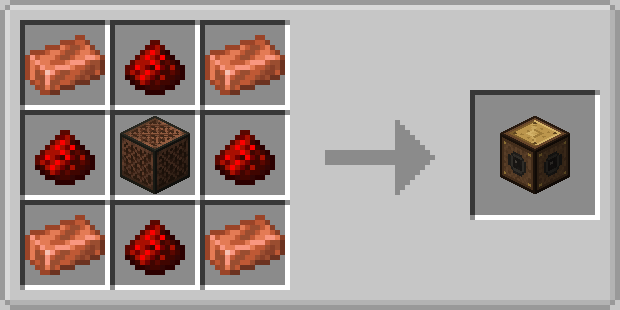
Any feedback or suggestions are appreciated!
(Feel free to use in modpacks).
常见问题
SoundBlock 支持哪些 Minecraft 版本?
SoundBlock 支持 Minecraft Java 版 1.20.1,可用的加载器:Fabric / Forge / NeoForge。下载时注意选择和你游戏版本一致的文件。
SoundBlock 怎么安装?
先用 PCL2 或 HMCL 启动器安装对应版本的 Fabric / Forge / NeoForge,再把下载的 .jar 文件放进游戏目录的 mods 文件夹,重新启动游戏即可。开启了版本隔离的,mods 文件夹在 versions/版本名 下面。
评论
登录后评论和评分